
PayPal Payment Pending or Unclaimed? Can You Cancel It?
PayPal payment pending or unclaimed? Find out when Cancel is available, how eCheck cancellation differs, and what to do if the payment is completed or held.
Contents
- First: match the status to the right action
- 1. If you sent the payment, open the exact transaction
- 2. Cancel an unclaimed payment when PayPal offers Cancel
- Why is there no Cancel button?
- 3. A pending eCheck has a different cancellation route
- 4. If you received money On Hold, inspect the hold instructions
- 5. If the payment is Completed, request a refund
- How long before an unclaimed payment returns?
- What to send PayPal support if the status is unclear
- Cancelling a subscription is a separate task
- Official sources and image credits

To cancel an eligible unclaimed PayPal payment, open Activity, find the payment and select Cancel if that option appears. If there is no Cancel button, read the transaction details before doing anything else: a payment can still be waiting for recipient acceptance or bank clearance. Missing Cancel does not automatically mean Completed.
Start by identifying whether you sent money, received money, or created a payment request. This guide uses PayPal’s US and UK help pages; local availability, menu labels and transaction-specific instructions may differ. Do not resend the money until you know what happened to the first payment.
First: match the status to the right action
| What you see | What to check | Useful next action |
|---|---|---|
| Unclaimed payment with Cancel available | Correct transaction, amount and recipient | Use Cancel and confirm the result. |
| Pending or Unclaimed, no Cancel | Recipient acceptance, funding review or eCheck details | Follow the matching branch below; do not assume completion. |
| Pending eCheck / eCheque | Expected clearing date in Activity | Wait for clearance, or the sender asks their bank about cancellation. |
| Payment On hold / Held | PayPal’s transaction notice and account instructions | Use the account’s hold or review process. |
| Completed payment | Recipient and payment type | Request a refund; eligible purchase problems may have a dispute route. |
| Pending money request | Whether anyone has actually paid it | Check the request: this can mean payment has not been made. |
PayPal’s status definitions distinguish sent payments from money requests. For a request, Pending can mean the person has not paid you. It is not proof that money is moving through the banking system.
1. If you sent the payment, open the exact transaction
- Open the PayPal app or type paypal.com into your browser and sign in.
- Go to Activity and select the payment using its date, amount and currency.
- Read the full status and recipient email address or phone number. Check whether the funding method is a card, balance or bank-funded eCheck.
- Look for a cancellation control, expected clearing date or request for action. Keep the transaction ID for support.
Use the web version if the app does not show enough detail. The aim is to inspect the account record, not to make a second test payment. A bank debit, email notification and PayPal transaction status describe different parts of the payment; compare them instead of treating one as the whole story.
2. Cancel an unclaimed payment when PayPal offers Cancel
- In Activity, locate the unclaimed payment.
- Select Cancel for that transaction.
- Follow the confirmation steps.
- Return to Activity and check that the cancellation is recorded. Note where the money is being returned.
PayPal’s unclaimed-payment guide describes this web route. One reason a payment may remain unclaimed is that the destination email or phone number is not linked to a verified PayPal account. Check for a typing error before asking the intended recipient to change anything.
Why is there no Cancel button?
Some recipients choose not to accept certain payments automatically, such as an unfamiliar currency. PayPal says the sender cannot cancel that acceptance-pending case themselves; the recipient must accept or deny it. Other Pending transactions can be under funding review. Read the actual details rather than using a rule that every pending payment is cancellable.
If you no longer want that acceptance-pending payment completed, contact the recipient through a known channel and ask them to deny it if their account offers that action. If you cannot identify the transaction type or reach the recipient, use PayPal support.
3. A pending eCheck has a different cancellation route
An eCheck is funded from the sender’s bank account. PayPal’s US eCheck guide gives a usual clearing period of 4–7 business days, sometimes longer. Check the expected clearing date inside Activity; weekends and holidays do not count as business days. The UK calls this an eCheque.
If the sender wants to cancel a pending eCheck, PayPal directs them to contact their bank. Its eCheck cancellation guidance says only the sender can do this. Once it has cleared, cancellation is no longer available and the sender can request a refund. Ask the bank what is still possible and what its terms are; contacting it is not proof that cancellation succeeded.
For a recipient, PayPal’s incoming eCheque guidance says not to ship goods or provide services until it clears. Check your own transaction and clearing date. A screenshot or reassurance from the sender does not change an uncleared payment into a cleared one.
4. If you received money On Hold, inspect the hold instructions
A seller hold is a separate problem from an unclaimed outgoing transfer. PayPal’s hold explanation lists account activity and verification among possible reasons. Sign in and open the information shown under your balance or in the transaction; the account’s own instructions are more useful than a generic release countdown.
For eligible payments, PayPal’s release guidance describes adding genuine shipping tracking or updating a service/order status. Only record delivery or completion that actually happened. Follow any verification request through your account, and check the stated conditions rather than promising the buyer or yourself a fixed release time.
5. If the payment is Completed, request a refund
A completed payment is not an unclaimed payment you can simply cancel. Open it in Activity and use the recipient contact details or transaction chat to request a refund. This is the route PayPal gives in its wrong-recipient guidance.
If it was an eligible Goods and Services purchase and you have an unresolved purchase problem, check the Resolution Center and the dispute deadline that applies. Friends and Family transfers do not use the same purchase-dispute route. Select the reason that matches what happened; changing your mind about an authorized transfer does not make it unauthorized.
- Open PayPal’s Resolution Center.
- Choose Report a problem.
- Select the correct transaction and continue.
- Read the available reasons and requirements. Submit an accurate explanation and relevant evidence if your case qualifies.
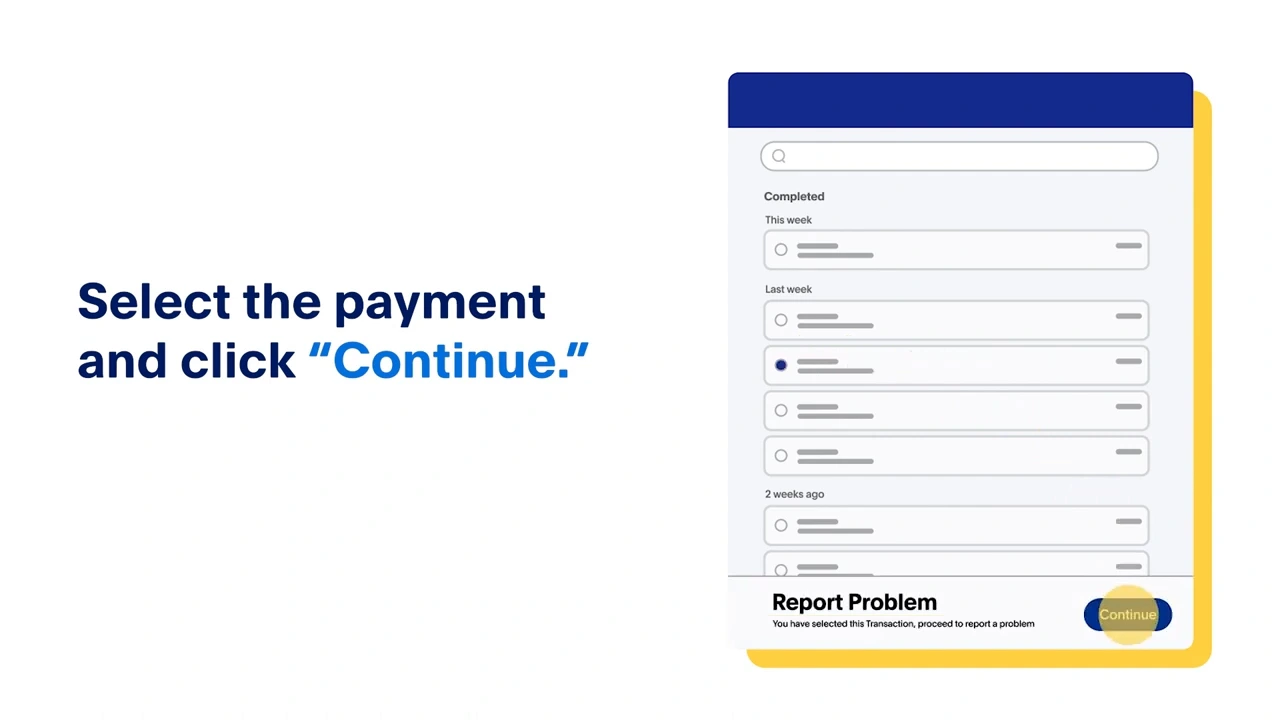
The frame above is from PayPal’s published tutorial and illustrates the selection step. It is not a live account screenshot or proof that every transaction qualifies. Your account may show different controls.
If you did not authorize the payment, use PayPal’s unauthorized-activity reporting process promptly instead. That is a separate issue from a seller refund or an accidental but authorized transfer.
How long before an unclaimed payment returns?
PayPal’s status guide says unclaimed transactions are automatically cancelled after 30 days. This rule should not be applied to every transaction labeled Pending: an eCheck, review, seller hold or payment request is a different case.
Cancellation and receipt of returned money are separate stages. After the cancellation, inspect the destination and processing information for your transaction. PayPal’s refund guide explains that money normally returns to the original payment method, with exceptions such as an unavailable original destination. Do not assume every return will appear in your PayPal balance.
For completed checkout refunds, Activity may show a Refund Tracker. If a refund is marked Completed but you cannot locate it, the refund guide tells you to contact the card issuer or bank using the bank reference ID or original transaction. Check which refund features apply to your transaction; the tracker is not offered for every payment arrangement.
What to send PayPal support if the status is unclear
Use Help or Contact Us from PayPal’s own site and select the payment issue. Keep the message factual: your role, transaction ID, date, amount, exact status, whether Cancel appears, and any clearing date or action requested. Share account details only through the official support channel.
I am the [sender/recipient] for transaction [ID], dated [date], for [amount and currency]. Activity shows [exact status]. The Cancel option is [visible/not visible], and the transaction says [clearing date or action, if shown]. Please confirm whether this is an unclaimed payment, an eCheck, a funding review or a recipient hold, and what action is available to me.
For example, “I sent it on Monday, it says Pending eCheck and the expected date is Friday” gives support something specific to check. “The money is missing” does not identify the payment stage. This is an example of how to describe the record, not a prediction that an actual Monday payment will clear on Friday.
Cancelling a subscription is a separate task
To stop a future automatic payment, PayPal’s automatic-payment instructions use Settings > Payments > Subscriptions and saved businesses or Automatic Payments, then the merchant. This does not serve as a cancellation button for an already-completed transfer. Check the merchant’s own subscription status too.
For a wider account review, see our hidden subscriptions and cancellation guide. For unfamiliar checkout links, use our online payment safety checks.
Official sources and image credits
- PayPal US — Pending or unclaimed payments
- PayPal UK — Payment and request status definitions
- PayPal US — Pending eChecks
- PayPal US — Cancelling an eCheck
- PayPal UK — Incoming eCheques
- PayPal US — Payment sent to the wrong person
- PayPal US — Refund status and destination
- PayPal US — Payments on hold
- PayPal US — Releasing eligible holds
- PayPal US — Unauthorized activity
Documentation checked on 3 November 2026. Account features vary by country and transaction. The in-text image is a frame from PayPal’s official tutorial linked in its wrong-recipient help article, not a transaction performed for this guide. Cover photograph: Vitaly Gariev / Unsplash; a general online-payment scene, not a PayPal account demonstration.
You may also like
 Technology & How-To
Is Tesla Discontinuing the Cybertruck? What We Know
Tesla plans a Cybertruck production wind-down in Texas around mid-2027. See what is confirmed, what remains unknown, and…
 Technology & How-To
Are AI Toys Safe for Kids? Privacy Risks and Parent Checks
Are AI toys safe for kids? Explore the evidence, privacy risks, age advice and practical parent checks for…
 Technology & How-To
iPhone Trust This Computer Not Showing? Windows and Mac Fixes
Restore the iPhone computer-trust prompt with checks for unlocking, Apple Devices or Finder, USB data cables and targeted…