
How to Find Hidden Subscriptions and Cancel Them: A Complete Step-by-Step Guide
Find forgotten recurring payments across cards, Apple, Google Play, PayPal and email; cancel safely and learn your refund options.
Contents
- Why forgotten subscriptions are hard to spot
- Start with a safe subscription audit
- Step 1: search bank and credit-card statements
- Step 2: search your inbox for renewals and receipts
- Step 3: review Apple subscriptions on iPhone and iPad
- Step 4: review Google Play subscriptions on Android
- Step 5: check PayPal automatic payments
- Step 6: inspect streaming, software, cloud and gaming accounts
- Step 7: review mobile-carrier and internet-provider bills
- How to identify a merchant you do not recognize
- How to cancel a subscription without losing important data
- Free trials: stop the renewal before the deadline
- What if the cancel button is missing?
- Can you get a refund after a renewal?
- United States: cancellation rights and complaints
- United Kingdom: consumer protections
- European Union: recurring contracts and withdrawal
- Canada: provincial rules and payment disputes
- Are subscription tracking apps safe?
- Make a simple subscription tracker
- Worked example: how small renewals add up
- If charges continue after cancellation
- Prevent unwanted subscriptions in the future
- A 20-minute action plan
- Official resources and further reading
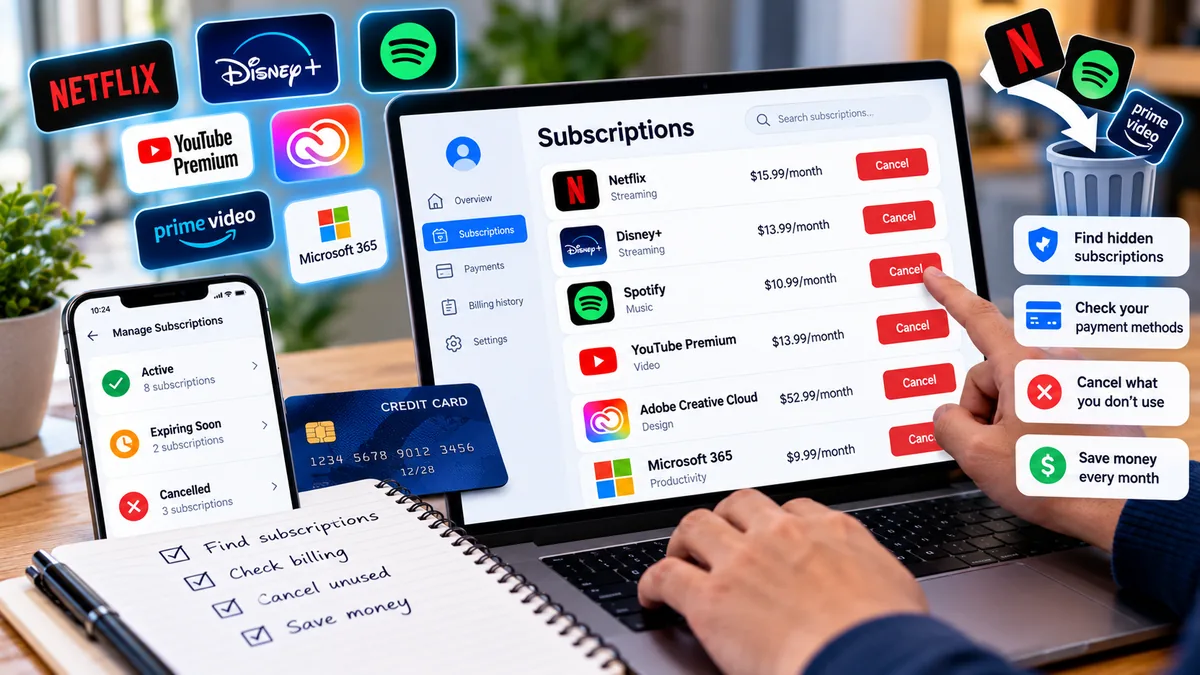
Updated October 15, 2026. A practical, privacy-conscious guide for readers in the US, UK, Europe and Canada.
Why forgotten subscriptions are hard to spot
A free trial becomes a paid plan, a yearly renewal arrives long after signup, or a family member activates a service on a shared card. Some merchants bill under a parent-company name that does not resemble the app. Others charge through Apple, Google Play, PayPal, a mobile carrier or a third-party billing platform. The goal is not to find a mythical universal subscription list: no single dashboard covers every merchant and payment method. Instead, audit the places where charges originate, identify the billing owner and cancel through the correct channel. This guide covers the United States, United Kingdom, Canada and much of Europe, with jurisdiction-specific rights explained separately.
Start with a safe subscription audit
Choose a review window of at least 12 months because annual subscriptions may appear only once. Gather statements from all cards and bank accounts you control, plus PayPal or other payment-wallet activity, app-store subscriptions, and email receipts. Record merchant, amount, currency, billing frequency, next renewal, payment method, login email, and cancellation status in a private spreadsheet. Do not upload unredacted bank statements or passwords to an unfamiliar “subscription finder” app. If you share a card, ask authorized family members whether they recognize a charge before disputing it.
Step 1: search bank and credit-card statements
In each banking app, open transactions and search for terms such as subscription, recurring, membership, renewal, monthly, annual, trial, or the names of services you once used. Filter by repeating amounts and dates, but remember that prices and taxes can change. Check debit cards, credit cards, digital wallets and any old cards still linked to a merchant. Download statements only from your bank's official site if needed. A repeated charge is a clue, not proof: utilities, insurance and installment payments can also recur. If the descriptor is unclear, ask your bank for the merchant details before sharing financial information with anyone.
Step 2: search your inbox for renewals and receipts
Search every email account you use, including archived mail, for “subscription”, “receipt”, “invoice”, “your trial”, “renews”, “renewal”, “payment successful”, “membership”, “billing” and “cancel anytime”. Search by likely merchants and payment processors too. Check spam and trash only if relevant; do not click suspicious links in messages. Instead, open the service's official website or app independently. A receipt may identify the account email, renewal date, subscription tier and billing platform, which are the most useful details for cancellation.
Step 3: review Apple subscriptions on iPhone and iPad
On an iPhone or iPad, open Settings, tap your name, then Subscriptions. Select an active subscription and choose Cancel Subscription when available. If there is no cancellation button or the screen shows an expiration message, it may already be canceled. Apple subscriptions are linked to the Apple Account used for the purchase, so check any other Apple Account you legitimately use. An app installed from the App Store is not necessarily billed by Apple: if a subscription is absent, check the provider's billing site and your receipt. Official instructions: https://support.apple.com/en-us/118428 .
Step 4: review Google Play subscriptions on Android
Open Google Play, tap your profile picture, then Payments & subscriptions and Subscriptions, or use Google's subscription management page while signed into the correct Google Account. Select a subscription and follow Cancel subscription. Repeat for any other Google Accounts you use. Uninstalling an Android app does not cancel its Google Play subscription. Some services sell direct website subscriptions even if their apps are installed from Play; the receipt and payment descriptor identify the billing source. Official instructions: https://support.google.com/googleplay/answer/7018481 .
Step 5: check PayPal automatic payments
In your PayPal account, locate automatic payments or subscriptions in the settings or payments area; interface labels can differ by region and device. Select each merchant to review or stop future automatic payments. Stopping PayPal authorization may prevent further PayPal charges, but it does not necessarily terminate the underlying contract with the seller. Cancel directly with the merchant as well, and retain confirmation. See PayPal's help center: https://www.paypal.com/us/cshelp/home .
Step 6: inspect streaming, software, cloud and gaming accounts
Sign in directly to services you recognize—streaming video, music, cloud storage, antivirus, VPN, design software, games, newsletters, fitness apps and professional tools—and open Account, Billing, Plan or Membership. Check whether you pay directly or through an app store, mobile carrier, broadband bundle or another partner. For example, a service may say “billed through Apple” and direct you to Apple's controls. Do not assume that removing a saved card or deleting an account cancels the recurring agreement; follow the actual cancellation process and verify the result.
Step 7: review mobile-carrier and internet-provider bills
Some subscriptions appear as premium services, entertainment bundles or third-party charges on phone and internet bills. Review itemized statements and optional add-ons in the carrier portal. If you find an unfamiliar charge, ask the provider what it covers, who authorized it and how to block future third-party billing where available. Removing a carrier-billed add-on may have different effects from ending the underlying telecom contract, so read the confirmation carefully.
How to identify a merchant you do not recognize
Copy the transaction descriptor exactly, including abbreviations, then compare the amount and date with receipts. Search the descriptor on the merchant's official support pages or contact your bank through a verified channel. Check whether a payment processor, parent company, local tax or currency conversion explains the label. If the transaction is genuinely unauthorized, contact your bank promptly to discuss a fraud claim and card protection. Do not provide full card numbers or one-time verification codes to someone who calls claiming to “help cancel” the charge.
How to cancel a subscription without losing important data
Before cancellation, note the next billing date, remaining access period, refund terms and what happens to stored data. Download files you are entitled to retain, export account information where available and check whether a paid plan's storage downgrade could affect syncing. Cancel through the billing provider, then capture the confirmation email or cancellation screen. Confirm the account shows a canceled or non-renewing status and set a reminder to verify that no new charge posts after the expected renewal. Some subscriptions continue to provide access until the paid period ends; others end immediately.
Free trials: stop the renewal before the deadline
A free trial often requires cancellation before a stated cutoff to avoid its first paid charge. Read the trial terms, including whether cancellation must occur a day or more before renewal, and check the exact timezone if shown. Set a reminder well before the deadline, not at the last minute. Save the trial signup and cancellation confirmation. A trial obtained through Apple or Google Play normally must be canceled through that platform, while a trial started on a merchant website generally must be canceled with that merchant.
What if the cancel button is missing?
First check whether you are signed into the correct account and whether a different provider bills you. Look for “Manage plan”, “Turn off auto-renew”, “Billing”, “Membership” or support instructions. If cancellation is offered only through support, submit a clear written request and keep the case number and timestamp. Avoid assuming that a canceled app account automatically cancels payment. If the merchant refuses to process a valid cancellation, contact your payment provider and, where appropriate, a consumer-protection body. Disputes and stopping a payment do not always extinguish contractual obligations.
Can you get a refund after a renewal?
Refund eligibility depends on the seller's terms, billing channel, product type, timing and applicable consumer law. Start with the merchant or app-store refund workflow and provide the charge date, receipt and cancellation confirmation. Apple's refund request portal is https://reportaproblem.apple.com/ and Google's Play refund guidance is https://support.google.com/googleplay/answer/2479637 . In the United States, card-dispute rights can depend on the payment type and timing; contact your card issuer promptly rather than assuming every unwanted renewal is fraud. In the UK and EU, withdrawal rights for certain distance contracts have exceptions, including some digital services after performance begins with required consent. Do not claim an automatic 14-day refund for every digital subscription.
United States: cancellation rights and complaints
US subscription rules vary by state, product and regulator. The FTC has guidance on negative-option and subscription practices, but the legal status and enforcement of particular rules can change; verify the current law before relying on a specific cancellation deadline. Keep evidence of deceptive enrollment, misleading renewal terms or obstructed cancellation. You can report suspected unfair practices at https://reportfraud.ftc.gov/ and learn more at https://consumer.ftc.gov/ . For a disputed card charge, ask your bank about the applicable process and deadlines. A complaint is not itself a cancellation.
United Kingdom: consumer protections
In the UK, start with the seller's terms and the current rules governing recurring contracts. The Consumer Rights Act and other consumer laws may be relevant, but not every renewal automatically qualifies for a refund. The UK government has announced changes to subscription-contract protections under the Digital Markets, Competition and Consumers Act; commencement and detailed obligations should be checked against the latest official guidance rather than assumed to apply to every contract today. For practical help, see https://www.citizensadvice.org.uk/consumer/ and https://www.gov.uk/consumer-protection-rights .
European Union: recurring contracts and withdrawal
EU consumer law provides information and cancellation protections, with implementation and remedies varying by member state and contract type. A 14-day withdrawal period can apply to many distance contracts, but there are important exceptions and special conditions for digital content and services. Consult Your Europe at https://europa.eu/youreurope/citizens/consumers/shopping/guarantees-returns/index_en.htm and your national consumer authority. If you live in one EU country and the trader is in another, the European Consumer Centres Network may be able to help: https://www.eccnet.eu/ .
Canada: provincial rules and payment disputes
Canadian subscription cancellation and automatic-renewal protections may depend on provincial consumer law and the contract. Review the provincial consumer-protection office's guidance rather than assuming a single nationwide cooling-off rule. The Canadian Consumer Handbook links to provincial and territorial contacts: https://ised-isde.canada.ca/site/office-consumer-affairs/en . If the issue is an unauthorized payment or unresolved billing error, speak with your financial institution promptly and document all contacts.
Are subscription tracking apps safe?
A third-party subscription manager may be convenient, but examine what it needs to access. Some request read access to email or connect to bank accounts through an aggregator. Review permissions, privacy policy, data retention, security controls, supported regions and whether you can disconnect and delete your data. Prefer the least access necessary. You can perform a manual audit without giving a third party visibility into your finances. Be especially skeptical of apps that promise to cancel every subscription automatically or ask for banking passwords outside a legitimate authorization flow.
Make a simple subscription tracker
Create columns for service, billing owner, account email, price, currency, billing frequency, next charge, cancellation method, cancellation date and confirmation reference. Mark each service Keep, Downgrade, Cancel or Investigate. For annual plans, divide the annual price by 12 to estimate its monthly equivalent; remember exchange rates and taxes can affect actual costs. Review the tracker quarterly and whenever you change phones, cards or email addresses. Store the document privately, without full payment-card numbers or passwords.
Worked example: how small renewals add up
Suppose you discover a $12.99 streaming service, a $9.99 storage plan and a $7.99 app membership you no longer use. Together they cost $30.97 per month, or $371.64 over 12 months if prices stay unchanged. The point is not that every subscription should be canceled—some offer real value—but that reviewing recurring expenses makes the choice deliberate. Annual and usage-based charges should be calculated separately.
If charges continue after cancellation
Verify that the cancellation applied to the correct account, plan and payment channel, and whether the new charge relates to an earlier billing period. Contact the merchant with the confirmation and request correction or refund where appropriate. If unresolved, ask the payment provider about stopping future charges and disputing a charge under the applicable rules. Monitor for duplicate subscriptions under different emails. Keep statements and correspondence until the issue is resolved. Avoid publicly posting receipts that expose personal or payment details.
Prevent unwanted subscriptions in the future
Use one dedicated email label for receipts and renewal notices; calendar reminders for annual renewals; app-store subscription reviews every few months; and a clear rule for trials: record the cancellation date at signup. Consider using merchant-specific virtual card numbers if your bank offers them, but do not rely on card expiry or replacement as a lawful substitute for ending a contract. Review family-shared purchases and bundled subscriptions to avoid paying twice. When you no longer use a service, cancel before the next billing cutoff and save proof.
A 20-minute action plan
Minutes 0–5: open your bank and card statements and note recurring charges. Minutes 5–10: check Apple, Google Play and PayPal. Minutes 10–15: search receipts and inspect carrier bills. Minutes 15–20: cancel one or two unwanted plans through the correct provider, save confirmations and add renewal reminders for the rest. If you uncover a suspicious transaction, prioritize bank security over routine cancellations. Repeat the audit every three months and once a year for annual plans.
Official resources and further reading
Apple subscription cancellation: Apple Support. Google Play subscription cancellation: Google Play Help. Google Play refunds: Google Play Help. Apple refund requests: Report a Problem. US consumer guidance: FTC Consumer Advice. UK consumer guidance: GOV.UK. EU consumer rights: Your Europe. Canadian consumer guidance: Office of Consumer Affairs. These links are provided for verification; product menus and legal requirements can change.
You may also like
 History & Culture
Remembrance Day vs Remembrance Sunday: Dates and Meaning
Remembrance Day is 11 November; Remembrance Sunday is the second Sunday in November. Compare the dates, silence times,…
 How-To Guides
WhatsApp Messages Not Sending? Fix Clock and One Tick Issues
WhatsApp messages not sending? Check the clock or one tick, compare Wi-Fi and mobile data, fix Android, iPhone…
 News
Rubicon Yuzu & Pink Grapefruit Recall: Batches and Refund Steps
Check the Rubicon Yuzu & Pink Grapefruit 1L recall: affected batches and dates, where to find the code,…