
How to Spot a Fake QR Code Before It Steals Your Information
Scan safely: learn how to spot tampered QR stickers, fake payment websites, suspicious URLs and email quishing — plus exactly what to do if you already scanned one.
Contents
- Quick answer: seven checks before you trust a QR code
- What makes a QR code fake or malicious?
- Step 1: Inspect printed QR codes for sticker swaps and tampering
- The safer parking-meter routine
- Step 2: Preview the QR destination on iPhone or Android
- iPhone: use the built-in camera to see where it leads
- Android: use your Camera or supported QR scanner
- Step 3: Read the web address correctly — not just the brand name
- Look for these URL red flags
- Step 4: Identify suspicious QR-code requests before you act
- Why a QR code in an email or PDF deserves extra caution
- Workplace response: keep the incident inside the trusted process
- QR codes can also trigger actions other than visiting a webpage
- What happens if you already scanned a fake QR code?
- If you only opened the link
- If you entered a password or verification code
- If you entered card or bank information
- If you installed software or gave permissions
- How to report a fake QR code in the United States, UK or Europe
- Can you test a QR code safely using an online scanner?
- A practical five-second decision rule for everyday scanning
- Safety checklist for businesses that publish QR codes
- Common myths about fake QR codes
- The bottom line: verify the destination, not the square
- Official references and further reading
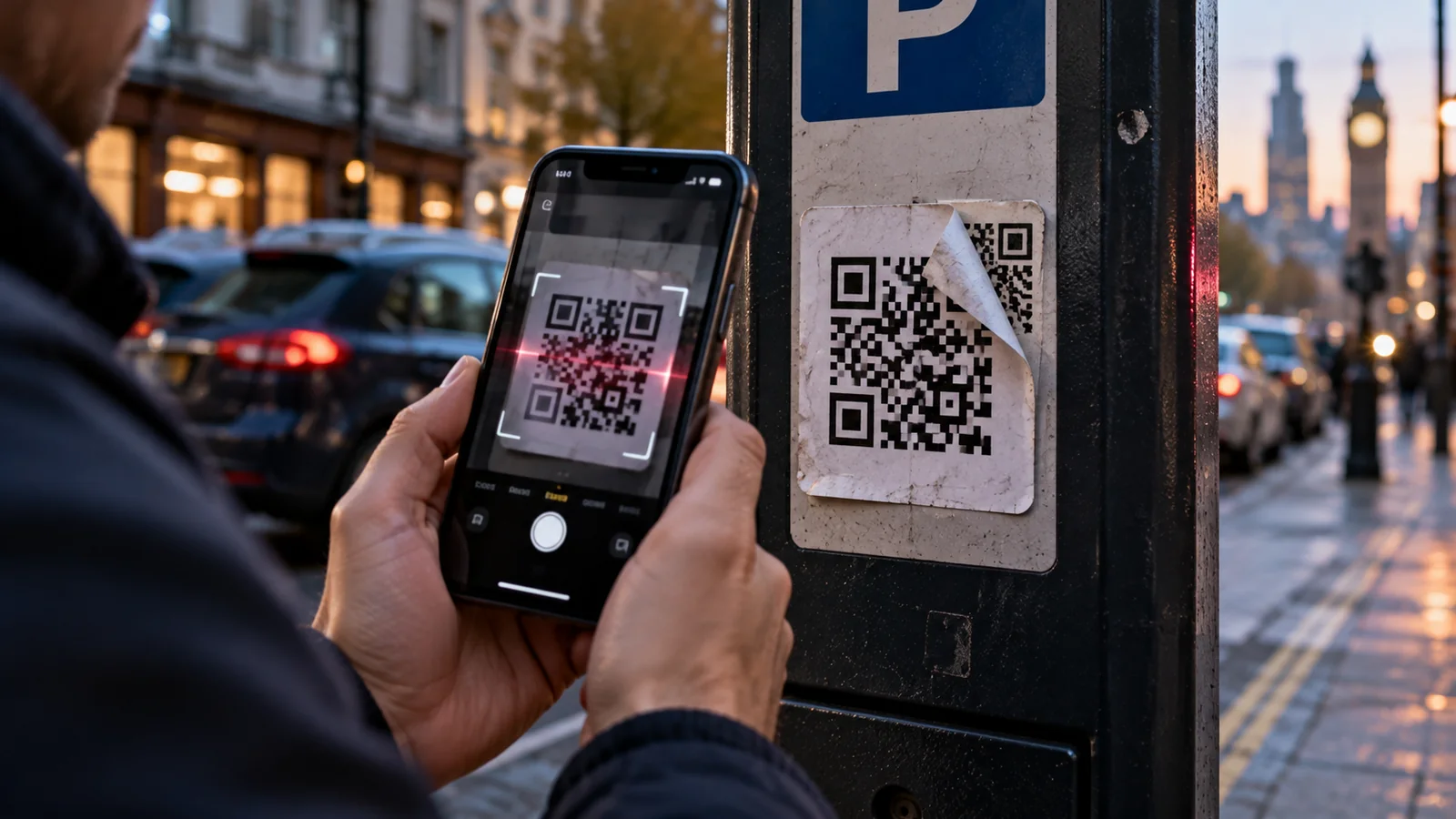
A QR code on a parking meter seems harmless. You point your phone at it, see a payment page and enter your card details. But what if a criminal placed a second sticker over the original code? The black-and-white square looks ordinary; the destination may be a fake checkout designed to steal your money and information. This is a form of QR-code phishing, often called quishing.
It is not a hypothetical concern. In a September 2026 consumer alert, the US Federal Trade Commission (FTC) warned about scammers covering legitimate parking payment QR codes with their own stickers. The FBI has also warned about codes included in unexpected packages, while the UK National Cyber Security Centre (NCSC) identifies QR codes in phishing emails as a growing method of deception. The practical defense is simple but specific: treat the code as an unknown link, inspect the destination, and verify the service through a trusted channel before signing in or paying.
This guide shows exactly how to check a QR code on an iPhone or Android phone, recognise malicious URLs, respond to a fake payment page, protect your accounts after a mistake, and report incidents in the United States, the United Kingdom and Europe. It does not assume that every QR code is dangerous; the risk depends on where it came from, what it opens and what the page asks you to do.
Quick answer: seven checks before you trust a QR code
- Check the source. Was the code expected, and does it belong to a business or event you can independently verify?
- Look for physical tampering. Extra stickers, crooked overlays, peeled corners and mismatched printing can be signs that a code was replaced.
- Preview the link before opening it. Use the phone’s built-in camera or trusted scanner and examine the visible web address.
- Check the actual website domain. A familiar brand name in the path or subdomain does not prove you are on the brand’s site.
- Be wary of urgency. Threats of fines, failed deliveries or account closure are classic prompts to rush into a payment.
- Verify sensitive requests independently. For parking payments, tickets, government services or banking, open the official app or type the known address yourself.
- Stop before submitting data. Do not enter passwords, one-time codes, card details or identification numbers until you have verified the destination.
A QR code is simply a way to carry information. It is not proof that the business printed it, that the website is genuine, or that the payment is going to the intended recipient.
What makes a QR code fake or malicious?
A QR code is a machine-readable pattern that can encode a web link, text, Wi-Fi configuration, a payment request or other data. Most of the everyday scams described here put a website address inside the square. The code itself generally does not display the address in a human-readable way, making it easier to hide a misleading destination than with a normal printed URL.
There are at least three common methods. A criminal may replace a physical code on a sign, send a QR image inside an unexpected email or message, or create a convincing fake webpage that captures login details or payments after the code is opened. Some attacks add redirects so the first address appears generic and a later page imitates a bank or official service.
The suspicious part is not a distinctive shape, a colour or a logo in the middle of the QR pattern. You usually cannot determine trustworthiness just by looking at the square. The reliable checks are the origin, the link preview, the real domain, the requested action and independent confirmation. The UK NCSC explanation of QR-code risks describes the physical and email-phishing scenarios.
Step 1: Inspect printed QR codes for sticker swaps and tampering
If a code is on a parking machine, restaurant table, public notice board, rental scooter, tourist attraction or charity collection point, inspect it before scanning. A tampered label may sit over the original printing. Signs worth noticing include a different paper finish, bubbled edges, glue residue, overlapping squares, or a code placed where the venue normally has a branded payment instruction.
A neat, professionally printed QR code is not automatically safe: an attacker can print a polished sticker, replace a sign, or place a malicious code on a legitimate-looking leaflet. Likewise, a genuine business may use stickers for perfectly ordinary updates. Physical appearance is a warning signal, not proof.
The safer parking-meter routine
- Check the operator name and machine identification on the permanent parking sign rather than relying on the QR label alone.
- If possible, open the operator’s app that you already installed from the official app store, or manually visit the URL printed on the main machine or council website.
- Check that the zone or location number displayed in the official app matches the sign before paying.
- If the machine’s sticker is peeling or layered, tell the car-park operator or local authority; do not try to remove it yourself.
- Never assume a QR page is official merely because it mentions your postcode, location or street.
This scenario is specifically reflected in the FTC’s 2026 parking QR warning. A local parking operator may have its own reporting process and payment channels; follow its published instructions.
Step 2: Preview the QR destination on iPhone or Android
iPhone: use the built-in camera to see where it leads
- Open the iPhone Camera app in Photo mode, if QR scanning is enabled in your device settings.
- Aim at the QR code without tapping a payment button or entering any information.
- Read the available link banner or destination preview; the exact presentation depends on iOS version and app.
- If the website address is unexpected, misspelled, shortened or unclear, close the camera or dismiss the banner and verify elsewhere.
- If you have already opened the page, inspect the browser address bar rather than trusting the page logo or headline.
Do not assume the on-screen banner shows every redirect or the final destination. A normal-looking short link can redirect to an impersonation page. A preview is the first filter, not a guarantee of safety.
Android: use your Camera or supported QR scanner
- Open the device camera or its built-in QR/Lens feature; the interface varies across Android manufacturers.
- Point at the code and look for the displayed link rather than tapping through immediately.
- Inspect the domain and context. If the tool tries to open a link automatically, cancel when possible and choose a scanner that shows a preview.
- Use your trusted browser and official app to navigate independently if the address is ambiguous.
- Keep Android and the QR-scanning feature updated through supported system and app updates.
You do not need a random third-party “QR safety scanner” to examine ordinary codes. Some apps demand unnecessary permissions or show ads and redirects of their own. Use the operating system’s built-in scanner or a trusted security app already in use. The FTC recommends checking previewed URLs and keeping software updated in its recent consumer guidance.
Step 3: Read the web address correctly — not just the brand name
A phishing site can copy logos, colours, fonts, page layouts and even customer-support scripts. The browser address is a more useful starting point than the webpage’s design. To assess it, identify the registered domain — the name controlled by the site operator — rather than skimming a word at the beginning of a longer address.
| Illustrative address (not a live site) | How to read it | What to do |
|---|---|---|
| https://payments.example/parking | Example-only domain payments.example | Trust only if it matches the independently verified operator; this address is a fictional example |
| https://parking.example.com.security-check.example.net/pay | The controlling domain is example.net, not example.com | Treat brand words before another domain as suspicious |
| https://accounts-example.com/login | This is not the same domain as example.com | Do not infer legitimacy from similar spelling |
| https://example.com@security-check.example.net/pay | After @, the host is security-check.example.net | Avoid confusing userinfo syntax with the real site |
| https://short.example/Ab3 | A shortened link may conceal a later destination | Prefer the official app or known address |
| https://verified-service.example/pay | HTTPS encrypts the connection but does not prove the business is genuine | Still check the exact operator and payment instructions |
All addresses in the table use example domains for demonstration. They are not allegations about real companies or phishing pages. The point is to understand the address structure: a legitimate-sounding word anywhere in a URL is not the same as the correct hostname.
Look for these URL red flags
- Misspellings and lookalike characters: a swapped letter, extra hyphen, number substituted for a letter, or an unfamiliar alphabet character.
- Unexpected domains: a parking brand routing through an unrelated site without a clear explanation.
- Misleading subdomains: the company name appearing before the attacker-controlled parent domain.
- Shortened or redirected links: hiding where the browser will land after opening the code.
- Odd demands: requiring a bank password, one-time passcode, photo ID or full card details when the service should not need them.
- Security theatre: a lock icon or HTTPS used to suggest an unverified company is automatically trustworthy.
HTTPS means the connection can be encrypted; criminals can also set up HTTPS websites. The FTC explicitly cautions that encryption does not establish a seller’s legitimacy in its online scam guidance. If unsure, enter the service’s known address yourself or navigate through a verified app. Do not search for a company and automatically assume the first sponsored result is genuine.
Step 4: Identify suspicious QR-code requests before you act
Fraudsters often provide a believable reason to scan. The story may concern something you already expect — a delivery, a restaurant bill, a parking fee, a work login or a train ticket. They may also pretend to solve an emergency. What makes the message dangerous is often the pressure to complete an action quickly.
| Situation | Scam warning sign | Safer alternative |
|---|---|---|
| Parking meter or toll notice | Overlaid QR, surprise fee or a payment domain unrelated to operator | Use established operator app or direct council/toll website |
| Email claiming work account expiry | Scan QR on your phone and sign in to restore access immediately | Open employer identity portal independently or ask IT |
| Unordered parcel with QR code | Scan to identify sender, claim a gift or process a return | Do not scan; check orders in your retail account |
| Delivery failure text | Small redelivery charge requiring card information | Use the courier’s known site or app and tracking number |
| Restaurant menu | Page unexpectedly requests bank password or broad phone permissions | Ask staff for printed menu or verified website |
| Event admission or charity donation | Urgent payment at unknown checkout or changed recipient | Confirm with venue/charity through official channel |
| Government citation or court warning | Threat of arrest, penalties or imminent deadline plus QR | Verify directly with named agency or court |
| Business invoice with replacement QR | Payment recipient changed without independent confirmation | Call a known number at the business before transfer |
The FTC documented a 2026 scam involving fake traffic-hearing notices and QR codes. The FBI described another variant involving unexpected packages with QR codes. Neither a professional-looking letter nor a real parcel makes the embedded payment request trustworthy.
Why a QR code in an email or PDF deserves extra caution
A QR image in a phishing email can hide the underlying web link from casual inspection. It may also encourage someone to take a photo of their work computer’s screen with a personal phone, switching away from their organisation’s browser protections. This is one reason the tactic is called quishing. The UK NCSC warns that QR codes have increasingly appeared in scam emails, while ENISA’s European cybersecurity awareness guidance includes quishing among the phishing methods people should recognise.
Examples include a fabricated Microsoft 365 password-expiry notice, a forged payroll update, a purported HR document, and an invoice that tells you to scan a square for “secure verification.” These are illustrative fraud patterns, not instructions to follow. A genuine organisation may also use QR codes for login, but an unexpected request to move from a work computer to an unverified webpage is a reason to verify with the organisation’s IT or security team.
Workplace response: keep the incident inside the trusted process
- Do not scan an unexpected “urgent account verification” code simply because the email displays a familiar logo.
- Report the message through your employer’s approved phishing-reporting method, preserving the original email when instructed.
- Open the established company sign-in page or app manually; do not authenticate through a link in the suspicious email.
- If you already submitted credentials, contact IT immediately so access and sessions can be reviewed and reset appropriately.
- Do not forward a suspicious QR image to colleagues as a warning if doing so might encourage more people to scan it; use approved reporting channels.
QR codes can also trigger actions other than visiting a webpage
Some QR codes encode contact details, Wi-Fi connection parameters, app-opening links, calendar entries or payment information. Before approving any action, read what the phone is asking to do and ask whether that action makes sense for the context. A restaurant menu has no sensible reason to request a new device-management profile or a broad package of accessibility permissions.
Do not approve prompts to install unknown apps, enable side-loading, grant device administration access, share authentication codes, or connect to an unfamiliar Wi-Fi network merely because a code offers it. Some legitimate login systems display QR codes as part of secure sign-in, but those workflows should be started from the official service you intended to use, not a QR image supplied by a stranger.
What happens if you already scanned a fake QR code?
Your next steps depend on what actually happened. Scanning a symbol, opening a web page, entering a password, submitting a card number and installing an app are different risk levels. Panic can lead to further mistakes, such as calling a phone number shown on the malicious page.
| What you did | Main concern | Immediate next step |
|---|---|---|
| Only viewed a preview and did not open it | Usually no account data submitted by that action alone | Dismiss it and verify the service elsewhere |
| Opened a webpage but entered nothing | Possible tracking, deceptive redirects or browser exploit on an unpatched device | Close it; update browser/OS; monitor unexpected behaviour |
| Entered login/password | Credential theft and account takeover | Change password on genuine site, revoke sessions, enable MFA |
| Entered one-time verification code | Possible completion of fraudulent login | Contact provider urgently, review devices and security methods |
| Entered payment card details | Unauthorised transactions | Call bank/card issuer via official number and request protection |
| Installed an app or approved powerful permissions | Malware, device surveillance or account compromise | Disconnect if advised, consult provider/IT, remove suspicious app safely; seek expert help |
| Approved a bank transfer or cryptocurrency payment | Funds may already be transferred | Contact bank/exchange immediately; report fraud |
If you only opened the link
In the usual phishing scenario, visiting a page without submitting information does not automatically hand over your bank password or card data. However, the page may learn information such as your IP address and browser, and malicious links can exploit software weaknesses or trick you into giving permissions. Close the tab, do not interact with pop-ups, check for unexpected downloads, and install legitimate device and browser updates. If the page tried to install software or modify settings, take that more seriously.
If you entered a password or verification code
- Navigate directly to the legitimate service using a known app or manually typed address.
- Change the affected password immediately, and change it on any other account where it was reused.
- Enable or review multifactor authentication and passkeys if supported; they help, but do not replace reviewing a compromised account.
- Sign out suspicious sessions and inspect account recovery email, phone number, forwarding rules and authorised applications.
- If you provided an authentication code or approved an unknown login notification, contact the account provider’s security team urgently.
- Keep screenshots, transaction details and suspicious URLs for a report, without circulating private codes or passwords.
For an account-specific security review, see the related Horus Valley guide: How to Check If Someone Has Access to Your Google Account. For legitimate passkey setup and recovery, read Google Passkeys Not Working? Safe Fixes. Never enter credentials into a suspicious “recovery” page linked by the QR code.
If you entered card or bank information
Contact your bank or card issuer through the verified phone number in its app, the number printed on the physical card, or its own website. Explain that the payment page was likely fraudulent and ask about card blocking or replacement, transaction monitoring, reimbursement/dispute options and any pending payment. Rules for chargebacks and authorised transfers differ by country, provider and circumstances; rapid reporting improves the chance of stopping harm but does not guarantee recovery.
If you paid a cryptocurrency address from a QR code, treat the incident as urgent and report it with the transaction identifier. Blockchain transactions are generally difficult to reverse. Beware of “fund recovery agents” demanding advance fees: that may be a second scam.
If you installed software or gave permissions
Do not follow cleanup instructions displayed by the suspicious site or call its “technical support” number. Disconnect from untrusted networks if necessary and seek guidance from a trusted device-security specialist, workplace IT team or the operating-system vendor. Review the device’s installed apps and permissions, but do not delete evidence that your bank, employer or investigators have asked you to preserve. For seriously compromised devices, expert help and a properly planned reset may be necessary.
How to report a fake QR code in the United States, UK or Europe
| Where | Where to report | What to include |
|---|---|---|
| United States | FTC ReportFraud.ftc.gov; FBI IC3 for internet crime | Scam page address, payment details, dates, venue, images and screenshots |
| England, Wales and Northern Ireland | Report Fraud for financial loss or cybercrime; NCSC for phishing messages/websites | Suspicious QR context, sender, website and any losses |
| Scotland | Police Scotland via 101 for relevant fraud matters; NCSC phishing reporting | Evidence and relevant financial account activity |
| European Union / EEA | National police or cybercrime reporting portal, bank and national cybersecurity body | Local language report, payment evidence, link and photos |
United States: Report scams through the FTC’s official ReportFraud portal. The FBI’s Internet Crime Complaint Center (IC3) also accepts internet-crime complaints. If identity information was misused, the FTC’s IdentityTheft.gov provides a recovery pathway. The FBI specifically requests reporting of suspicious unsolicited-package QR incidents.
United Kingdom: The NCSC recommends forwarding suspicious emails to report@phishing.gov.uk, and most UK mobile carriers support forwarding scam texts to 7726. A suspicious website can be submitted through the NCSC report-a-scam-website page. For financial loss or cybercrime in England, Wales or Northern Ireland, follow Report Fraud; in Scotland, contact Police Scotland using its published guidance. Reporting channels and eligibility can change, so check the current instructions before submitting personal details.
European countries: Use the relevant police cybercrime service and your country’s computer emergency response team (CERT/CSIRT) or national cybersecurity authority. EU countries do not share one universal individual fraud-reporting portal, and victims may need to notify banks, payment services and local consumer authorities separately. ENISA publishes European awareness resources but is not a replacement for a local police report.
For physical QR sticker tampering, also inform the venue, parking operator or transport authority using independently published contact details. Photograph the damaged sticker and note the location if safe, but do not confront a suspected fraudster or interfere with equipment.
Can you test a QR code safely using an online scanner?
A QR decoder can reveal the text or URL inside the code without navigating to the destination, but an online scanning service may collect the image and embedded information you upload. That matters if the code contains an event ticket, account-pairing token, private Wi-Fi details or a one-time sign-in session. Avoid uploading private QR codes to arbitrary “URL checker” websites. Trusted built-in phone previews and independent verification are normally enough.
A website-reputation checker can be an extra signal, but a clean result does not prove a site is genuine: newly registered scam domains may have no reputation history, while legitimate services can be misclassified. Do not “test” a suspicious payment website by typing fake card numbers into it, and do not share screenshots of live login, 2FA or payment QR codes publicly.
A practical five-second decision rule for everyday scanning
When a QR code is genuinely convenient — a museum label, restaurant menu or ticket gate — you can still use it sensibly. Before you follow the link, answer three short questions: Did I expect this code? Does the preview match the service I intended to visit? Would I be comfortable performing the requested action after opening the same website directly?
If the answer to any of those is no, stop and use a trusted alternative. A little friction is worthwhile when the request involves money, passwords, health details, government records or identity verification. The guidance is not “never scan QR codes”; it is “do not use an unverified QR code as a shortcut around normal security checks.”
Safety checklist for businesses that publish QR codes
Business operators have responsibilities too. If customers repeatedly scan a code displayed in public, the organisation should think about physical replacement attacks, not just whether the original link was safe on the day it was printed.
- Place codes on secured, monitored signage where possible and inspect them for replacement stickers.
- Print the readable official website or app name next to the code so visitors have an independent way to verify the destination.
- Prefer a stable official-domain landing page rather than a mystery short link that changes domains without warning.
- Explain on the sign what data the user will be asked to provide and whether payment takes place in an official app.
- Train staff to handle complaints about tampered stickers and establish a process for removing fraudulent labels safely.
- Monitor reports of lookalike payment pages and inform customers through official channels when fraud is discovered.
- Avoid placing login or payment QR codes in unsolicited email campaigns without alternative manual navigation instructions.
These controls do not eliminate all fraud, but they make impersonation more conspicuous and give customers a way to verify an action without trusting an opaque code.
Common myths about fake QR codes
| Claim | What is more accurate |
|---|---|
| “Every QR code with a logo is safe.” | Logos can be copied or printed by anyone; verify the real destination. |
| “A QR code can be judged by its visual pattern.” | The pattern alone cannot establish ownership or safety. |
| “If the page has a padlock, it is genuine.” | HTTPS can exist on fraudulent sites too. |
| “Merely pointing the camera at a code always steals data.” | Ordinary previewing does not normally send your bank credentials; the subsequent link, permissions and submissions matter. |
| “Only public QR stickers are risky.” | Codes can also arrive in emails, PDFs, messages and unwanted parcels. |
| “A URL checker guarantees safety.” | No reputation or antivirus tool can promise that every new phishing page will be detected. |
| “If I have already paid, there is no point reporting it.” | Promptly contacting the bank/provider and reporting the incident may still reduce harm. |
The bottom line: verify the destination, not the square
A QR code can save a few taps, but it cannot certify the page behind it. The strongest defense is to pause before a sensitive action: inspect for tampering, preview the URL, read the real domain, and independently open the correct service when money, account access or personal information is involved. The most dangerous moment is usually not seeing the square — it is trusting an unfamiliar page because the code was attached to a familiar place.
If you have already scanned a suspicious code, act in proportion to what you actually did. Close the page if you only viewed it; secure accounts if you entered passwords; call your financial provider if you submitted payment details; and seek specialist support if you installed untrusted software. Quick, specific action is more effective than blanket panic.
Official references and further reading
- FTC (September 2026) — See a QR Code Parked Somewhere? Don’t Scan It… Yet! — parking-meter sticker swaps and consumer response.
- FTC — Scammers Hide Harmful Links in QR Codes — QR phishing patterns and safe scanning.
- FTC (April 2026) — Fake Traffic Violation QR-Code Notices — scam notices targeting US drivers.
- FTC (August 2026) — Unexpected Package and Brushing Scams — suspicious codes in unordered parcels.
- FBI (2025) — Unsolicited Packages Containing QR Codes Used to Initiate Fraud Schemes — personal and financial data risks.
- FBI — Building a Digital Defense Against QR Code Scams — physical sticker replacement and payment scams.
- UK NCSC — QR Codes: What’s the Real Risk? — public-space abuse and email quishing.
- UK NCSC — How to Spot Phishing Scams — pressure tactics and suspicious requests.
- UK NCSC — Report a Scam Email and Report a Scam Text — UK reporting instructions.
- ENISA — Off the Hook: Don’t Be Phished — European awareness of quishing and other phishing forms.
You may also like
 Technology & How-To
 NHS App Prescription Not Showing? Check GP Approval, Pharmacy Status and Tracking
Find out why a prescription or medicine is missing from the NHS App in England. Separate repeat requests,…
 Technology & How-To
 Google Wallet Not Working After Switching Phones? Fix Card Setup and Tap to Pay
Google Wallet transferred but tap to pay fails? Separate card verification, bank approval, NFC, screen lock and device…
 Technology & How-To
 iCloud Family Sharing Not Working? Why You Still See 5GB and How to Fix It
Still seeing 5GB after joining an iCloud family plan? Check the account, invitation, sharing settings, personal plan and…