
UK eVisa Share Code Not Working? Fix Generation, Expiry and Right-to-Work or Rent Checks
UK eVisa share code not working? Diagnose generation errors, rejected W/R/S codes, UKVI sign-in problems, employer checks and official fallback routes.
Contents
- Start here: one-minute share-code diagnosis
- What a UK eVisa share code actually does
- W, R and S codes are not interchangeable
- Create a fresh share code using GOV.UK
- Fix 1: you can view the eVisa but the share code will not generate
- Low-risk checks before submitting the error report
- Information to prepare for the official error form
- Fix 2: the share code is rejected, expired or gives the wrong result
- A practical four-step verification test
- If the eVisa has the wrong status or conditions
- Fix 3: you cannot sign in to the UKVI account
- Fix 4: you can sign in but your eVisa is missing
- Fix 5: employer cannot complete a right-to-work check
- An employer's decision sequence
- Fix 6: landlord or letting agent cannot check a right-to-rent code
- Fix 7: a university, bank, council or airline asks for proof
- How to report an eVisa error properly
- Suggested description of the problem (adapt, do not send to Horus Valley)
- Four realistic scenarios and what not to conclude
- Scenario A: graduate starts work next week, visible eVisa, no code
- Scenario B: new tenant sends a W-code to an English letting agent
- Scenario C: passport changed, account still linked to old details
- Scenario D: share code was generated three months ago
- How long can resolving an eVisa error take?
- Keep your data safe when seeking help
- Official references and a final checklist
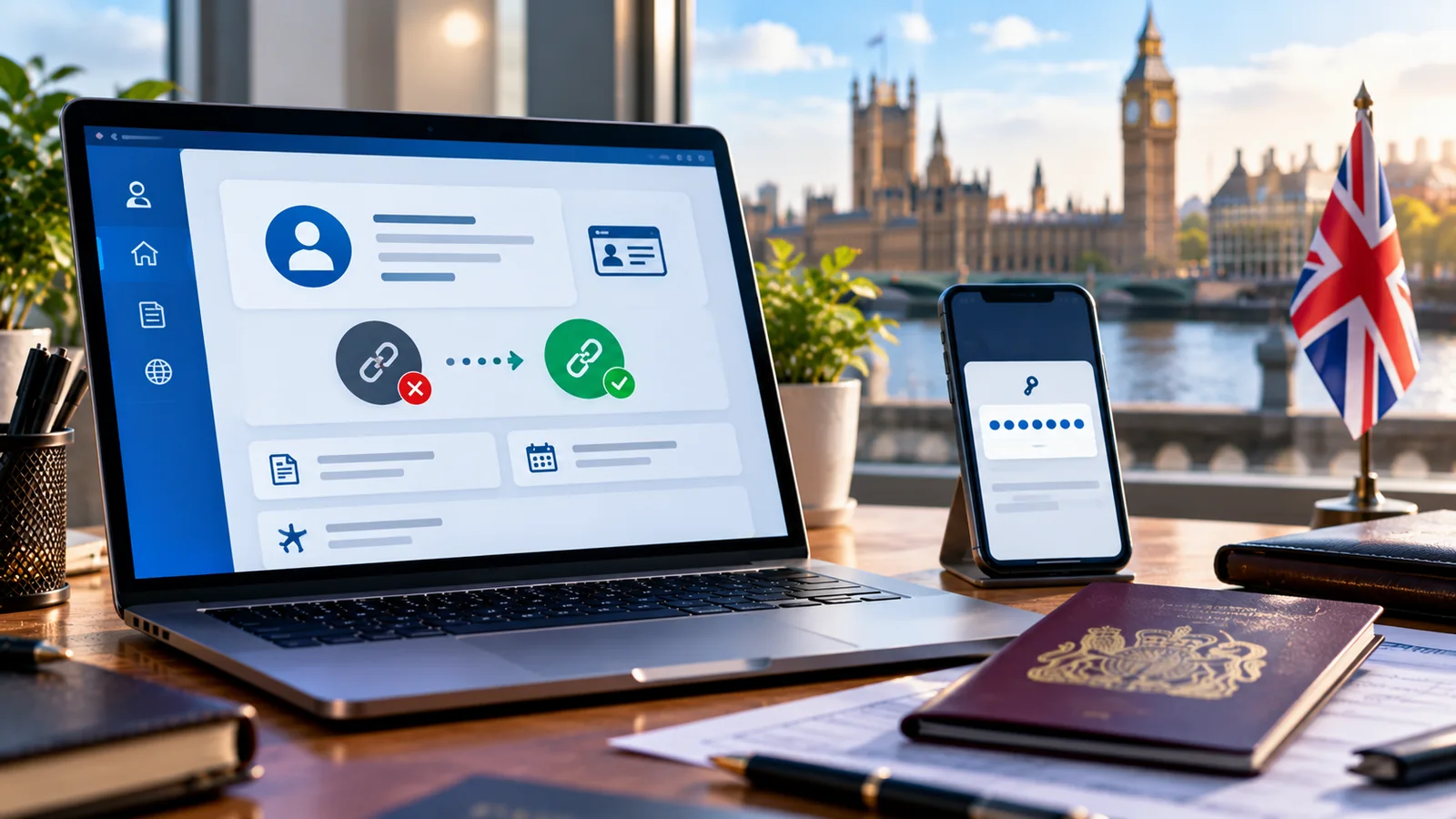
If your UK eVisa share code is not working, identify which of four stages has failed before doing anything else: signing in to your UKVI account, viewing your eVisa, generating a share code, or having another person verify a code you already have. If you can see your eVisa but cannot generate a share code, GOV.UK specifically tells you to report an error with your eVisa. If a landlord or employer rejects a code, first check the purpose, date of birth, expiry and official checker. Do not create a second UKVI account or pay a third party for a code.
This is a practical update to Horus Valley’s original October 2026 guide. It separates technical account issues from immigration-record errors and from checks carried out by another organisation. Official service wording can change; guidance and links were checked on 23 October 2026. An eVisa is your digital immigration-status record; a share code is a time-limited means of viewing selected parts of that record, not a visa decision itself. See the GOV.UK eVisa overview.
Start here: one-minute share-code diagnosis
Use the symptom, rather than the most alarming message on the screen, to choose the next step. The table distinguishes government instructions from low-risk checks you can try yourself.
| What you see | Likely stage | Safest next step | Official route |
|---|---|---|---|
| Cannot sign in or receive a sign-in code | Account access | Check the registered phone/email; recover access if unavailable | Recover UKVI account |
| Signed in, but no eVisa appears | Account linking or record display | Check setup and linking; if still unavailable after 24 hours or a technical error occurs, report it | Set up/access eVisa |
| eVisa appears, but no share code can be created | Share-code generation | Use the official error-report service; preserve the error wording | Report an eVisa error |
| A share code exists but employer rejects it | Purpose, expiry, date of birth, or checking route | Generate a W code for work and use employer checker | Employer checker |
| A share code exists but landlord rejects it | Wrong code purpose or checking service | Generate an R code for a right-to-rent check in England | Landlord checker |
| A university or another organisation cannot verify | General status share-code check | Use the general checker, not the work/rent checker | Status checker |
| Passport or other account details changed | Account information | Update the account using the official service, unless the eVisa record itself is wrong | Update UKVI details |
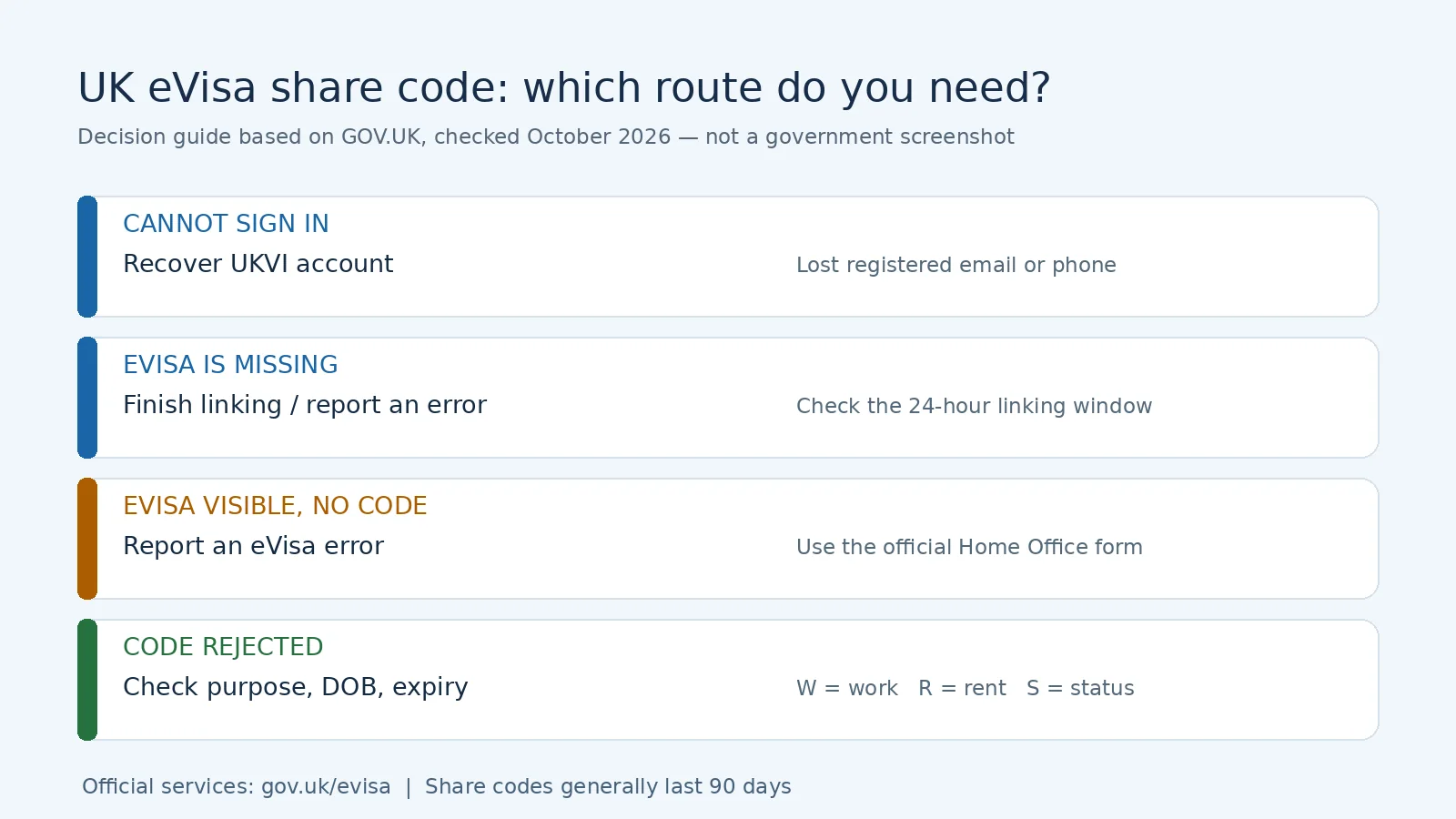
Important distinction: these are diagnostic routes, not a promise that a particular error has only one cause. A service outage, a newly linked record or an organisation using the wrong checker may appear similar. Only UKVI can confirm whether its record needs correction.
What a UK eVisa share code actually does
A UKVI account is how you sign in; the eVisa is the digital record of your immigration status and conditions; a share code gives a particular person or organisation restricted access to relevant information. Generating a share code does not grant, renew, extend or cancel your immigration permission. Losing the ability to obtain a code does not, by itself, prove you lost the right to live, work or rent in the UK. Equally, do not assume your rights remain unchanged merely because an old screenshot displays a favourable status: a formal check may be necessary.
The official View and Prove service says a share code lasts 90 days, may be reused during its validity, and a new code can be generated when needed. Share codes are not interchangeable across purposes. An employer, landlord or other checker also needs the person’s date of birth. Generate a new code from your own account instead of asking someone to invent or modify one.
W, R and S codes are not interchangeable
| Code starts with | Intended purpose | Correct checking route | Common mistake |
|---|---|---|---|
| W | Right to work | Check job applicant’s right to work | Sending a work code to a landlord |
| R | Right to rent property in England | Check tenant’s right to rent | Trying to use R in the employer’s system |
| S | General immigration status / other permitted purposes | Check someone’s immigration status | Assuming it proves the right to work for a statutory check |
The code-prefix distinction is reflected in the Home Office’s right-to-rent guidance. Right to rent is an England-specific checking regime, not an identical requirement for every home in Scotland, Wales and Northern Ireland. Where original documents are an accepted alternative, follow the relevant current government guidance rather than assuming every applicant must have a share code.
Create a fresh share code using GOV.UK
Use this route when you can sign in and can see a correct eVisa but need a new or correctly categorised code. Do not start here if the eVisa itself is missing or contains the wrong immigration status.
- Open View your eVisa and get a share code directly from GOV.UK.
- Sign in using the accepted identity document linked to your UKVI account. Depending on your account, GOV.UK lists a passport, national identity card, BRC, expired BRP or UKVI customer number as possible sign-in details.
- Have access to the registered email address or mobile number needed to receive the sign-in verification code. Never share that one-time code with an agent or prospective landlord.
- Review the eVisa details visible to you. If the name, date of birth, status or permission dates are wrong, use the error-reporting route instead of passing along inaccurate information.
- Select the reason for sharing. Choose the right-to-work route for an employer, right-to-rent for a landlord in England, or a general status check where appropriate.
- Review which details will be shared and create the code. Give the recipient the share code and date of birth by an appropriate secure channel; avoid posting either publicly.
- Ask the recipient to open the appropriate official checking service. If the checker produces a result, they should follow the evidence-retention rules applying to their organisation and type of check.
Do not use a bookmarked intermediary or imitation website. If you have been redirected to a paid website asking for a passport scan or one-time sign-in code, close it and restart from GOV.UK. There is no general fee to create your UKVI account or access an eVisa, as GOV.UK explains.
Fix 1: you can view the eVisa but the share code will not generate
This is the most important escalation trigger in the article. GOV.UK explicitly includes the situation where your eVisa is visible but a share code cannot be produced under Report an error with your eVisa. Use that official service rather than repeatedly changing unrelated details. If the service temporarily fails to load, you can make a limited low-risk browser check, but do not mistake that for an official resolution of a record problem.
Low-risk checks before submitting the error report
- Confirm the domain is
gov.ukor a government service reached from the GOV.UK page; sign out and return to the official entry point. - Note the exact error message, approximate time (UK time), intended code purpose and browser/device used. Avoid capturing a visible share code or passport number in screenshots.
- If a page is stuck loading, try a fresh browser session or another supported device. This is generic browser troubleshooting, not a guarantee against a UKVI service-side error.
- If you recently updated the identity document on your account, check the official account details rather than assuming a new passport automatically changed the immigration record.
- When your eVisa is visible yet no code is generated, submit the official error report. Do not wait indefinitely for a browser workaround to resolve an urgent matter.
GOV.UK says UKVI aims to fix most reported eVisa errors within five working days, with complex issues potentially taking up to fifteen working days; it says you will be emailed if resolution is likely to take longer or more information is required. These are targets, not guarantees. If a job start, tenancy or flight is imminent, use the relevant verification fallback as well rather than promising a particular completion date.
Information to prepare for the official error form
The service asks for a contact email or UK postal address, your name, date of birth and nationality, and a reference such as a passport number, expired BRP number, GWF application number, UAN application number or UKVI customer number. If you are reporting a mistake in name, birth date or nationality, GOV.UK says to provide those items as currently displayed on the eVisa. Do not send any of this information to Horus Valley; enter it only on the official government website. See the eligibility and input guidance.
A concise report should identify the stage where the service stops, the exact error, the fact that the eVisa itself is or is not visible, whether a previously issued code worked, and the urgency of an employer or landlord check. Do not claim an outage unless UKVI has confirmed one. Save your reference or acknowledgement securely.
Fix 2: the share code is rejected, expired or gives the wrong result
A recipient’s rejection is different from failure to generate the code. Before creating a support case, ask which official checking service they used and which purpose the code was issued for. Check that they entered the code and birth date accurately. A W code is not an R code. If the code is older than 90 days, request a new one. An earlier code may also cease to work following a relevant immigration-status change: a UK parliamentary answer identifies expiry and status changes as cases where codes can be invalidated. Do not assume generating a new code automatically cures an incorrect eVisa.
A practical four-step verification test
| Test | What to compare | What the result suggests | Next action |
|---|---|---|---|
| Purpose | W vs R vs S and recipient’s task | Wrong category is common | Generate a code for the right task |
| Validity | Date generated and current date | Code may be beyond 90 days | Create a fresh code |
| Personal match | Date of birth as UKVI records show it | Checker may have mistyped it | Re-enter correctly; report incorrect UKVI record |
| Checker | Government work, rent or general-status service | Recipient may be on a different service | Switch to the designated GOV.UK checker |
Worked example (illustrative, not a live test): A tenant sends an employer an R-code issued for a prospective landlord. The employer attempts to use it on the right-to-work checker and sees a failure. The correct action is to create a W code, not to request a new visa. A separate example: an employer tries a W-code that was generated 100 days ago. The code is outside its standard 90-day validity, even if the person’s underlying immigration permission is still current. In both cases the user should review the eVisa record before relying on it.
If the eVisa has the wrong status or conditions
An apparently valid code does not cure a substantive error in the digital record. If the eVisa shows an incorrect expiry date, a wrong name or restrictions inconsistent with the decision you received, use the eVisa error reporting process. A request to update your contact details is a different service. If an application, appeal or immigration-rights deadline is involved, seek advice from an appropriately regulated immigration adviser rather than relying solely on generic browser instructions.
Fix 3: you cannot sign in to the UKVI account
Do not create a duplicate UKVI account. GOV.UK states that people who already have an account should not create another one. If you have lost access to both the registered email and mobile number, the official recovery service explains the way to regain access. For an unchanged account with a delayed message, check the contact method, inbox and spam folder, and try using the current verification code without sharing it. These simple checks cannot substitute for recovery if the registered details are no longer yours.
The identity document used to sign in matters. A passport that has been replaced may need updating on the account; UKVI also allows several identifier types depending on individual circumstances. Start from the official sign-in requirements. Horus Valley already has a separate article on UKVI account login problems, so this guide focuses on share-code consequences rather than duplicating the entire account-recovery process.
| Sign-in symptom | Avoid doing this | Correct direction |
|---|---|---|
| Lost access to phone and email | Opening another UKVI profile | Official account recovery |
| New passport not reflected in account | Editing arbitrary visa data | Update account’s identity-document details |
| Cannot complete eVisa setup/linking | Treating absence as refusal | Follow setup and link instructions |
| Successful sign-in but blank/missing eVisa after linking | Applying for a new visa solely to see the record | Follow the eVisa error-reporting route |
Fix 4: you can sign in but your eVisa is missing
Account creation and linking an immigration record are separate steps. According to the UKVI account setup guidance, you must finish identity verification and link the account to the eVisa. Access is usually immediate after linking but may take up to 24 hours. If the eVisa still cannot be viewed after that, or you receive a technical error while signed in, GOV.UK directs you to report the problem. A missing digital view must not be treated as proof that your legal status has ended.
If you manage an account for someone else (such as a child or a person for whom you have authority), follow GOV.UK’s rules about whose contact details belong on the account. Never present another person’s eVisa as your own, and never use an adviser who demands that you disclose one-time login codes to an unrelated website.
Fix 5: employer cannot complete a right-to-work check
An employer generally needs a right-to-work W-code, your date of birth and the official employer checking service. Merely seeing a screenshot from the applicant’s account is not the same thing as completing the prescribed check. If a technical issue prevents the online check or the applicant cannot generate a share code, the employer may be able to use the Home Office Employer Checking Service, when the eligibility conditions apply. That route is distinct from correcting an inaccurate eVisa and may require information from both employer and applicant.
Do not assume every applicant can demonstrate the right to work by the same method. British and Irish citizens, for example, use other approved document or identity-check routes rather than generating UKVI share codes. Employers must consult the current official right-to-work guidance and retain the evidence required for their statutory obligations. The candidate should separately report a record error to UKVI where relevant.
An employer’s decision sequence
- Confirm that the applicant gave a share code specifically generated for work, not tenancy or a general purpose.
- Verify the code and date of birth using the official right-to-work checker, not a saved applicant screenshot.
- If the code cannot be generated or online checking cannot work, assess the Employer Checking Service’s official eligibility criteria rather than rejecting automatically.
- Record what route was used and follow current Home Office instructions on retaining the check.
- If the underlying immigration record itself is wrong, direct the person to the separate error-report service without promising a fixed resolution date.
Fix 6: landlord or letting agent cannot check a right-to-rent code
In England, the landlord or agent should use an R-code at the right-to-rent checking service, with the prospective tenant’s date of birth. A work or general-status code is not accepted as a substitute. Under the Home Office right-to-rent guidance updated in October 2026, a landlord may be able to use the Landlord Checking Service when a technical problem temporarily prevents obtaining a code and the prescribed conditions apply. The checking service is not the tool for correcting errors in a person’s eVisa.
The ordinary right-to-rent regime does not extend to Wales, Scotland or Northern Ireland. In England, some applicants can use accepted original immigration documents instead of an online check, and landlords must follow the relevant anti-discrimination and evidence rules. For applicable cases, the government right-to-rent overview explains the options. Do not imply that a technical error automatically means a person is prohibited from renting.
Fix 7: a university, bank, council or airline asks for proof
For a general immigration-status check, a recipient can use the general status checker with the correct status share code and date of birth. Do not provide a W or R code simply because they are the only ones you have on hand; ask what proof the institution actually requires. Universities may have their own compliance procedures; a digital status view and a formal right-to-work check do not necessarily serve the same purpose. Contact the institution’s immigration-compliance team when deadlines are close.
Travel needs separate care. GOV.UK says your passport or travel document details must match the information associated with your eVisa and the details supplied to the airline or carrier. A carrier may be able to use a share code or a valid physical immigration document in specific circumstances. If your carrier cannot verify permission, ask it to contact the official carrier-support channel. Do not assume an old screenshot, printed code, or expired document guarantees boarding. Read travel with your eVisa and confirm status to your carrier.
| Upcoming use | First document/system to check | Time-sensitive fallback |
|---|---|---|
| Start a job | W-code and current right-to-work checker | Employer Checking Service, where permitted |
| Begin tenancy in England | R-code and current right-to-rent checker | Landlord Checking Service or qualifying document route |
| University enrolment | General immigration status and institution requirements | University immigration/compliance team and UKVI |
| Airline travel | Passport linked to UKVI and correct eVisa data | Carrier contacts official support; seek UKVI assistance |
How to report an eVisa error properly
Use Report an error with your eVisa for errors in your displayed immigration status, an eVisa you should be able to see but cannot, or a visible eVisa that will not generate a share code. Select the actual problem, provide the identity and reference fields requested, and supply concise evidence that does not expose login credentials. A changed passport, email or phone number belongs in Update your UKVI account details. A lost login belongs in account recovery. Selecting the wrong route may increase delay, so read the service’s exclusion list before starting.
Suggested description of the problem (adapt, do not send to Horus Valley)
I can sign in to my UKVI account and view my eVisa. On [date and UK time], I selected [right to work / right to rent / another purpose] in the official View and Prove service, but the share code did not generate. The displayed error was: [exact words]. I tried [brief low-risk checks] and need the code for [reason/deadline]. Please check the share-code generation issue associated with my eVisa. I will provide identity and reference information through the official form.
This is an illustrative description, not a UKVI-approved form template. The person submitting should adapt it truthfully, use the official form, and avoid including unrequested identity-document scans in informal correspondence. An employer, representative, friend, university or charity staff member may help report a problem using the authorised official route; GOV.UK explains who can assist.
Four realistic scenarios and what not to conclude
Scenario A: graduate starts work next week, visible eVisa, no code
Illustrative: The account opens and displays permission to work, but code creation repeatedly fails. The graduate records the exact error and reports it using the eVisa error service because the eVisa is visible. They notify the employer that an online check may need an official fallback. It would be wrong to say the graduate’s visa has automatically lapsed, or to promise that a browser refresh will restore the code by tomorrow.
Scenario B: new tenant sends a W-code to an English letting agent
Illustrative: The tenant successfully generates a code but has chosen right to work. The letting agent cannot complete its rental check. The tenant generates an R-code and provides the correct date of birth; the agent uses the right-to-rent service. There is no reason to file an immigration-record error solely because the original work code was unusable for renting.
Scenario C: passport changed, account still linked to old details
Illustrative: Someone renewed a passport and is preparing to travel. Their account and travel-document information need reviewing. They use the official update service to add current passport details, check the eVisa and their booking information, and contact UKVI if a status entry itself is wrong. This is not the same as changing visa conditions. The traveller should leave time for document changes and never rely on the assumption that a printed share code will overcome a mismatch.
Scenario D: share code was generated three months ago
Illustrative: An employer is sent an old code and the government checker rejects it. The applicant checks the issue date and creates a fresh code for the right purpose. A past code’s expiry says nothing conclusive on its own about their present immigration rights. An official result, and where needed the fallback check, determines the evidence available to the employer.
How long can resolving an eVisa error take?
GOV.UK’s current target is most issues within five working days, and up to fifteen working days for complex cases, with an email where additional time or evidence is expected. A working day is not the same as a calendar day. For example, a report filed on a Friday does not have its fifth working day on the following Wednesday simply by counting Saturday and Sunday. Do not promise a completion date from a rough calculation: public holidays, validation, complexity and UKVI workload may matter. If an employer or landlord has a legal checking deadline, their separate Home Office checking service may be relevant while correction is pending.
| Action | Official timing or scope | What not to assume |
|---|---|---|
| A newly linked eVisa becomes visible | Usually immediately; can take up to 24 hours | A missing record instantly means refusal |
| Report an eVisa error | Target: most issues in 5 working days; complex up to 15 | Every error is resolved within 5 days |
| Generated share code validity | 90 days, normally reusable for its purpose | A code is permanent or works for any purpose |
| Employer/landlord fallback | Depends on official eligibility and case type | Anyone can self-issue an alternative share code |
Keep your data safe when seeking help
A share code is not your account password, but paired with your date of birth it can reveal selected immigration data. Share it only with someone who has a legitimate reason to check it. Never disclose a UKVI one-time sign-in code, full identity-document images, or password through unsolicited messages. Mask screenshots that include personal references. Horus Valley does not receive, process or verify UKVI codes and has no ability to repair a UKVI account; the links here send readers to the official government service.
If you cannot use online services, GOV.UK describes routes for having someone you trust assist you, including authorised representatives. Keep your own contact details under your control when possible, and review what information a helper will see. A separate Horus Valley article on account sign-in difficulties explains recovery-focused issues. If your immigration rights or a legal deadline are disputed, seek appropriately regulated immigration advice.
Official references and a final checklist
Before you leave this page, identify the exact failure stage. Confirm the purpose W / R / S, the 90-day code validity, the correct government checker, your date of birth and the accuracy of the underlying eVisa record. Recover inaccessible accounts through the recovery service, update changed account details through the update service, and report a visible eVisa with no generated share code through the eVisa error service. For immediate work or rental checks, ask the relevant organisation about the prescribed Home Office fallback rather than inventing a shortcut.
- View eVisa and create share code — GOV.UK
- Report an eVisa error — GOV.UK
- Recover a UKVI account — Home Office
- Update UKVI account information — GOV.UK
- UKVI account setup and linking — GOV.UK
- Check right to work — GOV.UK
- Check right to rent in England — GOV.UK
- General immigration-status checker — GOV.UK
- Employer Checking Service — GOV.UK
- Right-to-rent guidance (October 2026) — GOV.UK
Bottom line: An error creating or using a UK eVisa share code is a problem to diagnose and, where appropriate, report. It is not itself a lawful decision on your immigration status. Use the exact official route for the stage that has failed and seek official or regulated advice if the situation threatens an urgent work, housing or travel decision.
You may also like
 Technology & How-To
 Android Auto Keeps Disconnecting? How to Fix USB and Wireless Dropouts
Android Auto keeps disconnecting? Separate USB, wireless and app failures, check Galaxy USB mode, compare connection methods and…
 Technology & How-To
 Netflix Says Your TV Isn’t Part of the Household? How to Fix It
Fix a Netflix household warning by separating home verification, permanent household updates and temporary travel access, with genuine…
 Technology & How-To
 Google Photos Stopped Backing Up from Your PC? What Changed and How to Fix It
Google Photos stopped backing up your computer folders? Understand the Drive for desktop change, configure browser folder backup…