
Netflix Account on Hold After Payment? What to Check
Netflix still on hold after updating your card or seeing a charge? Check pending authorizations, payment history, bank declines and provider billing.
Contents
- Start here: choose your payment situation
- 1. Confirm the account and who collects the payment
- 2. Update a direct Netflix payment method
- 3. If the bank shows money deducted, identify the transaction type
- 4. If the card still fails, ask the issuer specific questions
- 5. If a company bills your Netflix package, fix that bill first
- 6. The new payment method saved, but the warning remains
- Give support a record they can investigate
- If the warning arrived only by email or text
- Final check: has the original problem actually cleared?
- Sources and image credits

If Netflix says your account is on hold because of your last payment, first check who bills you. For direct Netflix billing, review the saved payment details and the bank’s transaction status. For a phone, TV or internet package, start with that provider. Saving a card or seeing a pending bank entry does not by itself confirm that your membership payment succeeded.
This guide focuses on the payment-related hold, including error E101. It helps you choose the next useful check when the card looks valid, money appears deducted, or the warning stays after an update. Payment options and account controls vary by country and billing arrangement.
Start here: choose your payment situation
| Your situation | First useful action |
|---|---|
| Netflix charges your card directly | Open the account’s Manage payment info page and check the saved method. |
| Netflix is included with a provider package | Check the provider account, bill and Netflix entitlement. |
| Your bank shows a pending entry | Ask whether it is an authorization or a settled subscription charge. |
| The bank confirms a settled charge but Netflix still shows a hold | Compare the account and payment history, then contact Netflix with the transaction details. |
| Only an email or text mentions a payment failure | Open Netflix independently and check the account before following the message. |
| The message says the TV is not part of the Household | Use household verification troubleshooting rather than changing cards. |
For the last situation, see our Netflix Household error guide. Note the exact wording on the screen; several different account problems can interrupt playback.
1. Confirm the account and who collects the payment
- Open Netflix in a browser and sign in to the account that shows the hold.
- Review Account and the membership/payment information. Identify direct billing or a named provider.
- For direct billing, open Payment History and compare the relevant billing period with the bank record.
- For package billing, open the provider’s account instead and check its bill and Netflix package status.
Netflix’s payment history guidance says direct customers can view past charges and select View for details. Partner-billed customers need their provider account for billing history. A familiar profile name on the TV is not enough to establish which account or bill you are inspecting.
Make a short private note: Netflix account email, billing company, billing period, amount, currency and the last four digits of the payment method where shown. If several household members pay for different accounts, compare those details before trying another payment.
2. Update a direct Netflix payment method
- Open Account > Manage payment info, or use the payment link in Netflix’s own help page.
- Choose Update beside the existing method to correct its details.
- If you need a different method, use Change payment method or + Add Payment Method, whichever your account offers.
- Enter the correct information and save. Use an accepted payment option for your country.
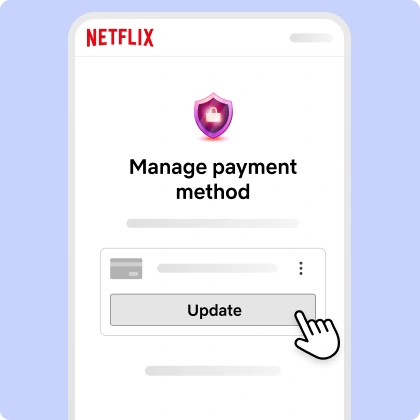
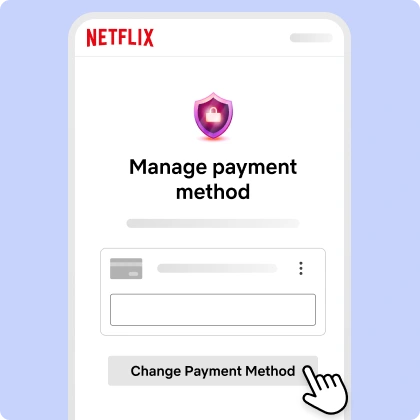
These are Netflix’s published interface illustrations, not screenshots of a customer account. Netflix’s payment update guide uses Update and + Add Payment Method, while its hold-error guide also illustrates Change payment method. Follow the controls shown in your own account.
Compare the expiration date, security code and billing postal code with your bank record. Correct any mismatch rather than repeatedly submitting the same details. Netflix’s failed-payment guidance recommends this check before retrying a declined charge.
Enter payment details only inside your Netflix account. Do not send a card number or security code to someone offering to fix the hold by message.
3. If the bank shows money deducted, identify the transaction type
A pending card entry is not the same as a settled subscription payment. Netflix says adding some payment methods can trigger a temporary authorization to verify the method. The issuer may take a few business days to remove its pending status. See the authorization note in the official payment-method guide.
| Bank record | Question to ask |
|---|---|
| Pending / authorization | Is this a temporary verification hold or the actual membership payment? |
| Declined / reversed | Why was the charge declined or reversed, and what must change before retrying? |
| Posted / settled | Which merchant, amount, currency and transaction date does this record identify? |
Compare the bank record with Netflix Payment History for the same account. A bank notification describes a banking event; a saved card describes an account setting. Neither alone proves the membership is now paid. If the bank confirms settlement but Netflix has no matching record, contact Netflix before making another attempt simply to test it.
For example, a small pending entry immediately after adding a card may be a verification authorization. Ask the issuer to identify it; do not assume every pending amount is harmless or that every deduction paid the subscription. This example is a diagnostic question, not a record of a charge tested for this article.
4. If the card still fails, ask the issuer specific questions
Netflix’s payment options guide says cards must support recurring e-commerce payments and may need international transactions enabled. A card working in a shop or for a different website does not establish that the bank will approve this recurring charge.
- Does the bank see the Netflix attempt for this date, amount and currency?
- Was it declined, and what reason can the bank provide?
- Are recurring online payments allowed, and was this treated as an international transaction?
- Are available funds or credit sufficient after other pending authorizations?
- Was the card recently replaced, expired or blocked?
After resolving the issuer’s explanation, retry through Netflix’s own account controls if offered. If the method still cannot be approved, check another supported option for your country. Do not assume a virtual or prepaid card is accepted everywhere; Netflix lists country-dependent availability.
5. If a company bills your Netflix package, fix that bill first
For Netflix included with a mobile, TV or internet package, Netflix directs you to the partner account to resolve a declined payment. Contact that provider if the issue continues. Updating an unrelated Netflix card may not repair the provider’s bill or restore its entitlement.
There is a further distinction between a payment hold and an account that became canceled, disconnected or paused. Netflix’s partner-payment guidance gives separate rejoin or relink instructions for those situations. Check the exact status with the provider rather than relinking every account as a routine step.
Before switching to direct Netflix billing, ask the provider whether Netflix is still included and whether activation must be restored through its package. Record the answer and use the existing Netflix account where the provider’s instructions call for it. This keeps the problem focused on the intended bill and account.
6. The new payment method saved, but the warning remains
Netflix recommends Back or Refresh after a successful payment-method update if the same warning persists. It also says it periodically retries failed payments during the billing cycle. That statement does not give a guaranteed retry time for your account.
- Refresh the account page and read the current warning.
- Check whether payment succeeded, is still failing or requires an action shown in the account.
- If the bank approved the charge and Netflix still reports a hold, collect the matching details and contact Netflix.
- Once the account’s payment issue is resolved, reopen Netflix on the affected device and test playback.
Avoid changing five things at once. If playback starts after the payment is confirmed, there is no need to reinstall the app just to complete a checklist. If the message changes to Household or another error, follow that new message instead of repeating card updates.
Give support a record they can investigate
Use Netflix Contact Us from the official Help Center. For a bank decline, the issuer can explain its decision; for a package, the provider controls its billing; for a settled payment missing from the Netflix account, Netflix needs the account and transaction details.
My Netflix account shows “[exact message]”. I am billed [directly by Netflix / by provider]. The payment on [date] for [amount and currency] is [pending / declined / settled] according to my bank or provider. Netflix Payment History shows [result]. I updated the payment method and refreshed, but [current result]. Please check whether the payment is matched to this account and what action is required.
Keep the transaction reference and any case reference privately. Share only what the official support process needs; do not put full card details in a chat summary or public screenshot. Ask for the specific next action rather than a general instruction to keep trying.
If the warning arrived only by email or text
Open Netflix directly to verify the account. A real payment problem can exist, but a convincing message is not proof. Netflix’s phishing guidance says it will not ask for card numbers, bank details or passwords in texts or emails. It also says not to follow unfamiliar links.
If you already entered payment details on a suspicious page, contact the financial institution. If you shared a Netflix password, change it and replace it on any other account where you reused it. These are account-security steps, separate from fixing a genuine billing decline.
Final check: has the original problem actually cleared?
Confirm the intended account is active, the bill or payment record matches the correct period, and a title starts playing on the affected device. Save the working billing arrangement. A different payment method being listed is only one part of that result.
Sources and image credits
- Netflix — Account on hold because of the last payment
- Netflix — Failed payments and partner billing
- Netflix — Update or change a payment method
- Netflix — Payment history and invoices
- Netflix — Accepted payment methods
- Netflix — Suspicious messages
Documentation and published interface images checked on 3 November 2026. The two payment images come from Netflix Help Center and illustrate its controls; they are not captures from a live customer payment or evidence of a transaction tested for this article. Cover photo: Jonas Leupe / Unsplash.
You may also like
 Technology & How-To
Is Tesla Discontinuing the Cybertruck? What We Know
Tesla plans a Cybertruck production wind-down in Texas around mid-2027. See what is confirmed, what remains unknown, and…
 Technology & How-To
Are AI Toys Safe for Kids? Privacy Risks and Parent Checks
Are AI toys safe for kids? Explore the evidence, privacy risks, age advice and practical parent checks for…
 Technology & How-To
iPhone Trust This Computer Not Showing? Windows and Mac Fixes
Restore the iPhone computer-trust prompt with checks for unlocking, Apple Devices or Finder, USB data cables and targeted…