
Binance Hack: How to Check Withdrawal Updates and Avoid Recovery Scams
Check official Binance hack and withdrawal updates, use Binance Verify, protect your account, and spot fake support and recovery-fee scams in the US and UK.
Contents
- What Binance has confirmed about the incident
- First check which Binance platform you actually use
- How to check withdrawal updates safely
- How to use Binance Verify without over-trusting the result
- Recovery-scam messages: three examples to recognise
- “Pay a small fee to release your compensation”
- “Send your assets to this protected wallet”
- “Our investigator can guarantee recovery”
- Protect your login without confusing it with the exchange’s investigation
- Review passkeys and two-factor authentication
- Set an anti-phishing code
- Check withdrawal-address controls
- What to do if you already responded to a suspicious message
- Where to report a recovery scam in the US or UK
- Before acting on the next update
If you are checking the Binance hack, start with the official incident notice and your own platform’s account messages. Do not follow an unsolicited “refund” link, pay a recovery fee, or give a caller your login codes. A withdrawal suspension and an individual account takeover need different responses.
Reviewed 31 October 2026. The service information below describes the official notices available during this review. It is a dated snapshot, not a live status feed. Read any newer announcement before acting.
What Binance has confirmed about the incident
In its second security update, dated 30 October, Binance reported roughly $6.3 billion in stolen assets and said it would cover incident-related losses using its SAFU fund and corporate resources. It described withdrawals as temporarily suspended, while deposits and unaffected services remained operational.
The company targeted a phased start to withdrawal restoration in approximately 34 hours from that update, conditional on security checks. That is a target in a particular announcement, not a fresh countdown each time someone reads this page. It does not guarantee that every asset, network or account will reopen together.
Binance also said it had identified additional breach points beyond its initial compromised-laptop hypothesis. It had not found evidence of leaked wallet private keys at that stage. The complete cause remained under investigation; an early explanation should not be presented as a final technical finding.
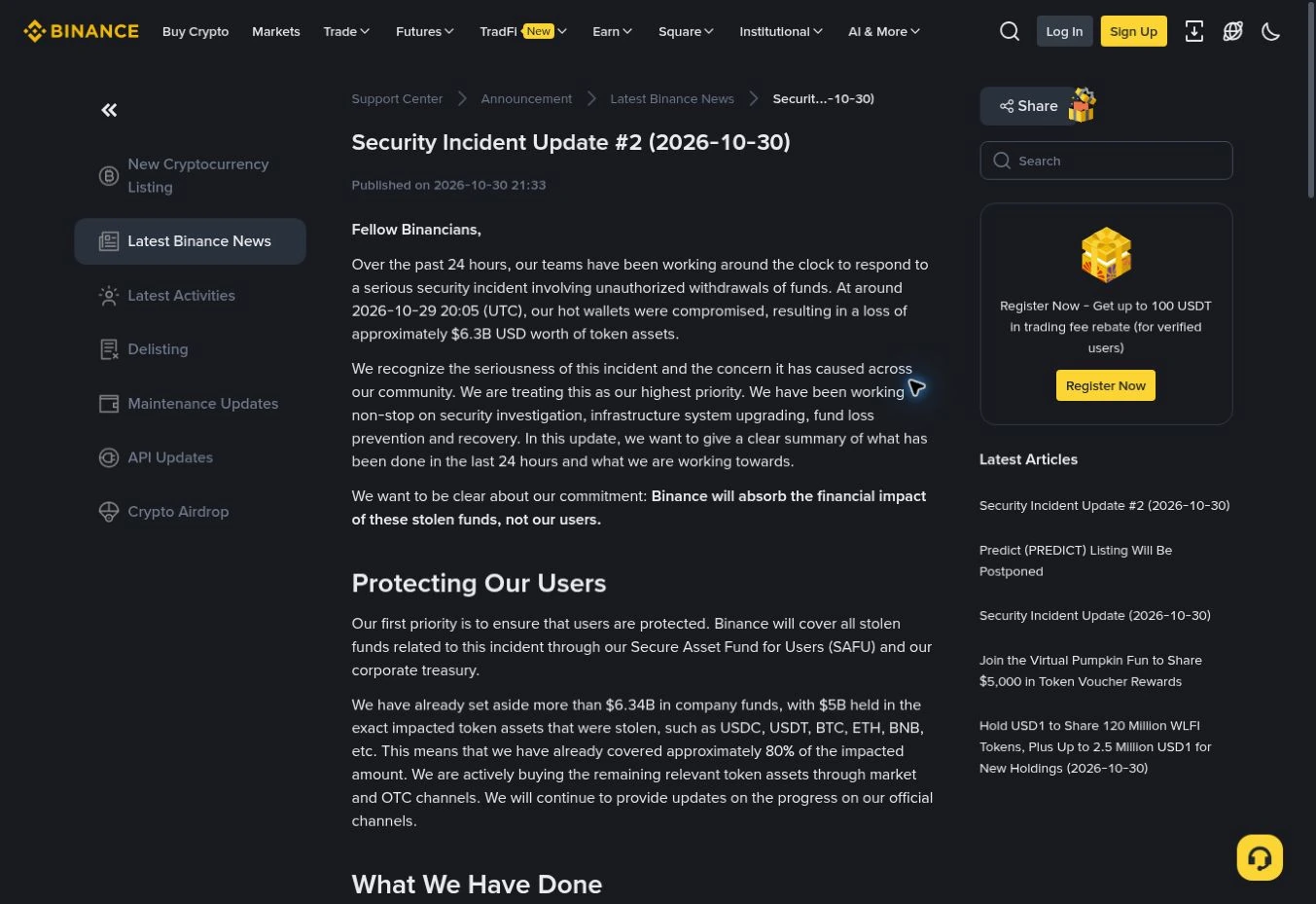
The earlier incident notice was amended to clarify that deposits continued normally. An old screenshot may therefore differ from a revised notice. Check the current text and any correction note rather than treating every circulating screenshot as equally current.
First check which Binance platform you actually use
Binance.com and Binance.US are separate platforms. The Binance.US help centre explicitly tells people with Binance.com login problems to use Binance.com support.
Check the domain, the app you originally installed and the service named in your account documentation. Do not assume that a headline about Binance.com describes your Binance.US account, or that a notice for one regional service applies everywhere.
For UK readers, the Binance UK page also warns that some services are unavailable to UK retail clients. A button or feature shown in a general tutorial may consequently be absent from your account. Do not use a stranger’s workaround to bypass that restriction.
This distinction also matters when asking for help: give the correct platform name and the exact error message. “Binance is not working” is less useful than explaining which service you use and whether the problem is logging in, withdrawing a particular asset, or seeing an unfamiliar transaction.
How to check withdrawal updates safely
Use this routine whenever a new headline or message appears:
- Open the app you already use, or navigate independently to the official support centre. Avoid links supplied by someone who contacts you about compensation.
- Find the incident announcements and compare their dates. Follow the newest applicable update, including corrections to earlier notices.
- Separate the service being discussed: deposits, trading, withdrawals and account access are different functions. One being available does not establish that the others are available.
- Read the message for your particular asset and network inside your account. If it conflicts with a broad headline, ask support through the official channel rather than repeatedly trying alternatives.
- Keep a brief note of the announcement date, the service affected and any conditions attached to restoration. A screenshot without those details is easy to misunderstand later.
Binance’s general withdrawal-suspension guide distinguishes wallet maintenance, asset/network issues and account-specific restrictions. Those explanations help interpret a message, but the general guide does not override a newer incident notice.
For example, imagine an announcement saying withdrawals will return in phases while your account still shows one network as unavailable. The broad announcement alone does not prove your account is broken. Record the specific network and message, then use the provider’s support route. Do not pay someone to “unlock” it.
How to use Binance Verify without over-trusting the result
Binance Verify checks whether a submitted website or communication identifier is recognised as official. It is a useful identity check, not permission to perform whatever action a message requests.
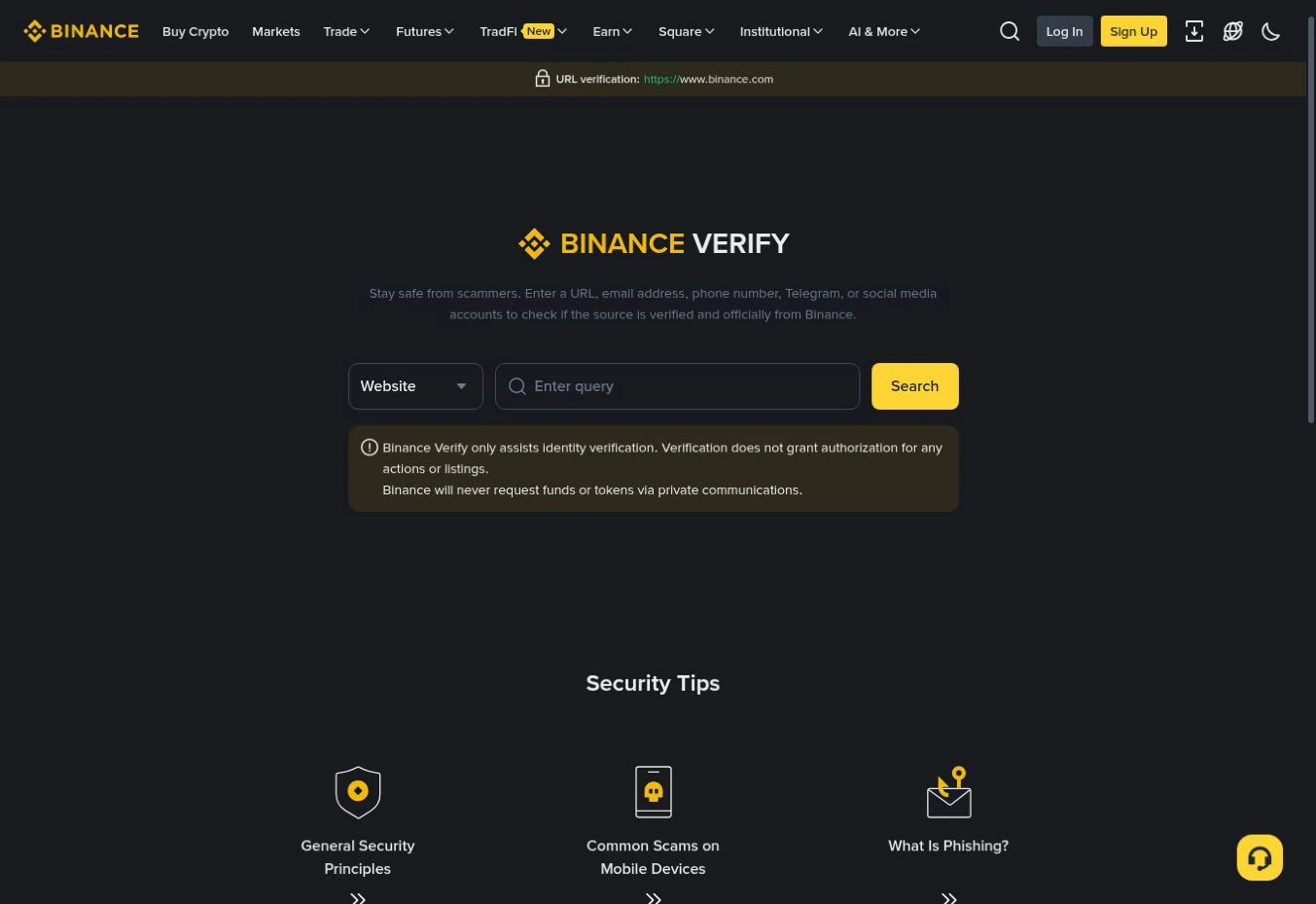
To use it:
- Open the tool independently from Binance’s official site.
- Select the appropriate source type, such as Website or Email.
- Enter the actual address or identifier, rather than a display name such as “Customer Support.”
- Read the result and its limitations. Then verify any sensitive request through support you opened yourself.
During our check on 31 October, entering the public address https://www.binance.com under Website returned a verified result. No account, password, wallet or private message was used in this test. It demonstrates the tool’s response for that address only.
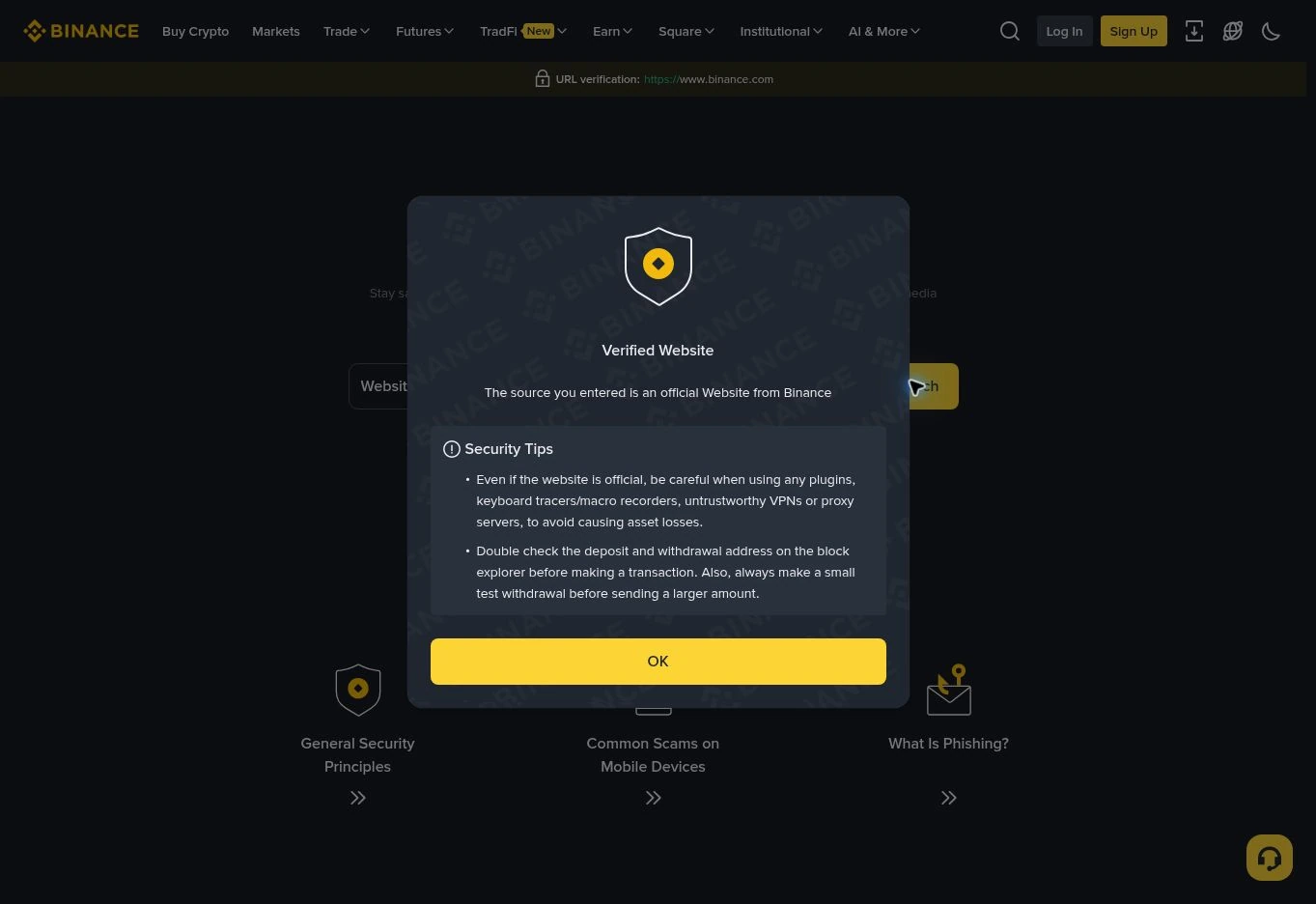
The page warns that identity verification does not authorise actions or listings, and that Binance does not request funds through private communications. A positive result is therefore no reason to transfer assets to an unsolicited contact.
Recovery-scam messages: three examples to recognise
The following are illustrative examples, not messages we collected from victims of this incident. They show how a real news story can be used as a pretext for a separate fraud.
“Pay a small fee to release your compensation”
A message claims your refund is ready but asks for a processing payment first. It may use a case number, a professional signature and an urgent deadline. None of those details proves it came from the exchange.
The US Federal Trade Commission’s recovery-scam guidance warns about unexpected contacts demanding advance payments or financial information to return money. Do not send the fee. Keep the message and check the claim independently.
“Send your assets to this protected wallet”
A supposed security agent says moving funds to an address they provide is the only way to protect them. Stop before approving anything. Verify through support you reached yourself; do not let the sender define both the emergency and the solution.
“Our investigator can guarantee recovery”
A commenter or private account promises to trace funds, then asks for money or documents. A tracking report and recovered funds are different outcomes. Ask what authority the person actually has and avoid sending more money because an earlier payment supposedly uncovered another obstacle.
The FBI’s cryptocurrency-recovery warning describes fraudulent tracing businesses and explains that private recovery companies cannot issue seizure orders. This is established background guidance, published in 2023, not an FBI finding about the Binance incident.
If the approach begins with a QR code, use our guide to checking fake QR codes and their destinations before opening or approving anything.
Protect your login without confusing it with the exchange’s investigation
Improving your account settings reduces your exposure to account misuse. It does not repair the exchange’s infrastructure or prove that its incident has been resolved.
Follow the provider’s account-security recommendations: use a unique password, protect the linked email account, review account activity and remove unnecessary API access. Do not reveal one-time codes or allow an unsolicited caller to watch your screen.
If your password was reused or entered on a suspicious page, change it through the genuine service from a trusted device. Secure the linked email account too. An exchange-wide pause is not, by itself, evidence that someone knows your personal password.
Review passkeys and two-factor authentication
Binance supports passkeys and authenticator-based verification. Its passkey guide explains the supported setup routes. Start from the account’s Security section and follow the instructions for your device. Interface labels and available methods can vary.
Before changing an authentication method, make sure you understand the service’s recovery process. Do not delete a working method simply because a caller says it is necessary for compensation. Authentication setup belongs inside the genuine service, not in a chat with someone requesting codes.
Set an anti-phishing code
An anti-phishing code is a recognisable marker you configure for Binance communications. It is different from a one-time login code or password.
The official setup guide gives the app route through your profile’s Account Info and Security screens, followed by Anti-Phishing Code and Create. On the website, it describes Account, Security and the Advanced Security section. Follow the current prompts and complete verification yourself.
A missing or incorrect marker is a reason to stop and investigate. A correct marker should not override the rest of your checks, especially if a message asks for a payment or unusual approval. If the marker may have been exposed, update it through the real account settings.
Check withdrawal-address controls
Binance’s withdrawal whitelist guide explains how withdrawals can be restricted to approved addresses. Review the addresses you recognise and investigate unfamiliar entries through support.
Read the consequences before changing these settings: modifications can trigger temporary withdrawal restrictions. Do not disable a safeguard simply because a stranger says it is causing the incident-wide pause. Your personal settings and a platform suspension are separate issues.
What to do if you already responded to a suspicious message
Your next step depends on what you actually did. Use this table to describe the situation accurately when contacting the provider; these are starting points, not a remote diagnosis of your device.
| What happened | Immediate priority | What to preserve |
|---|---|---|
| You received a message but shared nothing | Stop engaging and verify through the genuine service | Sender identifier, message and claimed website |
| You entered credentials, shared a code or see unfamiliar account activity | Contact official support urgently; secure access from a trusted device | Relevant times, alerts and unfamiliar activity |
| You sent money to a supposed recovery service | Contact the sending exchange or payment provider and report the fraud | Transaction ID, network, destination address, amount and conversation |
If you see unauthorised account activity, Binance advises disabling the account and contacting official support. Its disable-account guide describes the app route through Account Info, Security, Manage Account and Disable Account. Read the warnings and complete the service’s checks yourself. Disabling an account is a protective action, not a promise of reimbursement.
If you installed remote-access software at a stranger’s request, stop the session and seek trusted technical help. Avoid entering replacement credentials while someone still controls or observes the device.
Preserve the original conversation and relevant records before blocking the sender. Share necessary evidence privately with the provider or authorities. Do not post authentication codes, identity documents or account screenshots in public comments asking strangers for help.
Where to report a recovery scam in the US or UK
For US readers, use the FBI IC3 website to report internet crime and FTC ReportFraud for consumer-fraud reporting. A report is not a guarantee that a transfer will be reversed. The FBI warning recommends supplying transaction details and information about anyone claiming to offer recovery.
For England, Wales and Northern Ireland, Report Fraud’s reporting page separates suspicious approaches from reports of cyber crime or fraud. For Scotland, the same guidance directs people to Police Scotland on 101.
For UK suspicious texts, the official reporting guidance explains forwarding them to 7726. Reporting a message to a network is different from filing a report about money you have lost; use the route that fits what happened.
Before acting on the next update
Check three things together: which platform issued the notice, when it was issued, and exactly what service it covers. Then compare it with your own account’s message.
A promise to cover losses, a target for reopening and an announcement that a service has actually resumed are different statements. Keep that distinction when reading headlines or replying to someone offering help. Use official channels you open yourself, and do not turn a real security incident into a second loss by paying an unsolicited recovery contact.
You may also like
 Technology & How-To
Is Tesla Discontinuing the Cybertruck? What We Know
Tesla plans a Cybertruck production wind-down in Texas around mid-2027. See what is confirmed, what remains unknown, and…
 Technology & How-To
Are AI Toys Safe for Kids? Privacy Risks and Parent Checks
Are AI toys safe for kids? Explore the evidence, privacy risks, age advice and practical parent checks for…
 Technology & How-To
iPhone Trust This Computer Not Showing? Windows and Mac Fixes
Restore the iPhone computer-trust prompt with checks for unlocking, Apple Devices or Finder, USB data cables and targeted…