
Amazon Refund Issued but Not Received? How to Track It
Amazon says refund issued but the money is missing? Check US and UK processing times, the refund destination, and when to contact Amazon or your bank.
Contents
- 1. Check the actual refund record
- What each status tells you
- 2. Use the correct US or UK processing window
- A simple business-day example
- 3. Look in the destination Amazon actually used
- 4. Check whether the original payment was only an authorization
- 5. If the expected window has passed, contact Amazon with five facts
- 6. Ask the card issuer to investigate the confirmed refund
- What if Amazon and the bank keep referring you to each other?
- When to ask about a payment dispute
- Two situations this guide does not cover
- Sources and image credits

If Amazon says “Refund issued” but the money is missing, check the refund date, amount and destination payment method in your order details. Then compare the processing window for your Amazon marketplace and payment method. If that window has passed, ask Amazon for confirmation and a traceable refund reference, if available, before contacting your card issuer.
The useful question is not simply “How many days since I returned it?” A return can be delivered before a refund is issued, and a refund can be issued before your bank posts the credit. This guide covers ordinary Amazon.com and Amazon.co.uk shopping refunds. Other marketplaces and payment products have their own rules.
1. Check the actual refund record
- Open the Amazon app or website yourself and choose the marketplace where you placed the order.
- Open Your Orders or Your Returns, select the item and look for View return/refund status or similar wording.
- Record the exact status, refund issue date, amount, currency and destination shown. Check the refund confirmation email against the account record.
- On Amazon.com, inspect Your Payments > Transactions if needed. Amazon says issued refunds and payment transactions appear there.
Amazon’s US refund-status guide and UK guide explain these routes. Button wording varies between app versions and markets. If the account contains no issued refund, a chat promise or carrier delivery scan is not the same record.
What each status tells you
| Status or evidence | What it establishes | Your next check |
|---|---|---|
| Return requested / initiated | The return process has started. | Check the return instructions and tracking. |
| Dropped off / received | The parcel has entered or reached the return process. | Look for an actual refund issue date. |
| Refund issued | Amazon records sending the refund to the chosen destination. | Check the payment-method processing window. |
| Refund credited | Amazon’s UK tracker records credit to the destination. | Check that exact card, account or gift-card balance if you still cannot locate it. |
The UK tracker uses these stages for items returned directly to Amazon. Your order may show different wording. Save the actual wording rather than changing it to match a tutorial.
2. Use the correct US or UK processing window
Count the payment-processing period from the refund issue date, not the parcel drop-off date. Amazon’s return-processing stage is separate. Treat the following as published guidance, not a promise that every order follows the same schedule. Follow any order-specific instructions or updated estimate.
| Marketplace and refund destination | Published processing time after issue |
|---|---|
| Amazon.com — gift-card balance | 2–3 hours |
| Amazon.com — credit card | 3–5 business days |
| Amazon.com — debit card | Up to 10 business days |
| Amazon.co.uk — gift-card balance | 2–4 hours |
| Amazon.co.uk — credit or debit card | Up to 7 business days |
Sources: Amazon.com Refunds and Amazon.co.uk Refunds. The UK page says some circumstances take longer. The US page gives different windows for other payment methods, so do not apply the credit-card row to checking accounts, prepaid cards, benefits cards or every buy-now-pay-later service.
Amazon.com says return/refund timelines can reach 30 days depending on the order, shipping, processing and refund method. Its help page tells customers to contact Customer Service if they returned an item over 30 days ago without receiving any refund notification. That is a different situation from an already-issued card refund exceeding its payment window.
A simple business-day example
Suppose a refund was issued on a Friday. For a rough planning count, Monday is the first following business day if it is not a relevant bank holiday. Saturday and Sunday are not two extra business days. Use the estimate shown by Amazon and your issuer for the actual transaction; an example cannot determine the exact posting date.
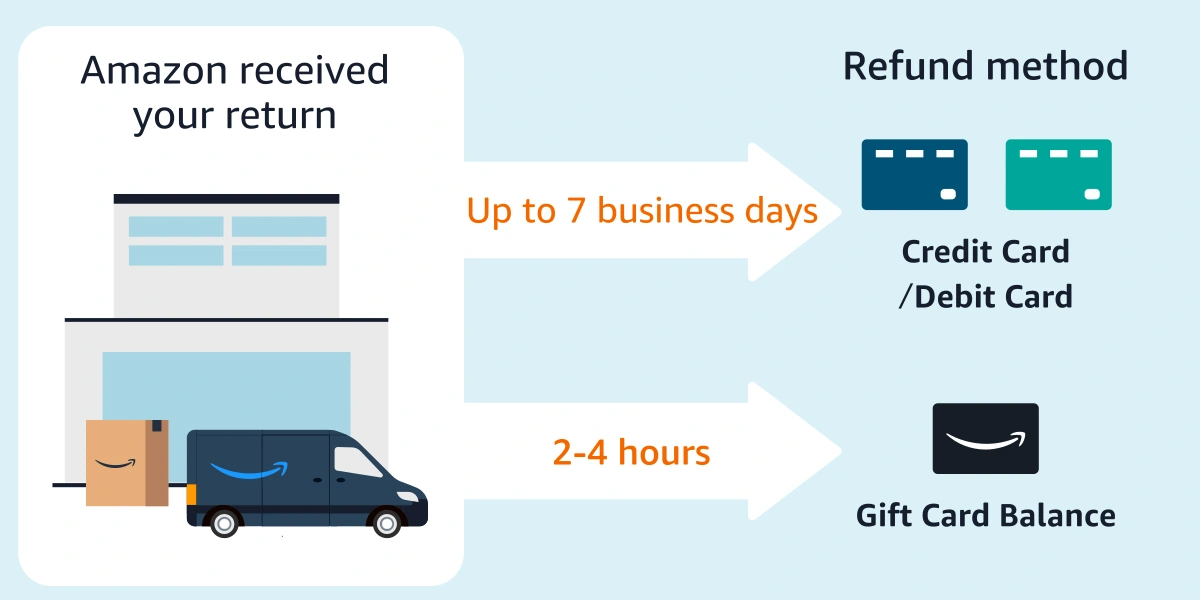
Keep both dates in your notes: return received and refund issued. Amazon’s UK illustration above summarizes refund destinations, while the page’s written guidance places the card-processing window after the refund is issued. Do not start that bank-processing count from the illustration’s warehouse label.
3. Look in the destination Amazon actually used
Search by the refund amount and currency, not just the original order total. If you returned one item from a larger order, compare the refund summary for that item. Check whether your payment was split between a card and gift-card funds, and ask Amazon to confirm each refunded portion if the destination is unclear.
- Card refund: inspect the account linked to the original card, including recent activity and statements. A credit-card refund is a credit to that card account, not necessarily a deposit into your everyday bank account.
- Gift-card destination: inspect the relevant Amazon marketplace’s gift-card balance and activity. Do not wait for a bank deposit when the confirmation names a gift-card balance.
- Gift return: Amazon.com says a gift recipient’s refund goes to the gift-card balance of the account used to create that return. Check that account.
- Expired or replaced card: ask Amazon to confirm whether the refund succeeded or was declined, and ask the issuer how it handles the original account. Do not assume a replacement card automatically means the refund is lost.
Amazon.com’s refund policy says that when it cannot use the original payment method, a declined refund goes to the Amazon account balance. Confirm your own record; this US statement should not be treated as a universal rule for every Amazon marketplace.
4. Check whether the original payment was only an authorization
A cancelled order can leave you looking for a refund transaction that will never appear in that form. If the original card entry was only pending, ask the bank whether the money was reserved and then released, rather than collected and refunded.
Amazon’s authorization guide explains that an authorization reserves funds and is not itself a completed charge. Check whether the original entry disappeared, was reversed, or actually posted. Do not label every missing credit as an authorization release; confirm the original payment status first.
5. If the expected window has passed, contact Amazon with five facts
Use Customer Service inside the Amazon app or the marketplace’s own site. Select the affected order and keep these details together: order number, refund issue date, amount/currency, destination, and the processing estimate you were given. Include the return receipt if processing is still unresolved.
Send this short request, replacing the bracketed details:
My order [order number] shows a refund of [amount and currency] issued on [date] to [payment method / last four digits]. The stated processing period has passed, but I cannot locate the credit. Please confirm whether the refund was successfully processed, its exact destination and any bank-traceable refund reference available. If it failed or was redirected, please explain the next action and provide a case reference.
Ask the representative to distinguish “refund requested” from “refund completed on Amazon’s side.” Keep the response and case reference. If support provides a revised date, ask what changed and which processing stage it refers to. This makes the next contact more useful than repeatedly asking whether your money is coming.
6. Ask the card issuer to investigate the confirmed refund
If Amazon confirms a card refund and the applicable processing window has passed, contact the issuer through its app or the number on your card. Provide the refund date, amount, currency, original transaction and any reference Amazon supplied.
A supported card refund may have an Acquirer Reference Number (ARN) or another trace reference such as STAN or RRN. Stripe’s payment-network explanation describes their tracing purpose. This explains the terminology; it does not mean Amazon uses Stripe, or that every Amazon refund has an ARN you can obtain. An Amazon order number is not automatically a bank trace number.
Ask: “Can you check whether this credit is pending, posted, rejected or absent using the refund details?” The issuer may need to escalate the inquiry or may not be able to locate an in-transit refund immediately. If it cannot find the credit, record its explanation and take that back to Amazon. A reference helps investigation; it does not guarantee faster payment.
What if Amazon and the bank keep referring you to each other?
| Amazon says | Issuer says | Useful follow-up |
|---|---|---|
| Refund issued | No credit located | Ask Amazon for destination confirmation and a supported trace reference; give the issuer its response. |
| Refund failed or was redirected | Nothing expected on the card | Ask Amazon where the money went and check that destination. |
| Return still processing | No refund received | Resolve the return/refund issue with Amazon; the issuer cannot post a refund that has not arrived. |
| Refund completed | Credit already posted | Match the amount, currency and account before opening a new claim. |
When to ask about a payment dispute
If a promised refund remains unresolved, ask your issuer about its complaint or dispute process and applicable deadlines. Keep the return evidence and merchant correspondence. Chase’s guidance is one issuer’s example of reviewing the transaction, contacting the merchant and keeping records; your bank’s rules may differ.
A refund for a purchase you recognize is a different issue from an unauthorized transaction. Explain the facts accurately. If a refund arrives while an inquiry or dispute is open, tell the issuer so its records can be updated.
Two situations this guide does not cover
Third-party seller has not issued a refund: start from the order’s seller-contact and eligible Amazon resolution options. A return to a marketplace seller is not necessarily at Amazon’s own returns centre. Do not apply a bank-posting countdown before a refund exists.
Amazon Prime settlement payment: that is a separate program, not an ordinary order refund. Use our Amazon Prime FTC refund guide if that is the payment you are looking for.
Sources and image credits
- Amazon.com — Check Your Refund Status
- Amazon.com — Refunds
- Amazon.co.uk — Check Your Refund Status
- Amazon.co.uk — Refunds
- Amazon.com — Authorizations
- Stripe — Tracing a refund using reference numbers
- Chase — Transaction dispute guidance
Checked on 3 November 2026. Amazon’s standard help pages were intermittently unavailable during research; the same help articles were readable on Amazon-owned customer-help subdomains. The account steps describe official guidance, not a test refund performed for this article. The in-text diagram is Amazon’s published UK illustration, not a screenshot of a customer account. Cover photo: Giorgio Trovato / Unsplash.
You may also like
 Technology & How-To
Is Tesla Discontinuing the Cybertruck? What We Know
Tesla plans a Cybertruck production wind-down in Texas around mid-2027. See what is confirmed, what remains unknown, and…
 Technology & How-To
Are AI Toys Safe for Kids? Privacy Risks and Parent Checks
Are AI toys safe for kids? Explore the evidence, privacy risks, age advice and practical parent checks for…
 Technology & How-To
iPhone Trust This Computer Not Showing? Windows and Mac Fixes
Restore the iPhone computer-trust prompt with checks for unlocking, Apple Devices or Finder, USB data cables and targeted…