
Steam Refund Approved but Not Received? Check Your Bank, Wallet and Payment Status
Trace a missing approved Steam refund by checking its destination, purchase history, bank authorization and payment status, with practical support templates.
Contents
- Start with the record that is actually missing
- 1. Separate submission, approval and receipt of money
- 2. Check the refund destination before checking another account
- When the purchase used more than one funding source
- 3. Reconcile Steam Wallet with purchase history
- A simple Wallet example
- 4. Check whether a bank charge was reversed or refunded
- 5. Use a timeline that both sides can check
- 6. Contact the bank with a question it can answer
- 7. Contact Steam when the destination or record is unclear
- Keep these cases separate
- Before you close the case
- Official sources

If Steam approved your refund but the money is missing, first check where the refund was directed and whether the original bank charge is still pending. A returned payment can appear as a credit, a Steam Wallet balance change, or the disappearance of an authorization. Those records require different follow-up.
Steam’s refund guidance allows up to seven days after approval, with approved Wallet credit potentially taking 24–48 hours and international methods sometimes longer. An approval within 24 hours of purchase may instead cancel the transaction: the bank can take up to 30 days to release the hold, with no separate credit. After seven days without an original-payment refund, ask the bank about pending refunds.
Reviewed October 26, 2026. This guide helps you reconcile the records and prepare a useful enquiry. We did not make a purchase, submit a refund or inspect anyone’s bank account. Your transaction record and provider’s response determine your individual case.
Start with the record that is actually missing
| What you can confirm | What to inspect next | Who can clarify it |
|---|---|---|
| You received only a submission confirmation | Whether a later decision or processed message exists | Steam Support |
| The refund destination is Steam Wallet | Balance and subsequent purchases in the same account | Steam Support for an unexplained Wallet discrepancy |
| The destination is the original payment method | That provider’s record, including pending and posted entries | Your payment provider, then Steam for missing transaction information |
| The original charge disappeared | Whether the provider released an authorization | The bank or card issuer |
| You cannot identify the destination | The refund correspondence and original receipt | Steam Support |
Do not decide the case from your current balance alone. A balance is a total after many transactions; it does not identify which entry changed. Your aim is to match one purchase, one refund decision and one destination record.
1. Separate submission, approval and receipt of money
A message saying that a request was submitted is evidence of submission. It does not by itself establish approval or payment. Steam’s official request instructions distinguish the initial confirmation email from the message sent once a refund has been processed.
Open the relevant correspondence and write down the exact wording and timestamp. Avoid summarizing every status as “refunded.” If one message says submitted and another says processed, retain both; the sequence is more useful than a screenshot of the subject line alone.
- Identify the game or purchase and its original receipt.
- Find the request confirmation and any later decision.
- Note the destination and amount if stated.
- Keep the dates in the time zone shown by each record.
- Record what is still unknown rather than filling the gap with an assumption.
For example, “requested Monday, decision received Wednesday” describes two separate events. Measuring every delay from Monday can send you to the wrong part of the process.
2. Check the refund destination before checking another account
The Steam refund policy says refunds go to Steam Wallet or the original payment method. If the original method cannot receive the refund, Steam credits Wallet instead. Available methods vary by country, so a card payment does not prove that your eventual refund must appear on that card.
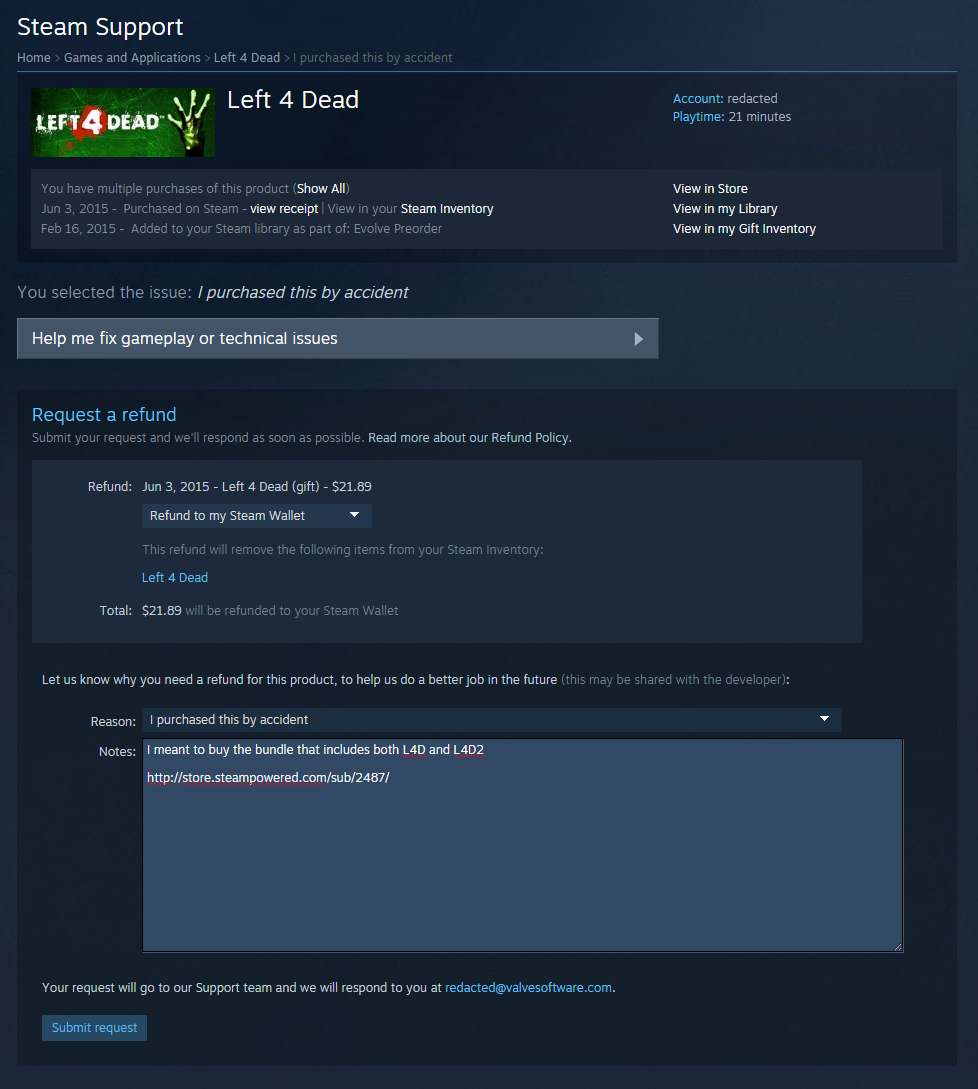
The official image above illustrates why the selected destination matters. It is Steam’s published example, not a screenshot of your account, and interface details may change. For an existing approved request, inspect its correspondence rather than opening another request just to reproduce this screen.
If the destination is not clear, ask a narrow question: “Which destination was used for this approved refund?” That is easier to investigate than asking why your bank balance has not increased when the refund might be in Wallet.
When the purchase used more than one funding source
Keep the original receipt and its breakdown together. Do not assume that a mixed Wallet-and-card purchase will produce one easily recognizable bank entry. Ask Steam to explain the allocation for that particular refund if the records do not show it clearly. We do not infer a universal split from a single payment example.
3. Reconcile Steam Wallet with purchase history
For a Wallet destination, use the same Steam account named in the receipt. Open your account menu, choose Account Details, then View purchase history. Steam points users to this history because later purchases can account for funds that seemed to disappear.
List the relevant entries chronologically: balance observed before the refund, the refund record if visible, purchases afterward and the current balance. When a starting balance is unknown, mark it unknown. Do not construct a confident reconciliation from an amount remembered approximately.
A simple Wallet example
Suppose your own records show a $5 starting balance, a $20 refund credit and a later $8 purchase charged entirely to Wallet. The expected remaining balance would be $17. This is an invented arithmetic example, not a Steam transaction we tested, a promise about display labels or a claim that every refund uses dollars.
That calculation helps identify the disputed difference. If your current balance were $17, the absence of a $25 balance would not prove the refund was missing. If the record instead showed $5 and no subsequent spending, you would have a specific discrepancy to ask Support to review.
4. Check whether a bank charge was reversed or refunded
A separate incoming credit is only one possible sign of resolution. Compare the original entry’s state before and after the refund decision. Ask the provider whether the entry was an authorization, a completed debit, a reversal or a refund awaiting posting.
Use the provider’s terminology in your notes. “The pending entry disappeared on Thursday” and “a credit posted on Thursday” describe different records. Neither requires you to understand the internal payment network; the bank can identify what its own statement means.
| Your observation | Useful question |
|---|---|
| The debit is still marked pending | Is this an authorization, and what release process applies? |
| The debit no longer appears | Was the authorization released rather than credited separately? |
| The debit is posted and no credit appears | Can you locate a pending refund associated with this payment? |
| A credit exists but the amount differs | Which currency, conversion or separate entry explains the difference? |
Steam separately explains failed-purchase authorization holds. That is relevant when a payment failed, but it does not prove your approved refund is a failed-payment hold. Establish the state of your transaction before applying that explanation.
5. Use a timeline that both sides can check
Build a short transaction timeline before contacting anyone. This avoids repeatedly telling the story from memory and makes it easier to notice a wrong account, date or payment destination.
| Event | What to record |
|---|---|
| Purchase | Date, amount, currency and receipt reference |
| Refund request | Submission timestamp and case reference |
| Decision | Exact message, timestamp and stated destination |
| Provider check | Pending or posted status and date checked |
| Follow-up | Contact date, reference and next action given |
Around midnight, dates can differ between email and bank records. Preserve the timestamps as displayed rather than silently changing them. If you calculate elapsed time yourself, state the starting event explicitly.
6. Contact the bank with a question it can answer
When the original payment method is the destination and the money remains absent beyond Steam’s stated interval, ask the provider to trace the relevant payment state. Steam cannot explain every label in a bank app; the bank cannot correct a Wallet ledger.
I am checking a Steam purchase for AMOUNT and CURRENCY dated PURCHASE DATE. Steam’s message dated DECISION DATE states that the refund was approved or processed to DESTINATION. My statement currently shows EXACT STATUS. Can you confirm whether the original payment was collected, reversed or remains an authorization, and whether a related refund is pending? Please provide a case reference and the next follow-up step.
Replace the capitalized fields with confirmed information. If the destination is uncertain, say so. Use your provider’s authenticated channel for identifying details, and keep passwords, security codes and complete card numbers out of ordinary correspondence.
7. Contact Steam when the destination or record is unclear
Start from Steam Support and the relevant purchase. Describe the unresolved record, attach only relevant evidence when requested and retain the case reference. We cannot promise the same button labels for every account or transaction state.
My refund for PURCHASE REFERENCE was approved or processed on DATE. The destination shown is DESTINATION, or I cannot identify the destination. I checked the relevant account and purchase history on DATE. The discrepancy is EXACT MISSING AMOUNT OR RECORD. My payment provider’s response was SUMMARY, with reference REFERENCE. Please confirm the refund destination and transaction status, and advise what information the provider needs to locate it.
Do not say that the bank confirmed nonreceipt unless it actually did. A bank’s statement that it cannot find a credit may still leave open the possibility of a released authorization. Include the precise reply instead of turning it into a stronger claim.
Keep these cases separate
- Market sale proceeds: funds from selling an item are a different transaction from a purchase refund. Use the notice attached to that sale.
- Wallet top-ups: money you added yourself is a separate ledger event. Identify that receipt rather than an unrelated game refund.
- Third-party purchases: Steam’s policy excludes refunds for purchases made outside Steam; identify the actual seller before requesting help.
- Gift purchases: the policy directs gift-refund funds to the original purchaser. The recipient should not assume a personal Wallet credit.
A card dispute is also different from an ordinary refund. Steam’s chargeback guidance distinguishes bank-initiated reversals from requests submitted to Steam. If a charge is genuinely unauthorized, report that accurately; do not describe an authorized purchase as fraud to accelerate a delayed refund.
Before you close the case
Confirm the destination record and amount, save the explanation if the original hold was released, and note whether anything remains unresolved. A processed message, a removed game licence and an available balance are different pieces of evidence; match the financial record rather than treating one as proof of all three.
This article does not establish a separate processing deadline for every US, UK or European bank, card or payment service. It supplies a method for identifying the transaction and asking the right party. Any provider-specific deadline should come from that provider’s current response.
Official sources
- Steam: Common Refund Questions — timing, cancellation and history checks.
- Steam: How To Request A Refund — request flow, messages and official example images.
- Steam Refunds — destinations and purchase categories.
- Steam: Purchasing Issues — failed-payment holds.
- Steam: Payment Disputes and Chargebacks.
You may also like
 Technology & How-To
 USB Works on PC but Not on TV? How to Find the Cause
Diagnose a USB drive that works on a computer but not a TV. Separate detection, missing files and…
 Technology & How-To
 WhatsApp “Waiting for This Message”: Fixes for iPhone, Android and Web
Fix WhatsApp’s waiting-message notice by comparing your phone and linked devices, checking updates and protecting existing chat data.
 Technology & How-To
 WhatsApp iOS 15.5 Requirement: What Changes on November 30, 2026?
WhatsApp raises its iPhone minimum to iOS 15.5 on November 30, 2026. Check your version, older iPhone eligibility…