
iPhone Duo Problems Reported So Far: Screen Cracks, Hinge Concerns and What’s Confirmed
A source-based review of early iPhone Duo screen and hinge reports, app-layout compromises, evidence limits and the checks owners should make before repair.
Contents
- iPhone Duo problems: what is reported and what is confirmed?
- 1. Inner-screen cracks and bright pixel lines
- See the original reports without losing their context
- 2. Hinge concerns: a plausible explanation is not a confirmed cause
- 3. Dust resistance does not make the hinge immune to grit
- 4. App layouts can feel unfinished on the larger screen
- 5. Design compromises are different from defects
- What has Apple confirmed about the reported failures?
- Repair prices and warranty: check the exact market
- If your iPhone Duo develops a screen line or hinge problem
- Should you buy now or wait?
- Sources, images and limits
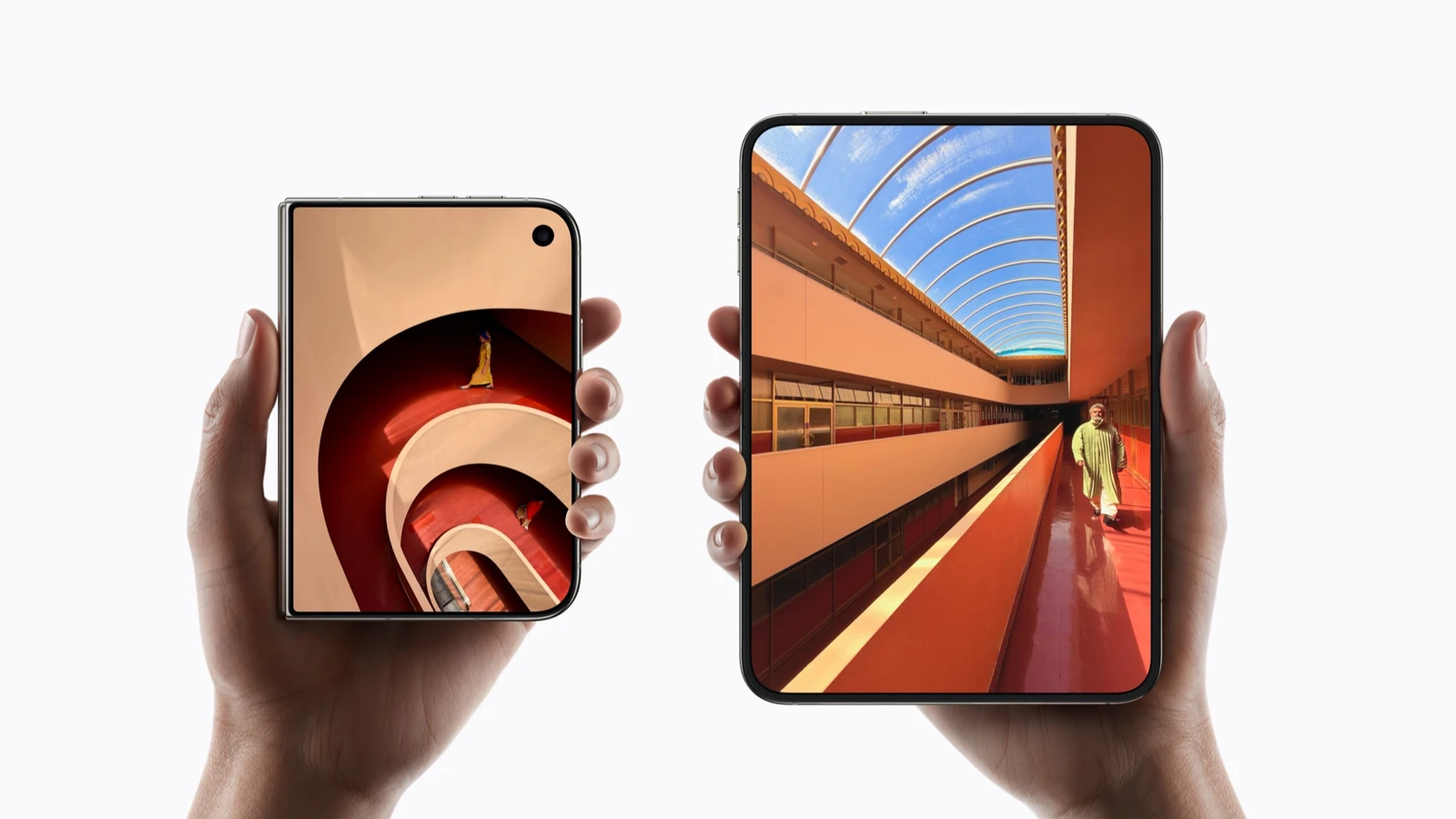
The most serious early iPhone Duo concern is a cluster of reports about cracked inner displays and bright lines near the fold. Those reports deserve attention, but they do not establish a failure rate or prove that every device has the same defect. A teardown has offered possible mechanical explanations; a confirmed cause across affected retail units has not been established in the sources reviewed.
Checked October 26, 2026. This is a source-based assessment, not a hands-on durability test. We separate owner reports, observations from a repair specialist, official specifications and practical buying considerations. Product photographs below are Apple press or developer illustrations, not photographs of broken customer phones.
iPhone Duo problems: what is reported and what is confirmed?
| Concern | Evidence category | What remains unknown |
|---|---|---|
| Inner-screen cracks and bright lines near the fold | Owner photographs and reports collected by technology publications | How many unique units are affected and the failure rate |
| Hinge stress contributing to screen failure | Repair-specialist hypothesis informed by teardown and modelling | Whether it explains individual failed retail units |
| Dust reaching moving hinge parts | Observation in an artificial powder test | How that test translates to ordinary long-term use |
| Some apps not fully using the unfolded screen | Documented differences in Apple’s developer guidance | The behavior of each app and version you use |
| Weight and authentication preferences | Published specifications and personal requirements | Whether they are drawbacks for a particular buyer |
1. Inner-screen cracks and bright pixel lines
MacRumors reported on October 23 that owners had posted photographs of damaged inner displays, often with faults near the hinge and a bright line across one side. It described an Australian owner who said the screen failed within hours and that the device was replaced. The account is an owner’s report relayed by the publication, not a test conducted by Horus Valley.
The same coverage notes that the history behind some images is unknown. Different outlets can also reproduce the same photograph or story. Counting articles, comments or reposts as separate broken phones would exaggerate the evidence.
What can reasonably be said is that publicly documented complaints exist and share some visual similarities. What cannot yet be calculated from them is the proportion of sold devices that fail, the risk after a particular number of folds, or whether normal use caused every photographed break.
See the original reports without losing their context
- MacRumors: screen-crack report and linked owner material.
- Owner post linked by iFixit: reported damage during setup. Treat the circumstances as the poster’s account.
- iFixit’s original teardown, including comparisons with reported damage locations.
These links let readers inspect the photographs with their attribution and surrounding discussion. A promotional image of an intact phone cannot establish how a broken unit was treated; equally, a photograph of a broken screen cannot alone establish its failure mechanism.
2. Hinge concerns: a plausible explanation is not a confirmed cause
In its October 25 teardown, iFixit compared hinge geometry and a model with the locations shown in reported failures. It proposed that local support geometry could create a stress concentration. This is a technical hypothesis, not confirmation that a particular component caused every failure.
A useful distinction is between an observed symptom and an inferred cause. A line of damaged pixels is a symptom. Proving why it occurred requires additional evidence about that device, its components and its history. Similar-looking faults can justify further investigation without proving identical origins.
If your hinge becomes unexpectedly tight or makes a new crunching sound, do not repeatedly force it to reproduce an internet video. Stop stressing the mechanism and arrange an assessment. The purpose of documenting a fault is to support diagnosis, not to make it more dramatic.
3. Dust resistance does not make the hinge immune to grit
iFixit also put a unit through a fluorescent-powder experiment and found material reaching moving parts, accompanied by hinge crunching. The team explicitly distinguished that procedure from an IP certification test. It should not be presented as proof that Apple’s published rating is fraudulent or that ordinary pocket dust inevitably causes failure.
For buyers, the practical lesson is to distinguish a controlled ingress rating from every real-world mechanical exposure. Sand, grit, a hinge obstruction and liquid exposure are different situations. Avoid intentionally adding powder or sand to your own phone as a diagnostic experiment.
4. App layouts can feel unfinished on the larger screen
This concern has a clearer official explanation. Apple’s developer documentation distinguishes apps built with older SDKs from versions adapted for newer layouts. Older apps can appear centered with unused space; newer builds can use more of the display. Hardcoded screen assumptions can also produce stretched or clipped content.
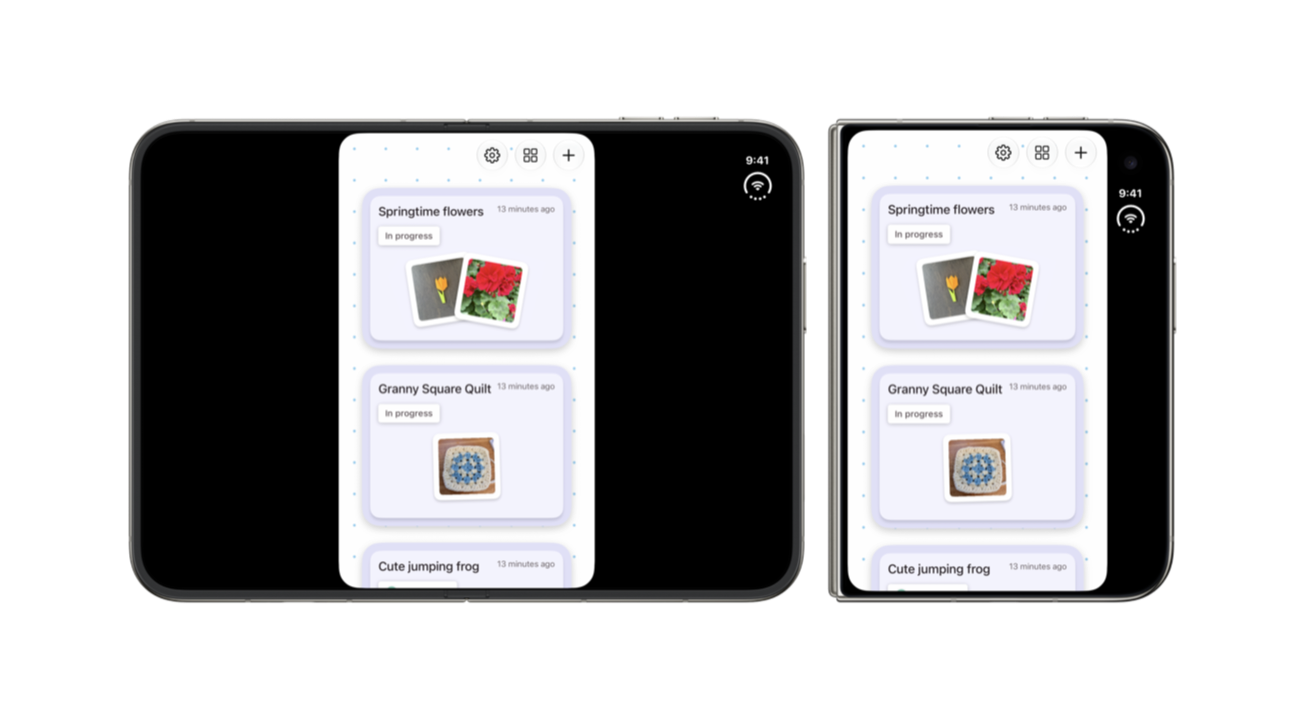
The official illustration shows an older-SDK app layout. It documents a compatibility mode, not a broken display. An app update may change that behavior; it cannot repair a physically cracked OLED panel.
Before buying, test the apps that determine the phone’s value for you: messaging, banking, maps, video, document reading and work software. Open and close the device during an ordinary task, checking whether text stays readable, controls remain accessible and your work retains its place. Do not assume one polished Apple demonstration represents every third-party app.
5. Design compromises are different from defects
Apple’s official specifications list a 254-gram device, 11.3 mm thick when closed, with a 7.6-inch inner display and 5.4-inch outer display. Authentication uses a Touch ID sensor in the side button. Whether these choices suit you is separate from whether a unit is faulty.
The camera specification lists main and ultra-wide modules, with 2x optical-quality framing enabled by the main camera. That is not the same claim as a dedicated long-range telephoto lens. Avoid treating marketing terminology as a guarantee that it will replace the camera system of a Pro model in every situation.
Try the folded device in the hand and, with store permission, assess pocket comfort and one-handed reach. A larger unfolded workspace can be useful while the folded proportions remain inconvenient for your own habits. That is a purchasing trade-off, not evidence of a manufacturing defect.
What has Apple confirmed about the reported failures?
Apple confirms the device’s design and specifications in its product documentation. That is not an acknowledgment of a particular screen-failure mechanism. No model-wide recall, published failure percentage or definitive manufacturer explanation was verified in the sources checked for this article.
This wording has a limit: it describes the material reviewed on the stated date. It does not establish that Apple has never responded privately to a customer or that a later announcement cannot appear. Owner replacement stories also do not amount to a universal replacement policy.
Repair prices and warranty: check the exact market
Repair cost is another concern, but a single online figure is easy to misapply. iFixit’s separate repair-price analysis discusses the expense. Treat a quoted price as market-, damage- and coverage-specific, not a worldwide promise.
Apple’s warranty information also distinguishes its warranty from additional consumer-law rights. The outcome for a particular phone depends on the assessment, applicable terms and local rights. This article does not determine whether a crack is accidental damage or a covered defect.
Before paying for a repair, request a written assessment describing the fault, the proposed work, coverage decision and total charge. If you disagree, retain your original photographs and ask which review or escalation process is available. Do not rely on another customer’s replacement or refusal as a binding outcome for your case.
If your iPhone Duo develops a screen line or hinge problem
- Stop forcing the fold. Avoid repeated opening, pressure on the affected area or attempts to peel display layers.
- Document the condition. Photograph the inner screen, exterior and hinge without manipulating the device unnecessarily.
- Write a factual timeline. Note purchase date, when the symptom appeared, any unusual noise and any relevant impact or exposure.
- Preserve important data if the phone remains safely usable. Avoid making a damaged mechanism move just to complete a demonstration.
- Contact Apple or the seller through verified channels. Ask for an assessment and retain the case reference.
- Check your own return, coverage and consumer-rights documents. Deadlines and remedies vary; this guide does not supply a universal return window.
| Record | Useful detail |
|---|---|
| Symptom | Crack, bright line, touch failure, hinge resistance or app-only layout issue |
| Timing | First observed date and what the device was doing |
| Condition | Exterior and screen photographs; relevant exposure history |
| Support | Case reference, written findings and proposed next step |
Should you buy now or wait?
If dependable daily use, inexpensive repairs or easy local support matter more than trying a new form factor, waiting for better evidence is a reasonable option. That is a decision about uncertainty and your tolerance for disruption, not a prediction that every Duo will fail.
If you still want the device, decide on the basis of the apps you actually use, the folded ergonomics, local service availability and the written coverage terms. A useful early review should help you ask those questions rather than claim either that a few alarming photographs prove a universal disaster or that an official durability description eliminates all risk.
Sources, images and limits
- Apple: iPhone Duo technical specifications — dimensions, displays, authentication and cameras.
- Apple Newsroom: product announcement and press imagery.
- Apple Developer: app-layout compatibility.
- iFixit: original teardown — observations and explicitly provisional explanations.
- MacRumors: early screen reports — a secondary collection of owner accounts.
Horus Valley did not test an iPhone Duo or independently authenticate the history of every pictured damaged device. We have not calculated a failure rate. The two embedded images are official Apple illustrations, labelled accordingly; linked owner and teardown photographs retain their original context. This article should be updated if stronger testing, verified service data or a manufacturer response becomes available.
You may also like
 Technology & How-To
 USB Works on PC but Not on TV? How to Find the Cause
Diagnose a USB drive that works on a computer but not a TV. Separate detection, missing files and…
 Technology & How-To
 WhatsApp “Waiting for This Message”: Fixes for iPhone, Android and Web
Fix WhatsApp’s waiting-message notice by comparing your phone and linked devices, checking updates and protecting existing chat data.
 Technology & How-To
 WhatsApp iOS 15.5 Requirement: What Changes on November 30, 2026?
WhatsApp raises its iPhone minimum to iOS 15.5 on November 30, 2026. Check your version, older iPhone eligibility…