
How to Delete Your Instagram Account: Download Your Data and Understand What Happens Next
Delete or temporarily deactivate your Instagram account, export photos and messages first, and understand the cancellation period and what remains afterward.
Contents
- Delete, deactivate, or uninstall: what is the difference?
- Step 1: Download your Instagram data before deleting
- Step 2: Permanently delete Instagram on iPhone or Android
- Delete an Instagram account on a computer
- What happens after you request deletion?
- How to cancel an Instagram deletion request
- Before you confirm: five practical checks
- If you cannot find Delete account
- Frequently asked questions
- Does deleting Instagram also delete Facebook?
- Can I download my Instagram photos after permanent deletion?
- Will deleting my Instagram account erase messages from other people's inboxes?
- Official references
To delete your Instagram account permanently, open Instagram’s Accounts Center (or Meta Account settings), find Deactivation or deletion, select the correct profile, and choose Delete account. Download and check your data export before confirming: the account becomes unavailable, and recovery stops after the cancellation deadline shown to you.
Delete, deactivate, or uninstall: what is the difference?
- Delete account: Requests permanent removal of your profile and account content. You can usually cancel during a limited period, but not after the deadline.
- Deactivate account: Temporarily hides your profile, posts, comments, and likes. Signing back in can reactivate your account.
- Uninstall the app: Removes the Instagram app from your device only; your online account remains active.
If you are unsure about leaving permanently, temporary deactivation is easier to reverse. Both choices are made in account settings, not by deleting the app from your phone.
Step 1: Download your Instagram data before deleting
- Sign in to the Instagram profile you intend to remove. Open Profile > menu > Accounts Center; some accounts now display Meta Account settings instead.
- Open Your information and permissions, then Export your information (also called Download your information on some screens).
- Choose Create export or the corresponding download option, select the correct Instagram profile, then choose an export to your device.
- Select All available information if you want the broadest archive, or choose specific items. For a full personal backup, consider All time and High media quality when offered.
- Choose HTML if you want files that are easier to browse, or JSON if you plan to process the data with software. Start the export and wait for Meta’s availability notification.
- Download the archive when ready, unzip it, open sample photos or videos, and inspect the available messages and information. Confirm it contains what matters to you before continuing. Export links may expire.
Large exports can take time. Starting deletion before the ZIP is actually downloaded and inspected could leave you without a usable copy. Never enter your Instagram password into an unrelated third-party download site. Meta explains that its account-data download tools are managed through Accounts Center.
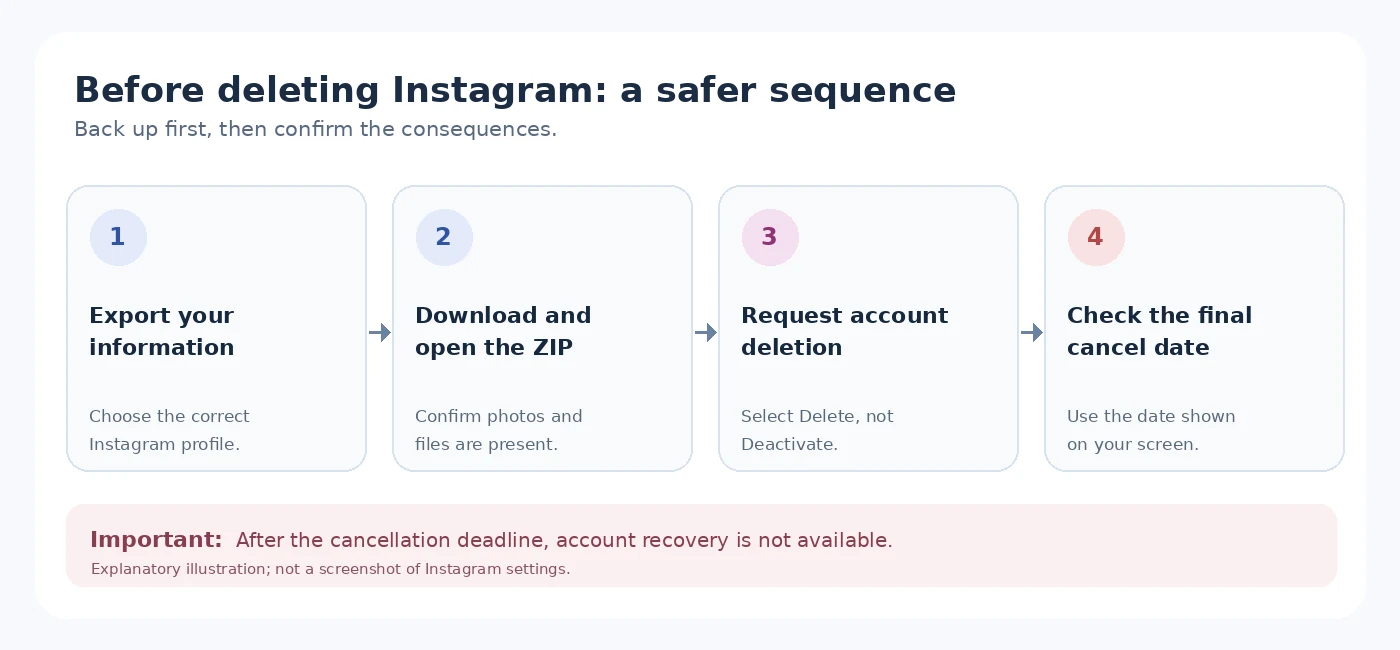
Step 2: Permanently delete Instagram on iPhone or Android
- In the Instagram app, tap your profile picture, then the menu in the top corner.
- Open Accounts Center or Meta Account settings. Find Personal details > Account ownership and control > Deactivation or deletion.
- If your interface shows Manage accounts or Profiles and personal details instead, select the account there and locate Deactivation or deletion.
- Choose the specific Instagram profile, then select Delete account rather than Deactivate account.
- Tap Continue, review the warning and cancellation date, enter your password if requested, and confirm only if you are ready.
Meta began rolling out a revised Meta Account interface in 2026, so menu names are not identical for every user. If the option is missing in the app, open instagram.com in your phone’s browser and follow the desktop path below.
Delete an Instagram account on a computer
- Open instagram.com in a browser and sign in to the intended account.
- Open More > Settings and select Accounts Center or the account-management area shown to you.
- Follow Personal details > Account ownership and control > Deactivation or deletion, or the equivalent Manage accounts route.
- Select the Instagram profile, choose Delete account, continue, and complete the confirmation prompts.
What happens after you request deletion?
- Immediately after the request: Your account and content generally become unavailable to other Instagram users. This does not mean all stored copies have already been removed.
- Cancellation window: Instagram commonly describes a 30-day period before permanent deletion. The time available to cancel can vary by region, so rely on the exact deadline in your confirmation.
- After that deadline: The account and its information cannot be retrieved through normal account recovery, even if you change your mind.
- Backend removal: Processing can take up to 90 days after deletion begins, and limited data may remain longer in backups or where legal and safety exceptions apply.
- What others still have: Messages in recipients’ inboxes, screenshots, reposts, and copies made by other people may not disappear merely because your account is deleted.
- Username and connections: Your old username is not guaranteed to remain reserved; review connected services and any linked Threads profile before deleting.
How to cancel an Instagram deletion request
Before the deadline shown in your deletion notice, sign back in to the account. If Instagram offers Cancel deletion or another recovery confirmation, select it and follow the prompts. Check that the profile has returned. Logging in after the cancellation period will not restore a permanently deleted account.
Before you confirm: five practical checks
- Verify the backup: Check the downloaded ZIP on your own device, not merely the email announcing it.
- Keep contact details: Save important friends’ or clients’ contact information outside Instagram, with their permission.
- Review subscriptions: Check Meta Verified and other paid services, including charges managed by Apple or Google. Deleting a profile is not a reliable way to cancel billing. Our subscription-check guide can help.
- Check business tools: If this is a creator or business account, review ads, partnerships, linked Pages, shops, invoices, and permissions.
- Confirm the account: If several profiles are linked in Meta Account, deletion should be requested only for the one you intend to remove.
If you cannot find Delete account
- Update Instagram, then search settings for Accounts Center, Meta Account, or Deactivation or deletion.
- Check whether the current screen says Accounts or Manage accounts; the navigation may differ.
- Try instagram.com in a browser if the app lacks the option.
- If you cannot sign in, use Instagram’s official account-access recovery before attempting deletion. Do not share a login code with anyone offering to delete the account for you.
Frequently asked questions
Does deleting Instagram also delete Facebook?
Selecting one Instagram profile for deletion does not by itself mean you requested deletion of a separate Facebook account. Check each account and connected feature individually.
Can I download my Instagram photos after permanent deletion?
Do not count on it. Request and verify the export before deleting, because permanent account removal may prevent access to Instagram’s export tools and original media.
Will deleting my Instagram account erase messages from other people’s inboxes?
Not necessarily. Recipients may still retain their copy of messages or screenshots. If a specific message must be removed from a chat, check the available Unsend feature before deleting, while remembering that others may already have saved it.
Official references
- Instagram Help Center: Permanently delete or deactivate an Instagram account
- Instagram Help Center: Download or export Instagram information
- Meta Newsroom: Managing information across Meta apps
- Meta Newsroom: New Meta Account settings rollout
- Instagram Terms of Use: Account and content removal
Interface note: Instagram’s account-management labels change over time. The illustration in this article is a decision sequence, not a claimed live screenshot of a signed-in Instagram account. Follow the options and deadline displayed on your own device.
You may also like
 Technology & How-To
How to Turn Lecture Recordings Into Study Notes With NotebookLM
Turn lecture audio into study notes with free Gemini Notebook (NotebookLM). Follow the upload steps, check transcript citations,…
 Technology & How-To
How to Use Google Lens to Find Products and Compare Prices
Find an item from a photo with Google Lens, check exact product matches and compare real checkout costs…
 Technology & How-To
Podcast Microphone Guide: USB vs XLR and Setup Tips
Choose a podcast microphone by room noise, connection type and recording style. Compare USB and XLR, see verified…