
How to Check FAA Ground Stops and Airport Delays
Learn how to check FAA ground stops and airport delays, read NAS Status notices and time zones, and confirm your flight with the airline.
Contents
- 1. Open NAS Status and check the update time
- 2. Check all the airports on your itinerary
- 3. Open the event details before interpreting the headline
- 4. Understand the difference between the main notices
- 5. Separate active restrictions from possible later events
- 6. Confirm the flight number and travel date with your airline
- What if the FAA page is blank or difficult to use?
- Sources and image credits

Open the FAA National Airspace System Status website, check your departure, connection and arrival airports, then confirm your specific flight in the airline’s app or website. FAA notices explain traffic restrictions; they do not replace your airline’s boarding, departure or cancellation information.
This guide uses the public FAA interface checked on November 14, 2026. The screenshots are dated examples of how to read the page, not a live report of today’s restrictions.
1. Open NAS Status and check the update time
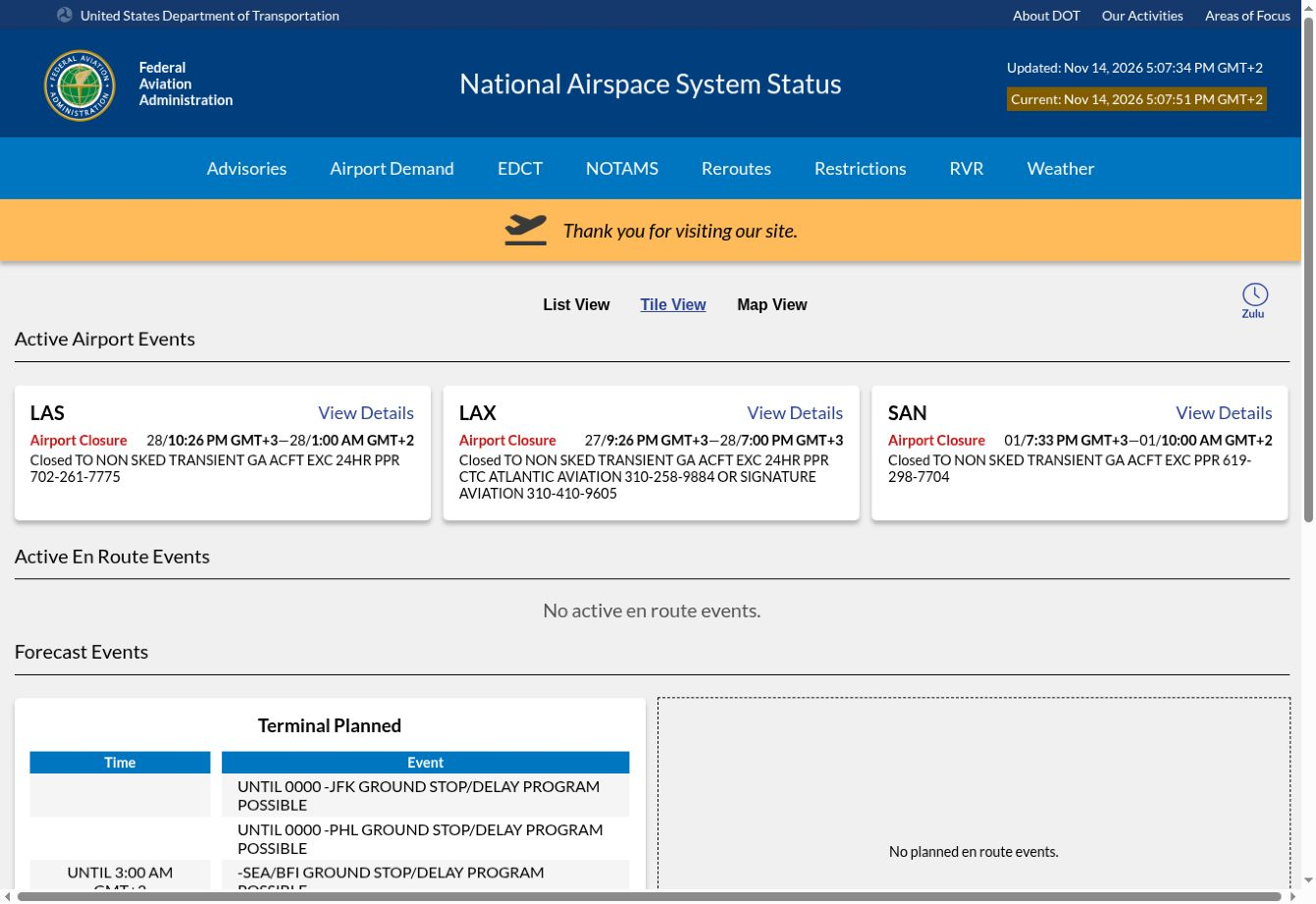
Use nasstatus.faa.gov directly. The page offers Tile View, List View and Map View. In Tile View, look under Active Airport Events for airport codes such as JFK, LAX or ORD.
Read both Updated and Current in the header. They answer different questions: when the displayed information was updated and what time the page currently shows. Check the stated time zone as well. In our capture, the browser displayed GMT+2; that was not the local time at every airport listed.
The FAA user guide documents the views and time controls, including the option to show UTC/Zulu time. If you see a time ending in Z, read it as UTC rather than automatically treating it as your airport’s local time.
2. Check all the airports on your itinerary
The FAA Command Center FAQ recommends checking both departure and arrival airports and checking the flight with the airline. For a connecting journey, apply the same check to the hub between them.
A ground stop at your destination can hold an affected aircraft at its departure airport. You may therefore be delayed somewhere with clear skies because another airport cannot accept the expected traffic.
For a hypothetical Atlanta–Newark journey, read both ATL and EWR. If EWR has a ground stop, inspect its scope before assuming every flight from Atlanta is included. If your route continues through Newark, check the onward flight separately with its operating airline.
3. Open the event details before interpreting the headline
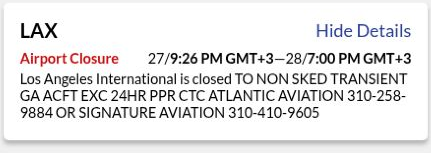
Select View Details on the airport card. Read the restriction, reason, applicable period and any scope or exceptions. Where available, Advisory opens the underlying Command Center notice. Airport codes identify the location involved; they do not describe every condition of the restriction.
Our November 14 capture shows why this matters. A LAX card was labelled Airport Closure, but its expanded wording referred to non-scheduled transient general aviation aircraft, with prior-permission exceptions. That wording should not be rewritten as “all commercial flights at LAX are cancelled.”
The FAA glossary distinguishes general aviation from air-carrier operations. If an abbreviation is unclear, consult the original notice and ask the airline about your flight instead of guessing from the red label.
4. Understand the difference between the main notices
The FAA’s explanation of ground stops and delay programs describes two different ways of managing traffic demand.
| FAA notice | Meaning for the affected traffic | What to verify next |
|---|---|---|
| Ground Stop | Affected flights bound for the airport are held at their departure points. | Scope, next update and your airline’s instructions. |
| Ground Delay Program | Arrivals are managed through controlled departure times. | Assigned delay information and the airline’s revised schedule. |
| Arrival or Departure Delay | Reported airport delay conditions. | Direction, reason, time range and trend. |
| Airport Closure | A closure notice that may contain operational exceptions or restrictions. | Full wording and whether your flight’s operation is affected. |
A published average delay is not a promise that your flight will be exactly that many minutes late. Likewise, an expected update time on a ground-stop notice is not your boarding time or a guaranteed release.
5. Separate active restrictions from possible later events
Active Airport Events and Forecast Events are separate sections. The FAA user guide describes Forecast Events as possible traffic constraints later in the day.
A line saying “GROUND STOP/DELAY PROGRAM POSSIBLE” is a planning indication. It is not equivalent to an active ground stop already applying to your flight. Open the full operations plan if you need its date and context, and recheck for a later update.
For example, if an airport appears only under Forecast Events, record the potential disruption but keep checking the active section and your airline. Do not tell someone their flight has been grounded solely because the word “possible” appears in a planning entry.
6. Confirm the flight number and travel date with your airline
The FAA FAQ explicitly says air traffic control does not cancel airline flights. The airline is the source for your individual cancellation, gate, boarding and revised departure information.
Check the operating carrier, flight number and date, especially around midnight or after a rebooking. Save relevant messages and follow the airline’s check-in and gate instructions. Do not arrive late because an airport-wide average suggested you had extra time.
A missing airport delay card is not a guarantee that your flight is on time. A particular flight can have its own problem even when no relevant FAA restriction appears. Similarly, a lifted restriction does not establish that your aircraft, crew and boarding arrangements are ready.
If your itinerary includes a European connection, our separate guide to missed connections and single versus separate bookings explains the booking questions to ask. FAA status alone does not determine passenger-rights coverage.
What if the FAA page is blank or difficult to use?
NAS Status requires JavaScript. If it does not load, try the FAA’s text-only airport status page, which lets you select an airport for delay information. Continue checking your airline directly; an inaccessible page is not evidence that the airport itself has closed.
Before relying on any shared screenshot, verify its date, time zone, airport code and full restriction. An old airport card can be accurate evidence of a past condition while being unsuitable for a current travel decision.
Sources and image credits
Official references are linked beside the relevant instructions: NAS Status, its user guide, the FAA Command Center FAQ, the delay-message help page and the FAA glossary.
Featured photograph: aircraft on taxiway N at Boston Logan International Airport, February 18, 2024, by 4300streetcar / Wikimedia Commons, CC BY 4.0. Cropped to 16:9 and converted to WebP. It is an archival illustration, not evidence of a ground stop.
Interface screenshots: FAA NAS Status, captured November 14, 2026, at approximately 15:08 UTC. They preserve the displayed information and are included to explain the interface. Always open the live website for current conditions. Reproduction does not imply FAA endorsement.
You may also like
 Technology & How-To
How to Turn Lecture Recordings Into Study Notes With NotebookLM
Turn lecture audio into study notes with free Gemini Notebook (NotebookLM). Follow the upload steps, check transcript citations,…
 Technology & How-To
How to Use Google Lens to Find Products and Compare Prices
Find an item from a photo with Google Lens, check exact product matches and compare real checkout costs…
 Technology & How-To
Podcast Microphone Guide: USB vs XLR and Setup Tips
Choose a podcast microphone by room noise, connection type and recording style. Compare USB and XLR, see verified…