
AI 3D Figurine Trend: Turn Your Photo Into a Collectible Figure With Prompts
Turn a portrait into an AI collectible figurine with step-by-step instructions, four prompts, face-consistency tips and troubleshooting.
Contents
- What Is the AI 3D Figurine Photo Trend?
- Choose a Good Reference Photo
- How to Make Your Own 3D Figurine Image
- Four Copy-and-Paste AI Figurine Prompts
- How to Keep the Face Recognizable
- Make It Look Miniature, Not Life-Size
- Troubleshooting Common AI Figurine Problems
- Can You 3D Print the Result?
- Image Sizes for Social Media
- Privacy, Consent and Copyright
- Official References
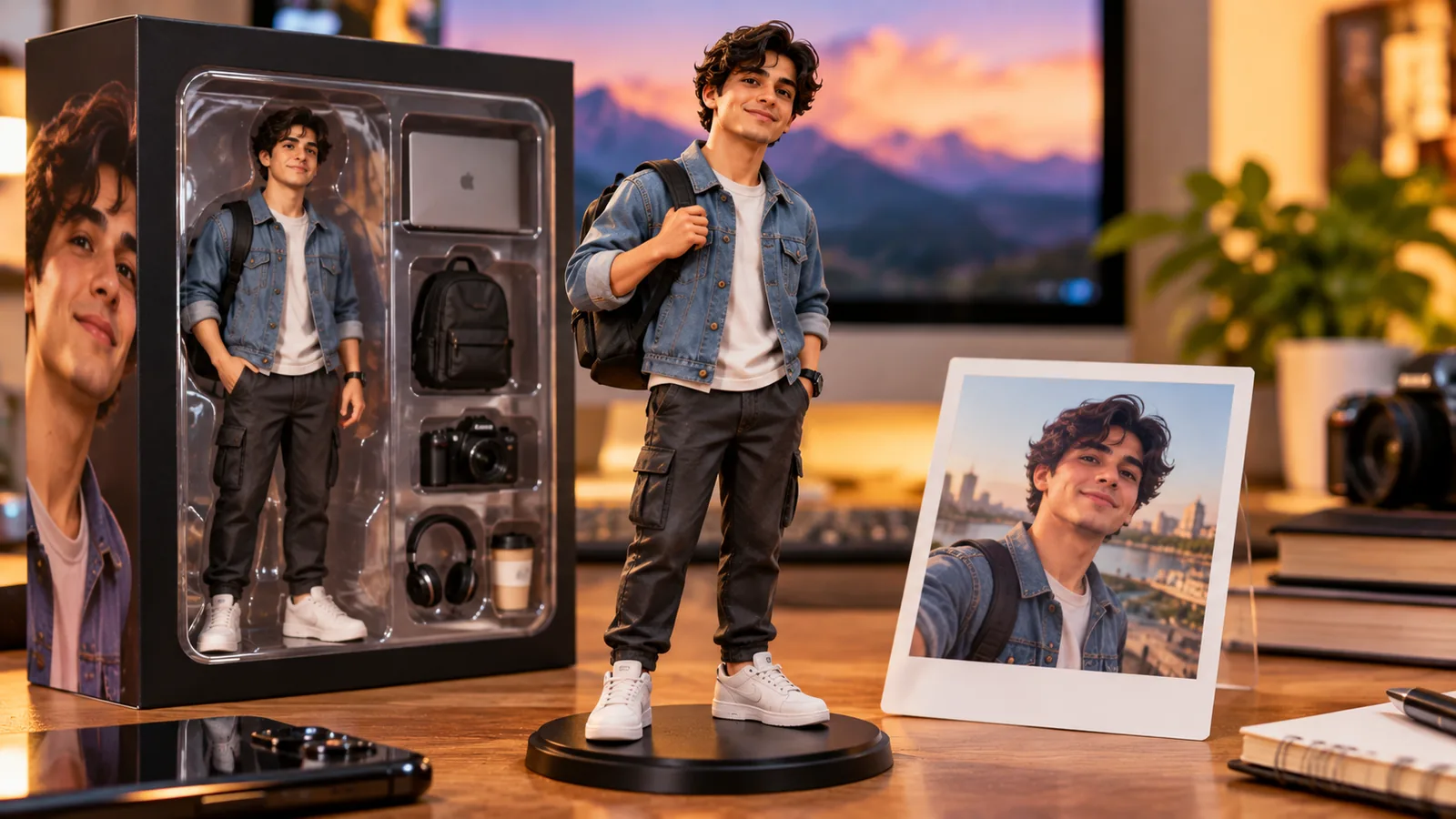
What Is the AI 3D Figurine Photo Trend?
The AI 3D figurine trend turns a portrait into an image that resembles a small collectible figure displayed on a desk, often with a toy-style presentation box and miniature accessories. The result is a fictional digital image—not evidence that a physical figure was manufactured and not necessarily a printable 3D model.
Choose a Good Reference Photo
Start with a sharp, well-lit photo where the face is visible. A full-body reference helps if you want the figurine to match the original outfit and posture. Avoid crowded group pictures and heavy filters. Only upload images you own or have permission to use, and keep sensitive documents out of the frame. Image-generation features and limits vary by product, account and region.
How to Make Your Own 3D Figurine Image
- Open an AI image tool that supports reference-image uploads, such as ChatGPT or Gemini where available.
- Upload one clear photo and say that you want a fictional miniature collectible, not a life-size portrait.
- Choose a visual style: realistic resin collectible, stylized cartoon figure, or boxed product display.
- Paste one of the prompts below and customize the clothes, accessories, desk setting and camera angle.
- Inspect the output for facial consistency, extra fingers, disconnected limbs, unreadable box text and missing shoes.
- Request one targeted correction at a time, or retry with a clearer source image if the face changes too much.
- Export the image at the best available resolution and crop for your intended platform.
Four Copy-and-Paste AI Figurine Prompts
These prompts are starting points rather than guarantees. Image models may interpret faces and packaging differently across attempts.
Realistic Desk Collectible
Copy-ready prompt: Use my uploaded reference photo to create a clearly fictional, photorealistic 1:7-scale collectible figurine of the same person standing on a matte black circular display base on a wooden desk. Preserve the person’s recognizable facial features, hairstyle, skin tone and outfit colors. Make the figure visibly miniature with molded resin texture and realistic toy proportions. Place a tasteful unbranded collector box beside it showing a stylized illustration of the figurine, not a real brand logo. Include a laptop and warm desk lamp in the softly blurred background. Three-quarter camera view, realistic shadows, no watermarks, no extra fingers, no duplicate people, no text.
Premium Boxed Figure With Accessories
Copy-ready prompt: Create a premium 3D miniature desk figurine based on my uploaded portrait. Keep the subject’s identity and facial structure consistent; show the entire figurine from head to shoes on a clear acrylic base. Include tiny removable accessories related to the subject’s hobby, arranged neatly next to a plain display box. Product-photography lighting, macro depth of field, polished plastic and painted details, realistic scale, no brand names, no extra limbs, no readable text.
Cute Stylized 3D Figure
Copy-ready prompt: Transform my reference photo into a charming stylized 3D figurine with slightly oversized head and simplified proportions, while retaining recognizable hairstyle, clothing and key facial details. Display it on a small pedestal in a cozy studio workspace. Warm rim light, clean background, high detail, no misleading claims of a real manufactured toy, no watermark, no text.
Reference Photo Versus Figurine
Copy-ready prompt: Create a side-by-side comparison: left, a simple framed representation of my supplied portrait; right, a fictional miniature collectible figure inspired by the same person, wearing the same outfit and standing on a circular base. Clearly separate the two panels, match clothing and hair, avoid copying logos, no readable text, no additional people.
How to Keep the Face Recognizable
Explicitly request consistent eyes, nose, jawline, hairstyle and skin tone, and describe the original clothing. Begin with one clear reference image. If the result drifts, simplify the background and remove extra characters before adding elaborate accessories. Never use a generated likeness as identity verification or proof that a real event occurred.
Make It Look Miniature, Not Life-Size
Ask for an approximate scale such as 1:7, a visible display base and nearby size references such as a keyboard or coffee mug. Macro product photography, shallow depth of field and a desktop setting make the miniature illusion more convincing. A plain unbranded box is easier to render than packaging with lots of text.
Troubleshooting Common AI Figurine Problems
- Face looks different: use a clearer portrait and request a less stylized face.
- Extra fingers or limbs: simplify the pose and separate hands from props.
- Garbled text on the box: ask for blank packaging and add typography afterward in a design editor.
- Feet or base cropped out: specify a full-body composition with the complete pedestal visible.
- Figure looks like a real person: request painted resin, molded plastic and toy-like proportions.
- Blurry or cluttered image: simplify the desk and lighting, then export at the highest available quality.
Can You 3D Print the Result?
An AI-generated picture is not automatically a printable 3D model. Physical printing requires actual three-dimensional geometry in a suitable format such as STL or 3MF, with watertight surfaces, adequate wall thickness and print supports. A separate modeling workflow is necessary unless the service explicitly produces validated 3D geometry.
Image Sizes for Social Media
A 4:5 portrait crop is often useful for feed posts, 9:16 for stories and vertical video covers, and 16:9 for wide article images. Keep the figurine centered and allow enough margin for cropping. Check the current platform specifications before publishing.
Privacy, Consent and Copyright
Get permission to use someone else’s likeness, especially a child’s. Avoid copying branded packaging or protected characters without permission. Label the image as AI-generated where appropriate and do not claim that a fictional figurine is a real product available to ship. Review the tool’s privacy and usage terms before uploading personal photos.
Official References
OpenAI Help Center — Creating images in ChatGPT and Google Gemini Help — Generate and edit images. Features, availability and interface labels may change.
You may also like
 Technology & How-To
 Chrome Keeps Reloading Tabs? Stop the Right Kind of Refresh
Find why Chrome tabs reload with targeted Memory Saver settings, controlled comparisons, extension checks and diagnostics that protect…
 Technology & How-To
 Google Drive for Desktop Not Syncing? Find the Cause Without Losing Files
Diagnose Google Drive desktop sync failures with a two-direction file test, current interface guidance, and recovery steps that…
 Technology & How-To
 Mac System Data Too Large? Find and Reduce It Safely
Find what is taking up Mac storage, review local backups and app data, understand purgeable space and snapshots,…