
2000s AI Photo Trend: How to Create Y2K Digital Camera Photos
A practical guide to recreating early-2000s digital camera and camcorder photos with AI prompts and troubleshooting.
Contents
- What Is the 2000s AI Photo Trend?
- Choose the Right Early-2000s Look
- How to Make a 2000s AI Photo Step by Step
- Copy-and-Paste Prompt: 2003 Friends Selfie
- Prompt: Solo Y2K Digital Camera Portrait
- Prompt: Early-2000s House Party
- Prompt: 2001 Home Camcorder Still
- How to Keep Your Face Recognizable
- Best Image Sizes for Social Media
- Troubleshooting Common Results
- It Looks Too Modern
- Faces or Hands Look Wrong
- The Date Stamp Contains Gibberish
- The Picture Is Too Dark or Grainy
- Privacy and Responsible Sharing
- Do You Need a Paid App?
- Official Resources
What Is the 2000s AI Photo Trend?
The 2000s AI photo trend recreates the look of early consumer digital cameras, home camcorders and casual snapshots from the Y2K era. Instead of applying a generic retro filter, it combines direct flash, imperfect framing, soft detail, mild digital noise and period-inspired surroundings. You can create a fictional scene from a text prompt or use your own reference photo when the image tool supports it.
Choose the Right Early-2000s Look
Three related aesthetics are often mixed together. A compact digital camera image has punchy flash and uneven exposure. A camcorder still looks softer, with analog-style color bleed and video artifacts. A fashion-oriented Y2K portrait emphasizes glossy clothing, accessories and stylized color. Decide which result you want before writing your prompt; asking for all three at once often produces an inconsistent image.
How to Make a 2000s AI Photo Step by Step
- Open a reputable AI image-generation tool, such as ChatGPT or Gemini where image creation is available to your account.
- Decide whether to generate fictional people or upload a photo of yourself as a reference. Obtain permission before uploading another person’s image.
- Describe the scene, people, clothing and background in one or two clear sentences.
- Specify the camera aesthetic: compact digital camera, built-in flash, subtle noise, imperfect framing.
- Request realistic faces and hands, and tell the tool not to add extra people or text.
- Generate the image, inspect the result at full size and revise one detail at a time.
- Export the image in the aspect ratio that matches your intended platform.
Copy-and-Paste Prompt: 2003 Friends Selfie
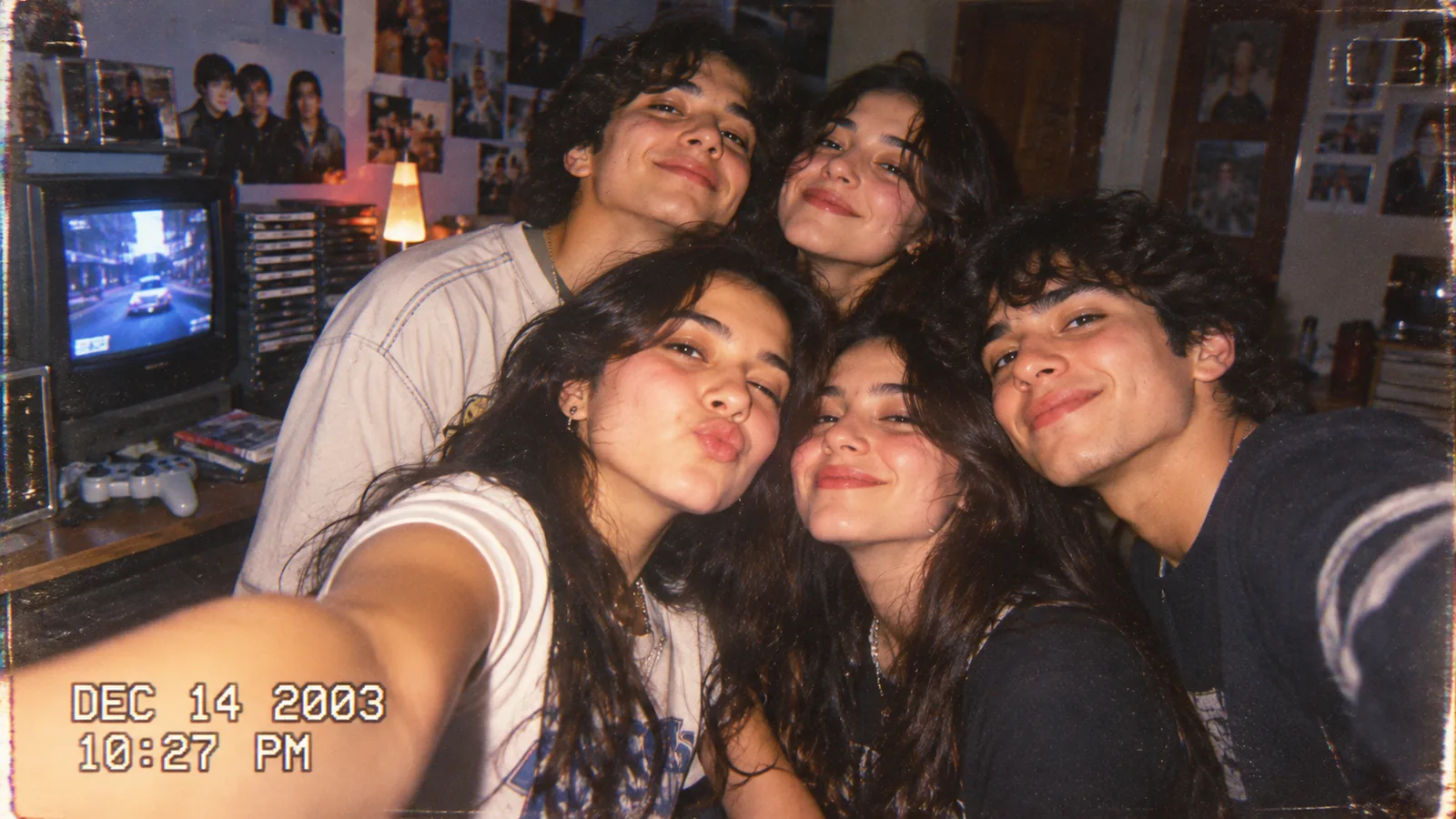
Create a believable early-2000s compact digital camera snapshot of a group of close friends taking a casual selfie in a cozy bedroom in 2003. Direct built-in flash, slightly blown highlights, natural skin texture, subtle digital noise, soft edges, warm indoor shadows, posters and a CRT television in the background, authentic candid expressions. Keep anatomy and hands realistic. No logos, no readable text, no watermarks. Landscape 16:9.
Prompt: Solo Y2K Digital Camera Portrait
Create a natural candid portrait photographed with a consumer digital camera circa 2002. Strong on-camera flash, a modest bedroom backdrop, slight color cast, mild compression artifacts, realistic skin and hair, imperfect framing, subtle grain, no glossy fashion retouching, no text, no watermark. Preserve the person’s recognizable features if a reference image is provided.
Prompt: Early-2000s House Party
A candid house-party photo from 2004 captured on an inexpensive point-and-shoot camera: friends laughing, colorful casual clothes, direct flash, imperfect framing, slightly soft detail, natural facial expressions, visible room clutter, early-2000s nostalgia, realistic proportions, no text or logos.
Prompt: 2001 Home Camcorder Still
A realistic frame from a family camcorder recording around 2001, soft analog video texture, gentle interlacing, slight chroma bleed, dim indoor lighting, imperfect white balance, candid moment, authentic home-video aesthetic. Avoid artificial glitch overload, avoid readable timestamps, no watermark.
How to Keep Your Face Recognizable
If you use a reference image, start with a clear, well-lit photograph without strong beauty filters. Ask the tool to preserve the eyes, nose, mouth, hairstyle and approximate age. Image generation can still change identity-related details, so compare the result carefully. Never present a synthetic image as genuine evidence of a past event.
Best Image Sizes for Social Media
- Square feed image: 1:1, such as 1080 × 1080 pixels.
- Portrait feed image: 4:5, such as 1080 × 1350 pixels.
- Stories and vertical videos: 9:16, such as 1080 × 1920 pixels.
- Website featured image: 16:9, ideally compressed for fast loading.
Set the aspect ratio before generating when possible. Cropping a completed image may cut off faces, arms or important background details.
Troubleshooting Common Results
It Looks Too Modern
Remove phrases such as ultra-sharp, 8K and professional studio lighting. Use consumer digital camera, direct flash and imperfect framing instead. Period-appropriate details work better than adding exaggerated VHS glitches.
Faces or Hands Look Wrong
Reduce the number of people, use a clearer reference image and simplify the pose. Ask for realistic anatomy and revise one issue at a time. A generated face may never match the reference perfectly.
The Date Stamp Contains Gibberish
AI image models can struggle with precise lettering and numbers. Generate the scene without readable text and add a timestamp later using an image editor if you want the effect. Treat the stamp as decoration, not historical evidence.
The Picture Is Too Dark or Grainy
Ask for moderate flash exposure, subtle grain and visible facial details. An authentic snapshot does not need to be unreadable.
Privacy and Responsible Sharing
Get consent before uploading or publishing images of other people, particularly children. Avoid submitting sensitive photos to unfamiliar services, and check the provider’s privacy terms. Label synthetic nostalgic scenes as AI-generated or AI-edited when the context could mislead viewers. Do not use them to impersonate someone.
Do You Need a Paid App?
Not necessarily. Image-generation availability, usage limits and pricing vary by provider, plan and region and can change. A reputable tool and a clear prompt matter more than an expensive preset. Avoid unknown websites that demand sensitive photos or payment details just to test a trend.
Official Resources
The featured image accompanying this guide was generated with AI as an illustration of the Y2K aesthetic; it is not an archival photograph from 2003.
You may also like
 Technology & How-To
 Android Auto Keeps Disconnecting? How to Fix USB and Wireless Dropouts
Android Auto keeps disconnecting? Separate USB, wireless and app failures, check Galaxy USB mode, compare connection methods and…
 Technology & How-To
 Netflix Says Your TV Isn’t Part of the Household? How to Fix It
Fix a Netflix household warning by separating home verification, permanent household updates and temporary travel access, with genuine…
 Technology & How-To
 Google Photos Stopped Backing Up from Your PC? What Changed and How to Fix It
Google Photos stopped backing up your computer folders? Understand the Drive for desktop change, configure browser folder backup…