
Google’s November 2026 Core Update: What to Do If Your Search Traffic Drops
Search traffic down after Google’s November 2026 core update? Use Search Console to check for ranking losses, lower click-through rates, and indexing issues.
Contents
Contents

Google began rolling out its November 2026 core update on November 10. It applies worldwide across all languages, and Google said the rollout could take up to two weeks. It was still in progress on November 18. If your search traffic has dropped, identify the pages and queries that lost clicks and fix any confirmed technical problems. To assess the impact, follow Google’s core update guidance and compare a full week after the rollout ends with a full week before it began.
How does the November core update affect websites?
A core update makes broad changes to Google’s search ranking systems. One page can climb while another on the same site slips. A page can also stay indexed and appear lower in search results. If traffic fell around the start of the rollout, check your site data and look for other changes around the same time, such as a new template or URL changes. Check the Google Search Status Dashboard entry for the November update for the official completion date.
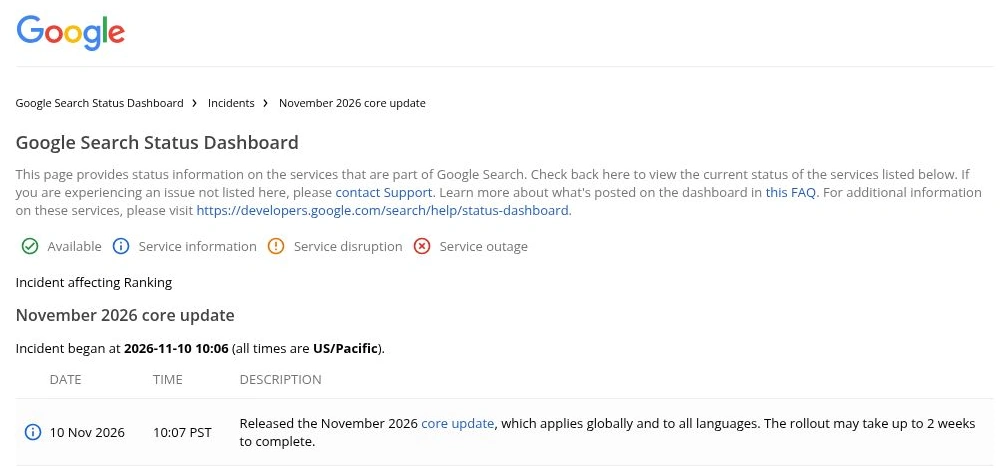
The Google Search Status Dashboard shows when the rollout started and its global scope.
What should you check during the rollout?
Open Google Search Console, select your property, and note when the drop began and what changed on the site around that date. If important pages have disappeared from search, use URL Inspection to check their indexing status, last crawl, and Google-selected canonical URL. Inspect a sample of affected pages alongside pages that kept appearing in search.
Fix confirmed problems as soon as you find them, such as an accidental noindex tag, a redirect to the wrong page, or recurring server errors. If the Manual Actions report says “No issues detected,” Google is reporting no manual action for that property. Use the indexing and performance reports to check for problems in those areas.
How to measure the impact after the rollout
Once a full week has passed since Google confirmed the rollout ended, open the Search results performance report and set Search type to Web. Open the date filter, choose Compare, and set two equal date ranges. For the November update, use November 3–9 as your baseline and compare it with the first seven full days after the rollout ended, once data for those days is complete. See Search Console’s guide to comparison filters for the controls.
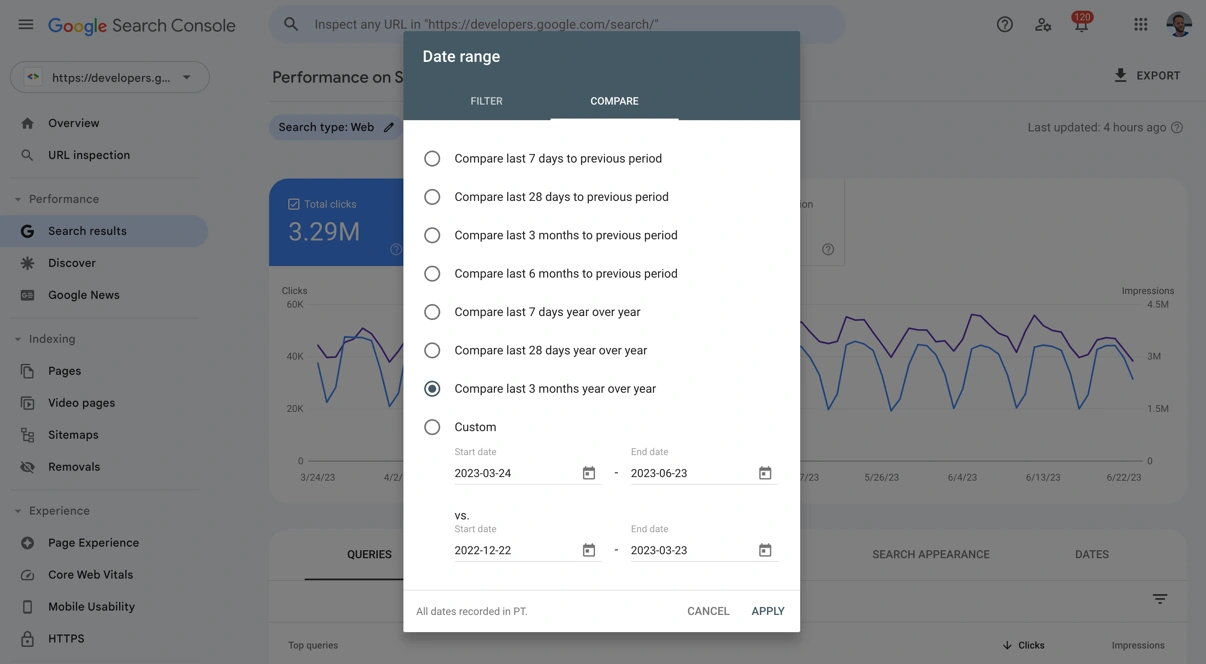
The date comparison dialog in the Performance report, from Google’s guide to diagnosing search traffic drops.
- Start with the Pages tab. Sort by the difference in clicks to find the URLs that lost the most traffic.
- Filter to a page, then open Queries. Compare clicks, impressions, click-through rate (CTR), and average position for the same query in both periods. A sitewide average can hide what happened to a single page.
- Keep country and device consistent. If you publish for readers in the US and UK, check each market separately. Review Image and News search separately from Web search.
- Check for seasonal demand. If impressions fell while position held steady, compare the same period last year and look up the query in Google Trends using the same country filter.
What to do about each type of decline
- The page lost rankings and is still indexed. Look at the current search results for the same query in the relevant market. If competing pages answer a practical question that yours buries or leaves unanswered, move the answer up or add the missing steps. For example, if readers want to know why an application was rejected, explain the common reasons and what to do in each case.
- Impressions and position held steady, but clicks fell. Check the title and snippet Google shows and look at the results on mobile. If the title is vague, make clear what readers can find or do on the page.
- Several URLs in one section stopped appearing. Open the Page indexing report and inspect a sample of the affected URLs. Check for changes to the section’s template, links, or redirects before editing the content.
Example. A page received 240 clicks from 6,000 impressions for one query. In the next period, it received 120 clicks from 6,000 impressions and stayed close to position 4. Its CTR fell from 4% to 2%, so start by reviewing the search listing and the results around it. If the same query instead fell from position 4 to position 14 while the page stayed indexed, start by comparing the page with the results that overtook it.
What if traffic stays down?
Start with the pages that account for the most lost clicks. Check whether the information is accurate, whether readers can follow the steps on a phone, and whether the page answers the queries it lost ground for. Record each change and use the same filters to track those pages over the following weeks. According to Google’s guidance, improvements can take anywhere from a few days to several months to show up in search.
If the losses are concentrated on a few pages, work on those first. If the decline spans several sections, look for a common issue in how pages are published, templated, or indexed before rewriting content across the site.
You may also like
 Technology & How-To
How to Turn Lecture Recordings Into Study Notes With NotebookLM
Turn lecture audio into study notes with free Gemini Notebook (NotebookLM). Follow the upload steps, check transcript citations,…
 Technology & How-To
How to Use Google Lens to Find Products and Compare Prices
Find an item from a photo with Google Lens, check exact product matches and compare real checkout costs…
 Technology & How-To
Podcast Microphone Guide: USB vs XLR and Setup Tips
Choose a podcast microphone by room noise, connection type and recording style. Compare USB and XLR, see verified…