
Google Messages RCS Not Sending Photos or Videos? Google Has a Fix — Here’s What to Do
Google has acknowledged a recent RCS media-delivery problem in Messages. Here’s how to update the app, check RCS status and fix photos or videos that won’t send.
Contents
- First: update Google Messages
- Check whether RCS is actually connected
- Do not keep switching RCS off and on
- Check whether the problem is only media
- Check photo and video permissions
- Try both Wi-Fi and mobile data
- Test HD instead of HD+ for a large photo
- Force close Messages and reopen it
- Clear the Google Messages cache — not your storage
- Make sure Google Messages is your default texting app
- If you use two SIM cards, check the active SIM
- Try another contact before resetting anything
- What if the message falls back to MMS?
- Should you enable automatic resend as SMS/MMS?
- Is this the same as an RCS activation problem?
- What if photos send to iPhone but not Android?
- What if text works but GIFs, stickers and Photomoji fail?
- Should you reinstall Google Messages?
- When to contact your carrier
- A quick fix order that avoids unnecessary resets
- Frequently asked questions
- Why is Google Messages not sending photos over RCS?
- Did Google confirm a fix?
- Why do RCS text messages send but photos fail?
- Should I turn RCS off and on?
- Can Google Messages send photos over Wi-Fi?
- Why does my photo send as MMS instead of RCS?
- Is HD+ causing my photo to fail?
- The bottom line
- Sources
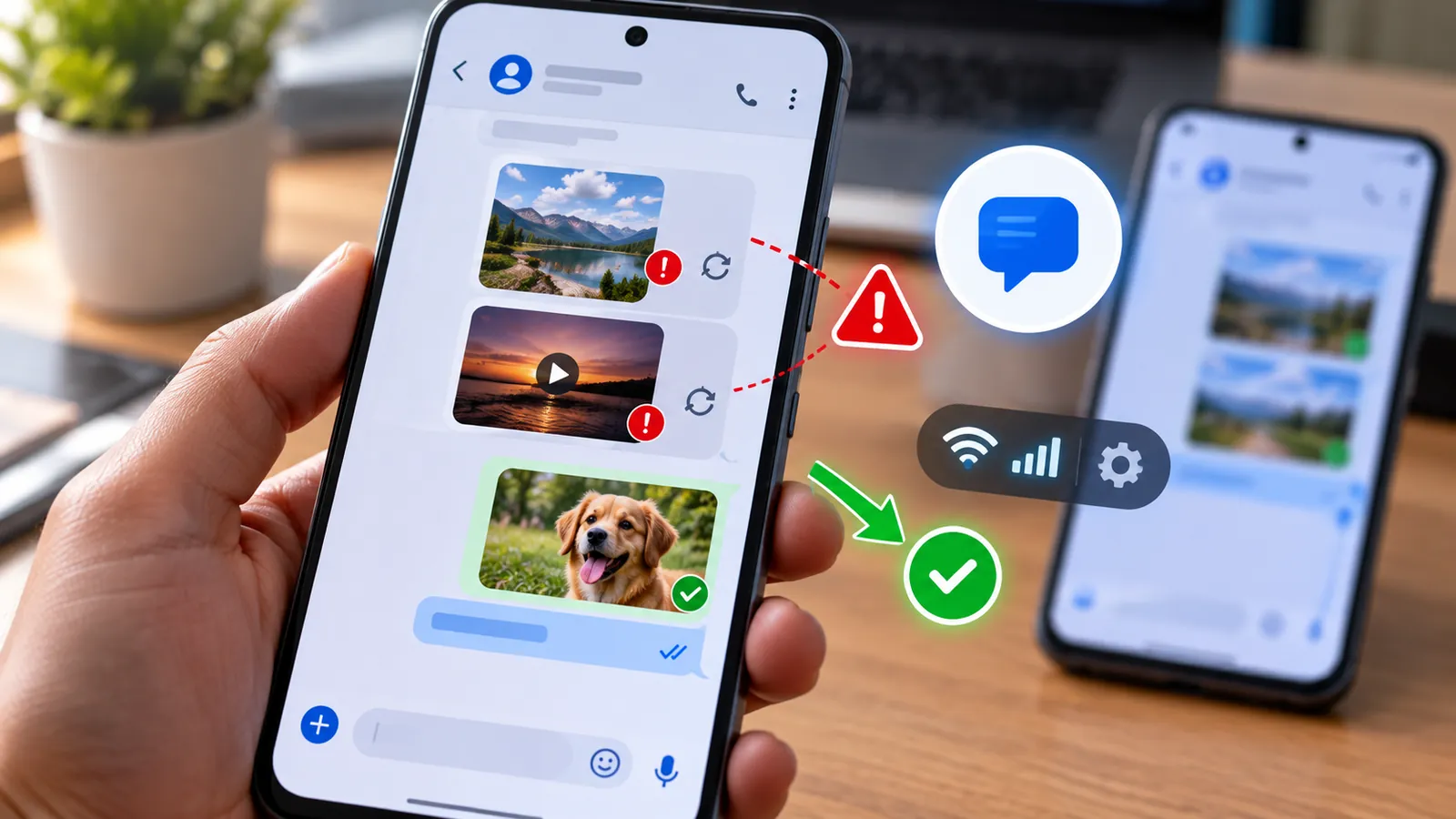
Last reviewed: October 9, 2026. If Google Messages suddenly sends normal RCS text but photos, videos, GIFs, stickers or Photomoji refuse to go through, you may not be imagining it. In early October 2026, users reported a media-delivery problem affecting RCS conversations, and Google told Android Authority that a fix had been prepared and was rolling out to Messages users.
The reported incident appeared to affect media sent from Android to other Android phones over RCS. Android Authority noted that affected users were still able to send media to iPhones over RCS, which is an important clue: if ordinary text works but Android-to-Android media fails, the problem may be the current Messages bug rather than your camera, storage or carrier.
That said, not every failed photo is caused by the same bug. Google’s own support documentation lists several other causes, including an outdated Messages app, disconnected RCS status, missing media permissions, weak data service, carrier limitations and MMS/APN problems.
This guide helps you separate the known Google Messages issue from a local phone problem and shows the safest troubleshooting steps to try first.
First: update Google Messages
This is the most important step if your problem started during the October 2026 RCS media incident.
Google said it had a fix and was rolling it out to Messages users. Because this type of fix can arrive through an app update or server-side rollout, make sure Google Messages is fully updated before changing deeper settings.
- Open the Google Play Store.
- Search for Google Messages.
- If an Update button appears, install it.
- Restart Google Messages and try sending one photo again.
Google’s troubleshooting page also lists using the latest version of Google Messages as one of the first checks when messages fail to send or receive.
Check whether RCS is actually connected
A media problem can look like an app bug when RCS itself is stuck verifying or disconnected.
- Open Google Messages.
- Tap your profile picture or initials.
- Open Messages settings > RCS chats.
- Check the status shown at the top.
Google documents several possible states. Connected means RCS is ready to use. Connecting or Trouble connecting. Awaiting retry means the phone is still trying to verify your number or establish the service.
If the status is not Connected, focus on fixing the RCS connection first rather than repeatedly resending the same photo.
Do not keep switching RCS off and on
Toggling RCS off and on is commonly suggested online, but Google specifically says it is not advised to turn RCS chats on and off unnecessarily. Doing so can remove you from RCS group chats.
If your RCS status already says Connected, leave it enabled while trying the safer fixes below.
Only disable RCS when you have a specific reason, such as changing to a device or messaging app that does not support RCS, or following official carrier/Google troubleshooting for your number.
Check whether the problem is only media
Send a short plain-text message in the same conversation.
If text sends normally but a photo, GIF, video or sticker fails, that narrows the problem to media delivery rather than the entire RCS connection.
You can also test another RCS contact. If media fails with several Android contacts at the same time but ordinary RCS text still works, that pattern is more consistent with the October 2026 service/app issue.
If nothing sends at all, check your internet connection and RCS status before assuming it is the media bug.
Check photo and video permissions
Google says Google Messages needs permission to send and receive files.
The exact menu name varies by phone manufacturer, but on many Android devices you can check it like this:
- Open Settings.
- Go to Apps and select Messages.
- Open Permissions.
- Make sure the app has appropriate access to photos, videos, camera or files where required.
If you recently changed privacy settings, upgraded Android or restored the phone from a backup, a permission may have been reset.
After changing a permission, reopen Messages and test with a single photo.
Try both Wi-Fi and mobile data
RCS can work over Wi-Fi or mobile data. A connection can be good enough to send tiny text messages but unstable enough that larger media uploads stall.
Try the following quick test:
- If you are on Wi-Fi, temporarily switch to mobile data and resend the photo.
- If you are on mobile data, connect to a stable Wi-Fi network and try again.
- Turn Airplane mode on for about 10 seconds, then turn it back off to refresh the radio connection.
- Restart the phone if the connection still behaves strangely.
If your phone says it is connected to Wi-Fi but nothing actually loads, see our guide Wi-Fi Connected but No Internet? 11 Fixes That Actually Work before troubleshooting Messages further.
Test HD instead of HD+ for a large photo
Google Messages now lets you choose media quality when attaching an image. HD is optimized for chat and uses less data, while HD+ sends the original-quality file.
Changing from HD+ to HD is not a confirmed fix for the October bug, but it is a useful diagnostic if only very large images fail on a slow or unstable connection.
- Attach a photo in Google Messages.
- Look for the HD or HD+ control in the image preview.
- Choose HD.
- Send the photo again.
If HD works but HD+ repeatedly fails, the issue may be related to file size, connection quality or upload reliability rather than a complete RCS outage.
Force close Messages and reopen it
A stuck app process can sometimes leave an upload spinning even after connectivity has recovered.
- Open Android Settings.
- Go to Apps > Messages.
- Tap Force stop.
- Open Google Messages again.
- Try one photo.
This does not erase your conversations.
Clear the Google Messages cache — not your storage
If updating and restarting do not help, clearing the app cache is another low-risk local step.
- Open Settings > Apps > Messages.
- Open Storage & cache.
- Tap Clear cache.
- Reopen Messages and test again.
Avoid blindly choosing Clear storage or Clear data as a first troubleshooting step. That is much more invasive and can reset app state and settings. A cache clear is the safer test.
Make sure Google Messages is your default texting app
Google lists this as a core troubleshooting check.
If another SMS app was recently installed or made default, RCS behavior can become confusing. Open Android Settings, find the default-app settings, and confirm that Google Messages is selected as the default SMS app if you intend to use its RCS features.
If you use two SIM cards, check the active SIM
Dual-SIM phones introduce another possible mismatch. Google’s RCS help notes that your calling SIM and mobile-data setup can matter during RCS configuration.
If you recently changed your default SIM, switched eSIMs or moved your number between devices, confirm that the phone number registered for RCS matches the SIM you are actually using for messaging and data.
Then return to Messages settings > RCS chats and check whether the status is Connected.
Try another contact before resetting anything
If one conversation fails but others work, the problem may be contact-specific rather than phone-wide.
Google suggests checking the recipient’s phone number, country code and block status for contact-specific sending problems.
Before changing APN settings or reinstalling anything, test one photo with a second known RCS contact. That simple test can save a lot of unnecessary troubleshooting.
What if the message falls back to MMS?
When RCS is unavailable, Google Messages can use SMS or MMS depending on your settings and the message type.
Google’s support documentation says MMS requires a working data connection, and APN settings can matter if MMS refuses to send.
If the failed media message is now showing as MMS rather than RCS:
- Make sure mobile data is available.
- Check that your carrier plan supports MMS.
- Reset APN settings to default if they were manually changed.
- Confirm that your carrier supports the required messaging service.
Do not confuse an MMS problem with the October RCS bug. If the compose/send indicator says MMS, you are troubleshooting a different delivery path.
Should you enable automatic resend as SMS/MMS?
Google Messages can automatically retry failed RCS messages using SMS or MMS.
This can be useful when RCS is temporarily unavailable, but there is an important privacy detail: Google warns that one resend option can send media as an SMS containing a link, and that media could then be accessible through a public link not controlled by Google.
So read the resend option carefully before enabling it. For sensitive photos or videos, waiting for RCS to recover may be preferable to using a link-based fallback.
Is this the same as an RCS activation problem?
No. The October 2026 issue reported by users involved media delivery while RCS itself could still be working.
An activation problem looks different. In Messages settings > RCS chats, you may see Connecting, Trouble connecting or a carrier-not-supported message instead of Connected.
Google says that if number verification remains stuck for more than about 30 minutes, you can use the Details option to submit feedback.
If your carrier explicitly says RCS is disabled or unsupported, contact the carrier instead of repeatedly resetting the app.
What if photos send to iPhone but not Android?
That exact pattern was notable in the early October 2026 reports. Android Authority said affected users reported trouble sending media to other Android phones while media to iPhones over RCS appeared unaffected.
If that is exactly what you are seeing, update Messages first and give the rollout time to reach your device before making aggressive changes.
A server-side or staged app fix can take time to reach every account and device even after Google says rollout has started.
What if text works but GIFs, stickers and Photomoji fail?
That was also part of the reported issue. Users described failures involving pictures, GIFs, stickers and Photomoji rather than plain RCS text.
Because several media types fail together, this points away from a single corrupted photo file and more toward the media-delivery path.
Again, the first actions are simple: update Google Messages, confirm RCS says Connected, test another contact and wait for the fix rollout if your symptoms match the known incident.
Should you reinstall Google Messages?
Reinstalling or removing updates is more disruptive than the first-line steps and is rarely where you should begin.
Try these first:
- Update Google Messages.
- Check RCS status.
- Test Wi-Fi and mobile data.
- Check permissions.
- Restart the app and phone.
- Clear cache.
- Test another RCS contact.
If the problem continues after the rollout should have reached you, use Google Messages feedback or the official help community before wiping app data.
When to contact your carrier
Contact the carrier when the problem looks network-specific rather than app-specific, especially if:
- RCS settings say the feature is disabled or unsupported by your carrier.
- SMS and MMS also fail.
- Mobile data is not working correctly.
- You recently ported your number or changed SIM/eSIM.
- MMS fails even though RCS is intentionally unavailable.
- APN settings appear incorrect or were manually modified.
If ordinary mobile data, SMS and RCS text all work and only Android-to-Android media fails, the known Messages bug or app rollout is a stronger possibility.
A quick fix order that avoids unnecessary resets
If you just want the shortest troubleshooting path, use this order:
- Update Google Messages.
- Check RCS status is Connected.
- Send a plain text message.
- Test one photo with another Android RCS contact.
- Switch between Wi-Fi and mobile data.
- Check Photos/Videos permissions.
- Force stop and reopen Messages.
- Clear cache only.
- Check carrier/MMS settings only if the message is falling back to MMS.
- Wait for the Google fix rollout if your symptoms match the October 2026 incident.
Frequently asked questions
Why is Google Messages not sending photos over RCS?
Possible causes include the October 2026 Google Messages media bug, an outdated app, disconnected RCS status, missing media permissions, poor internet connectivity, carrier issues or MMS fallback problems.
Did Google confirm a fix?
Yes. Android Authority reported on October 2, 2026 that Google said it had a fix for the RCS media-delivery problem and that the fix was rolling out to Messages users.
Why do RCS text messages send but photos fail?
Text messages are much smaller and use a different media-upload path. If plain RCS text works but several media types fail, the issue may be specific to media delivery rather than RCS activation itself.
Should I turn RCS off and on?
Not repeatedly. Google says unnecessarily turning RCS chats off and on is not advised because it can remove you from group chats.
Can Google Messages send photos over Wi-Fi?
Yes. RCS can use Wi-Fi or mobile data. Google Messages also lets you send media using RCS when the service is connected.
Why does my photo send as MMS instead of RCS?
RCS may be unavailable for that conversation or temporarily disconnected. Check the send indicator and RCS status. MMS uses the carrier’s multimedia service and may require mobile data and correct APN settings.
Is HD+ causing my photo to fail?
There is no evidence that HD+ caused the October 2026 bug. However, testing the smaller HD option can help determine whether a large original-quality upload is struggling on your connection.
The bottom line
If Google Messages suddenly stopped sending photos, videos, GIFs or stickers over RCS while normal text still works, update the app before doing anything drastic. Google has acknowledged the recent media-delivery problem and said a fix is rolling out.
If the issue does not match that pattern, check RCS status, permissions and network connectivity, then try a force stop and cache clear. Avoid repeatedly disabling RCS or wiping app data unless you have a specific reason.
Most importantly, identify whether the message is really being sent as RCS or has fallen back to MMS. That single detail determines which troubleshooting path makes sense.
Sources
Google Messages Help — Fix problems sending, receiving, or connecting to Google Messages.
Google Messages Help — Turn on RCS chats in Google Messages.
Google Messages Help — Send photos, videos, or voice messages.
Google Messages Help — RCS chats by Google FAQ.
Android Authority — Google Messages RCS media issue and Google fix update.
You may also like
 Technology & How-To
 Google Find Hub Trackers Get NFC Support — How to Identify Lost Tags and Set Left-Behind Reminders
Google Play services v26.39 adds NFC support for compatible Find Hub tracker tags and a new setup flow…
 Technology & How-To
 Android 17 Advanced Protection Adds 6 Powerful Security Features — Should You Turn It On?
Android 17 expands Advanced Protection with encrypted intrusion logs, USB protection, accessibility restrictions, WebGPU blocking and stronger authentication…
 Technology & How-To
 Google Pixel October 2026 Update Fixes 3 Bugs and Critical Security Flaws — Should You Install It?
Google’s October 2026 Pixel update fixes a missing keyboard, VoIP audio distortion and Pixel 11 photo rotation while…