
Google Find Hub Trackers Get NFC Support — How to Identify Lost Tags and Set Left-Behind Reminders
Google Play services v26.39 adds NFC support for compatible Find Hub tracker tags and a new setup flow for categories, names and Left-Behind Reminders.
Contents
- What changed in Google Play services v26.39?
- What NFC adds to a tracker
- Does every Find Hub tracker support NFC?
- How to use NFC to identify a Find Hub tag
- Why NFC matters when someone finds your lost item
- What are Left-Behind Reminders?
- How to set up a new Find Hub tracker
- How to check whether Google Play services is up to date
- Find Hub can do more than NFC identification
- Can you share a tracker with family members?
- What happens if an unknown tracker is following you?
- Does NFC make tracker stalking easier?
- Can NFC show the owner’s personal information?
- Find Hub versus AirTag
- When NFC may not work
- Best items to use with a Find Hub tracker
- A practical setup checklist
- Frequently asked questions
- What update adds NFC support to Find Hub tags?
- Can I tap a Find Hub tracker to identify it?
- Will every old tracker gain NFC after the update?
- Can I enable Left-Behind Reminders during setup?
- Can multiple people locate the same Find Hub tag?
- Does Find Hub support UWB precision finding?
- What should I do if I find an unknown tracker traveling with me?
- The bottom line
- Sources
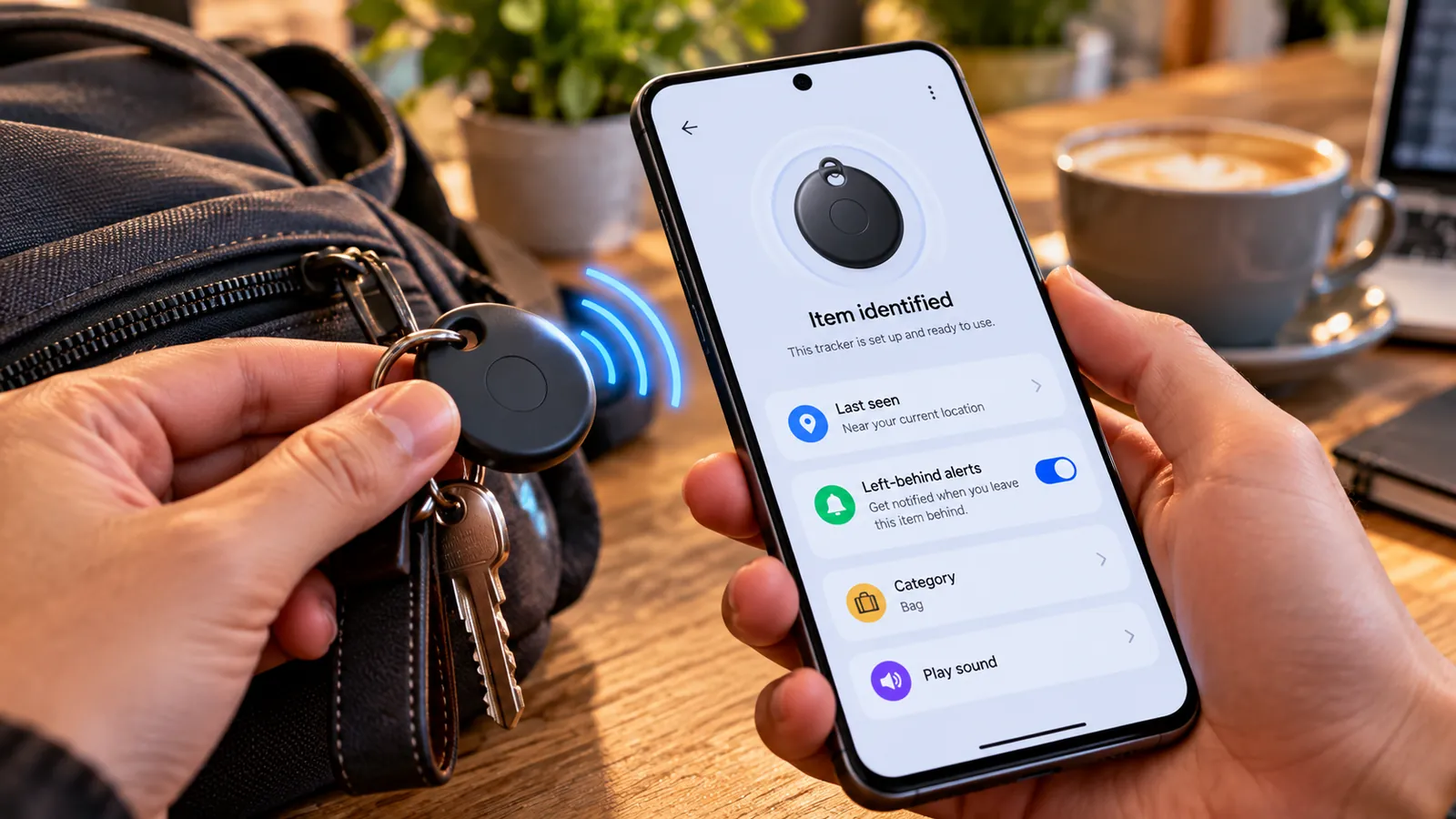
Last reviewed: October 10, 2026. Google is making Find Hub tracker tags easier to identify and configure. As part of the October 2026 Google System Services update, Google Play services v26.39 adds NFC support for Find Hub-compatible tags along with a redesigned registration flow that can configure Left-Behind Reminders during setup.
The practical idea is simple: if a compatible tracker supports the new NFC interaction, tapping it with a phone can open tag details and settings. A person who finds a lost tag can also use the NFC interaction to help identify it instead of relying only on Bluetooth discovery.
Google is also reducing setup friction. When registering a tracker, users can now choose a category, rename the tag and configure options such as Left-Behind Reminders during the initial setup instead of opening the Find Hub app later to configure everything manually.
What changed in Google Play services v26.39?
Google’s October System Services release notes list two Find Hub changes under Security and privacy.
- NFC support: tap a compatible Find Hub tracker tag with a phone to access its details and settings or identify a lost tag.
- New registration flow: choose a category, rename the tag and configure features such as Left-Behind Reminders while adding it to the Find Hub network.
The update is delivered through Google Play services, not necessarily through a full Android operating-system update. That means the feature can arrive in the background as Google Play services updates on supported phones.
What NFC adds to a tracker
Most item trackers primarily use Bluetooth and the Find Hub network to report location.
NFC adds a simple close-range interaction: physically tap the tag with a compatible phone.
For the owner, that can provide a quick route to settings without opening Find Hub and searching through a list of devices.
For someone who finds a lost item, NFC can provide a more obvious way to identify the tag and follow the information made available by the owner or tracker system.
NFC does not replace Bluetooth tracking or the crowdsourced Find Hub network. It is an additional short-range interaction method.
Does every Find Hub tracker support NFC?
No. The October release adds support for NFC interactions with compatible Find Hub tags, but the physical tracker still needs the necessary NFC capability and manufacturer support.
If your existing tag has no NFC hardware, a Google Play services update cannot magically add a radio chip to it.
Check the tracker manufacturer’s specifications or support documentation if you are unsure whether your specific model supports NFC identification.
How to use NFC to identify a Find Hub tag
The exact interaction can vary by tracker manufacturer, but the general process is straightforward.
- Make sure NFC is enabled on the Android phone if your device exposes a separate NFC switch.
- Hold the phone near the NFC area of the tracker.
- Wait for the phone to recognize the tag.
- Open the tag details or identification page that appears.
- Follow the on-screen instructions.
If nothing happens, move the phone slightly because the NFC antenna location varies by phone model. Also confirm that the tracker itself supports NFC.
Why NFC matters when someone finds your lost item
Imagine a tracker attached to a backpack, keys or luggage.
The Find Hub network may help you locate the item remotely, but the person physically holding the lost item needs a simple way to understand what the tag is and what to do.
An NFC tap reduces that friction because the finder does not need to install a special app just to recognize the accessory.
This can complement existing Find Hub lost-item tools, including the ability to share a lost item’s location through a web link with third parties such as participating airlines.
What are Left-Behind Reminders?
Left-Behind Reminders are designed to warn you when you move away from an item that has a tracker attached.
The October change is not simply that the reminder exists; Google’s release notes specifically say the new registration flow lets you configure features such as Left-Behind Reminders when you first set up the tag.
That means fewer people will finish setup, forget to enable the reminder and only discover the option after losing something.
The exact reminder behavior can depend on the tag, phone and Find Hub version.
How to set up a new Find Hub tracker
Google says Bluetooth tracker tags can be automatically added to Find Hub after pairing is completed.
With the updated registration flow, setup can now include naming and categorization.
- Bring the new compatible tracker close to your Android phone.
- Follow the Fast Pair or tracker setup prompt.
- Add the tracker to Find Hub.
- Choose a useful name such as Keys, Backpack or Luggage.
- Select the item category when offered.
- Enable Left-Behind Reminders if that feature is available and useful to you.
- Finish setup and confirm the tracker appears inside Find Hub.
Using a clear item name becomes especially useful if you own several similar tags.
How to check whether Google Play services is up to date
Because this feature comes through Google System Services, a full Android feature update is not necessarily required.
You can check your Google Play system status from Android settings. Menu names vary slightly by manufacturer, but on many phones the path is under Settings > Security & privacy > System & updates or the Android version information page.
Google Play services itself normally updates automatically through Google’s background system.
If the NFC feature is not visible immediately, the rollout may still be staged and the tracker manufacturer may also need compatible firmware or support.
Find Hub can do more than NFC identification
Google’s Find Hub tools already support several useful tracker functions.
- Locate compatible tags through the Find Hub network.
- Play a sound to help find a nearby tracker.
- Check approximate battery status on supported tags.
- Share ownership of a tracker with trusted people.
- Share the location of a lost item using a temporary web link.
- Use nearby finding and, on compatible hardware, UWB precision finding.
NFC improves the physical handoff between the digital tracker network and the person actually holding the item.
Can you share a tracker with family members?
Yes. Google says a Find Hub-compatible accessory or tracker can be shared with up to 10 trusted people.
The owner sends an invitation, and accepted users can help locate the shared accessory inside Find Hub.
This is useful for shared car keys, luggage or household items.
You can stop sharing later, and the primary owner remains in control of the accessory.
What happens if an unknown tracker is following you?
Android includes unknown tracker alerts for privacy and anti-stalking protection.
If another person’s tracker becomes separated from its owner and appears to be traveling with you, Android can notify you and show a map of where the tracker was detected.
You can then make the tracker play a sound, use nearby finding on compatible Find Hub tags, view identification details and follow manufacturer instructions to disable the tracker.
Google warns that simply turning off Bluetooth, location or enabling Airplane Mode on your own phone does not stop the tracker itself from reporting its location through other nearby devices.
If you believe a tracker was intentionally hidden on you or your property, prioritize your physical safety and consider contacting local law enforcement.
Does NFC make tracker stalking easier?
The NFC feature is intended to make tags easier to identify at close range, not to make remote tracking easier.
Remote location still relies on the tracker’s Bluetooth/network behavior. NFC requires close physical proximity.
In fact, easier identification can help a person who discovers a tag learn what it is and access the relevant identification flow more quickly.
Android’s unknown tracker alerts remain a separate protection against unwanted tracking.
Can NFC show the owner’s personal information?
Do not assume a tap exposes a tracker owner’s full identity.
The exact information available depends on the tag, its state and the Find Hub identification flow.
Google’s unknown-tracker documentation says identification steps can reveal a device identifier and a hidden version of the owner’s email address for compatible trackers. Lost-item information can also depend on what the owner has chosen to make available.
This balance is important: enough information to identify and recover a tag without unnecessarily exposing private account data.
Find Hub versus AirTag
The October update moves Find Hub closer to the experience users expect from modern item-tracking ecosystems: fast identification, easier setup, reminders and anti-stalking safeguards.
But hardware capabilities differ between tracker models. NFC, UWB precision finding, speaker design and battery type are determined partly by the physical tag manufacturer.
For that reason, compare the specifications of the tracker itself rather than assuming every Find Hub-compatible tag has the same features.
When NFC may not work
- The tracker does not contain NFC hardware.
- The tracker manufacturer has not enabled the new interaction.
- The phone’s NFC is disabled or unsupported.
- The phone is being held away from its NFC antenna area.
- Google Play services or tracker firmware has not received the required update.
- The staged rollout has not reached your device yet.
Try another NFC-enabled Android phone if available before assuming the tag is defective.
Best items to use with a Find Hub tracker
Google describes tracker tags as suitable for everyday belongings such as keys, luggage and similar items.
Common examples include:
- House or car keys.
- Backpacks and laptop bags.
- Checked luggage.
- Camera bags.
- Wallets when using a card-style tracker.
- Bicycles or other personal belongings where the tracker can be securely attached.
Google specifically warns that tracker tags should not be used to track people without consent. Its support guidance also says they should not be treated as a tool for locating stolen items in a way that puts you at risk.
A practical setup checklist
- Update Google Play services and the Find Hub app.
- Pair the tracker using the manufacturer’s setup process or Fast Pair.
- Give the tag a clear name and category.
- Enable Left-Behind Reminders if useful.
- Confirm the tag appears in Find Hub.
- Test Play sound.
- If supported, test NFC by tapping the tag.
- Review ownership sharing if another household member should have access.
- Make sure unknown tracker alerts remain enabled on your Android phone.
Frequently asked questions
What update adds NFC support to Find Hub tags?
Google lists the change in Google Play services version 26.39, dated October 5, 2026.
Can I tap a Find Hub tracker to identify it?
Yes, for compatible NFC-enabled Find Hub tags supported by the new Google Play services feature.
Will every old tracker gain NFC after the update?
No. The tracker needs physical NFC hardware and compatible manufacturer support.
Can I enable Left-Behind Reminders during setup?
Yes. Google says the new tracker registration flow can configure features such as Left-Behind Reminders when the tag is first registered.
Can multiple people locate the same Find Hub tag?
Yes. Google says tracker ownership can be shared with up to 10 trusted people.
Does Find Hub support UWB precision finding?
Yes, on compatible phones and trackers. Google says UWB support varies by device and tag model.
What should I do if I find an unknown tracker traveling with me?
Use Android’s unknown tracker alert tools to locate it, play a sound, identify it and follow the manufacturer’s disable instructions. If you feel unsafe, contact local authorities.
The bottom line
The October 2026 Find Hub update is a small change with practical value. NFC makes compatible tags easier to identify and manage at close range, while the improved registration flow makes it more likely that users will configure names, categories and Left-Behind Reminders correctly from the beginning.
The most important limitation is hardware: Google can add NFC support to the Find Hub ecosystem, but an older tracker without an NFC chip cannot gain that capability through software alone.
If you already use Find Hub tags, keep Google Play services and the Find Hub app updated and check whether your tracker manufacturer supports NFC identification.
Sources
Google System Services Release Notes — October 2026, Google Play services v26.39.
Android Help — Be ready to find a lost Android device and tracker tags.
Android Help — Share and manage devices with Find Hub.
Android Help — Find unknown trackers.
Android Authority — Find Hub trackers get NFC support in October update.
You may also like
 Technology & How-To
 Android 17 Advanced Protection Adds 6 Powerful Security Features — Should You Turn It On?
Android 17 expands Advanced Protection with encrypted intrusion logs, USB protection, accessibility restrictions, WebGPU blocking and stronger authentication…
 Technology & How-To
 Google Pixel October 2026 Update Fixes 3 Bugs and Critical Security Flaws — Should You Install It?
Google’s October 2026 Pixel update fixes a missing keyboard, VoIP audio distortion and Pixel 11 photo rotation while…
 Technology & How-To
 Chrome 155 Security Update Fixes 247 Vulnerabilities — How to Update Chrome Now
Google Chrome 155 includes 247 security fixes, including four Critical vulnerabilities. Here’s how to update on Windows, Mac,…