
Making Tax Digital 2027: £30,000 Threshold, Registration, Quarterly Deadlines and Penalties
MTD Income Tax expands on 6 April 2027 for UK sole traders and landlords above £30,000 qualifying income. Check deadlines, registration, software, quarterly updates and penalties.
Contents
- The three dates to know before April 2027
- Who must start Making Tax Digital in April 2027?
- £30,000 threshold calculator: add the right amounts, not your profit
- Which income sources require extra care?
- What actually changes under MTD for Income Tax?
- Your full first-year MTD calendar: 2027–28
- A common 2027 trap: two tax years overlap on your calendar
- How to register for MTD for Income Tax before 6 April 2027
- Which software should a sole trader or landlord choose?
- Can Excel or Google Sheets work?
- A practical quarterly-record example for a landlord
- What if your details changed after your last return?
- What if HMRC has not sent a letter—or has signed you up?
- Late quarterly update penalties from 2027: what is the actual risk?
- Exemptions: when might digital reporting not be required?
- A pre-April 2027 readiness checklist
- Bottom line: the £30,000 threshold changes the reporting process, not your tax rate
- Official sources and verification notes

Making Tax Digital (MTD) for Income Tax expands on 6 April 2027 to sole traders and landlords whose qualifying gross income was more than £30,000 in the 2025–26 tax year. If you are in this group and are not exempt, you must keep relevant income and expense records digitally, use compatible software to send four quarterly updates and submit an annual Self Assessment tax return through the software. Your quarterly updates are not four extra tax returns, and they do not create four new tax-payment deadlines. The first update for the 2027–28 tax year is due 7 August 2027.
This guide was checked against HMRC guidance on 27 October 2026. It focuses on the April 2027 intake, including precise threshold examples, the full first-year calendar, software selection, sign-up issues, exemptions and late-submission penalties. Rules may be updated before April 2027; use the linked official pages to confirm your position.
The three dates to know before April 2027
| Date | Who is affected | Qualifying income reference |
|---|---|---|
| 6 April 2026 | Individuals with more than £50,000 | Gross self-employment and property income in 2024–25 |
| 6 April 2027 | Individuals with more than £30,000 | Gross self-employment and property income in 2025–26 |
| 6 April 2028 | Individuals with more than £20,000 | Gross self-employment and property income in 2026–27 |
The thresholds are more than, not equal to. An eligible person’s 2025–26 qualifying income of £30,000 exactly does not cross the April 2027 threshold; £30,001 generally does. These amounts are not tax-free allowances or net-profit figures. They decide when the digital reporting obligation begins, subject to the eligibility and exemption rules.
HMRC announced on 5 October 2026 that about 1.077 million additional sole traders and landlords would enter the system in April 2027. That makes this a live preparation issue, not merely a distant policy proposal. Source: HMRC’s October 2026 notice.
Who must start Making Tax Digital in April 2027?
The standard April 2027 test is whether you are an individual registered for Self Assessment, receive self-employment or property income, and had more than £30,000 of qualifying income for the 2025–26 tax year. HMRC uses your Self Assessment details and may write to you, but no letter does not mean no obligation. Check the test yourself.
An owner of a limited company is not automatically covered because the company’s sales exceed £30,000. Partnerships have a separate future timetable; a partner’s share of partnership profit does not by itself count as qualifying income for the personal MTD threshold. You can still be brought within MTD if you also have your own qualifying sole-trade or property income above the threshold.
The official test is at HMRC: find out if and when you need MTD. For complex cases involving non-UK residence, trusts, multiple property ownership or changed tax returns, use HMRC’s qualifying-income guidance rather than a simplistic online quiz.
£30,000 threshold calculator: add the right amounts, not your profit
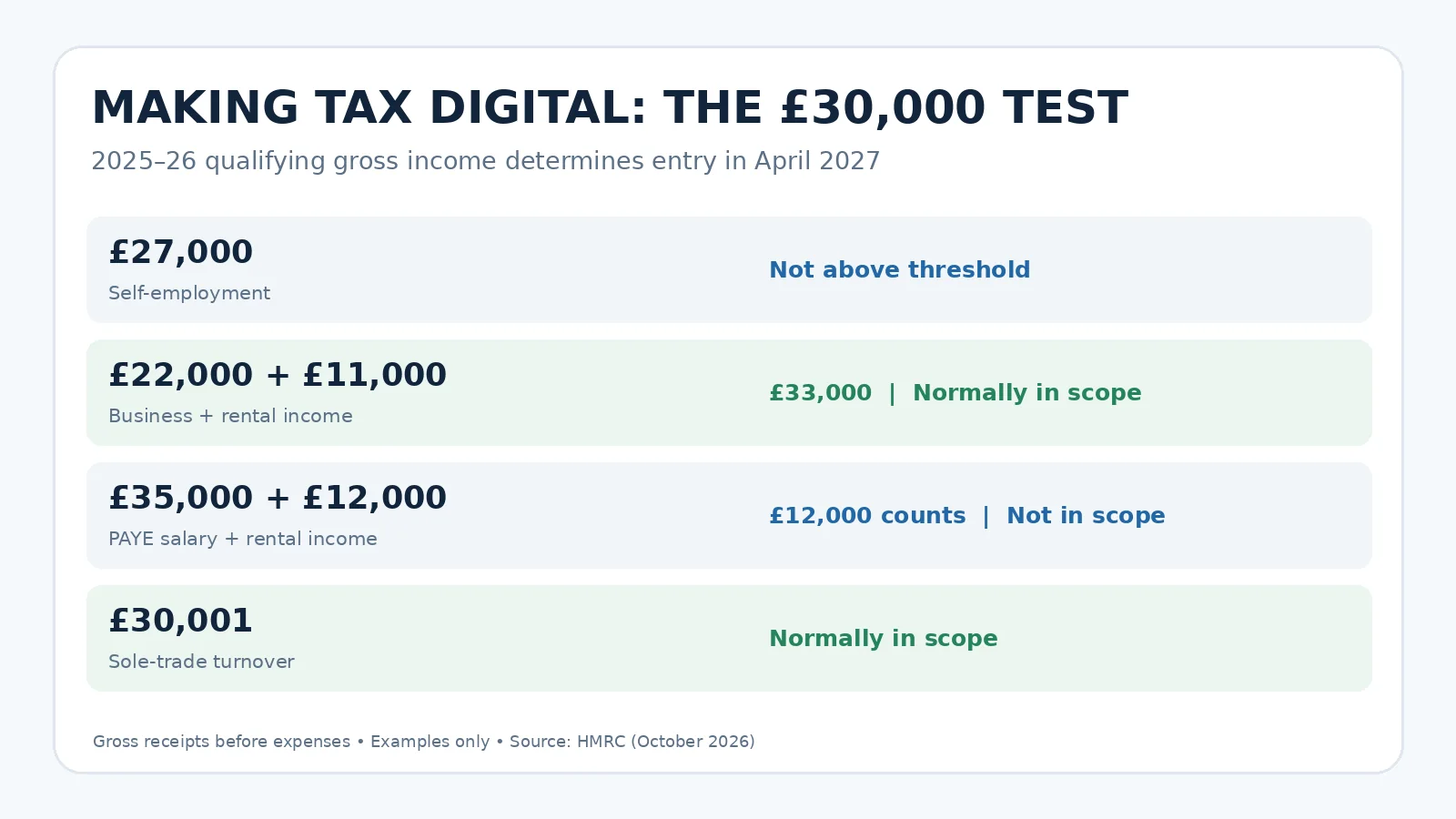
Your qualifying income normally adds together gross receipts from all your self-employment businesses and relevant property income, before allowable expenses, tax or capital allowances. It does not usually include PAYE employment salary, dividends, pensions, savings interest or your share of partnership profits. You may still need to report some of those other amounts in the annual return once you are using MTD.
| Illustrative 2025–26 income | Qualifying income | April 2027 outcome |
|---|---|---|
| Sole trader turnover £27,000; business expenses £8,000 | £27,000 | Not required by the £30k test |
| Sole trader turnover £22,000; rental receipts £11,000 | £33,000 | Normally required |
| PAYE wages £35,000; rent received £12,000 | £12,000 | Not required by the £30k test |
| Sole trader turnover £30,000 exactly; expenses £17,000 | £30,000 | At the threshold, not over it |
| Sole trader turnover £30,001; expenses £25,000 | £30,001 | Normally required |
| Sole trade £18,000; 50% share of property producing £30,000 gross rent | £33,000 | Normally required if each owner’s share is £15,000 |
Worked case: Alex invoices £24,000 in gross sole-trade revenue and receives £9,600 in gross rent. Their business costs are £11,000 and rental costs are £3,200. Their net amounts are irrelevant to the MTD entry threshold: £24,000 + £9,600 = £33,600 qualifying income. If those figures were declared in the 2025–26 return, Alex would normally be in the April 2027 cohort, even though their combined net income is £19,400. This is an illustrative eligibility calculation, not a tax-bill calculation.
Property owned jointly: Generally count your own share rather than the entire property’s rent. HMRC has a specific treatment if your co-ownership statement tells you only your share after expenses: read the official wording before deciding which number to use. Likewise, HMRC may annualise income for a short period of trade or property letting. Simple comparisons with a bank statement can therefore mislead.
Which income sources require extra care?
- Multiple trades: gross receipts from different sole-trade businesses generally combine for the threshold; each business may require its own records and updates.
- UK and foreign property: UK tax residence and what appears on your UK Self Assessment return matter. A UK tax resident’s relevant foreign property income may count; rules differ for non-residents.
- Income that has stopped: if one source stops but another continues, historical receipts may still enter the initial threshold test; if all such income ceases, notify HMRC so it can assess whether MTD should apply.
- A revised tax return: an amendment can change qualifying income and when the requirement begins. The timing of the correction matters.
- A new business: do not assume that current-year projected turnover alone automatically means April 2027 compulsory entry. Check the reference-year rules and any voluntary-sign-up option.
These details make HMRC’s current qualifying-income page an essential reference, especially where exactly £30,000 is involved.
What actually changes under MTD for Income Tax?
There are three operational changes. First, maintain income and expense records digitally using appropriate software. Second, send cumulative summary updates during the year. Third, finish one annual Self Assessment return through compatible software. HMRC will not receive every invoice or receipt as part of each quarterly summary, and routine quarterly updates generally do not need year-end accounting adjustments before submission.
| Task | Before joining MTD | After joining MTD |
|---|---|---|
| Bookkeeping | Paper, spreadsheet or software depending on circumstances | Digital records with compatible workflow |
| In-year updates to HMRC | No standard MTD Income Tax quarterly updates | Four quarterly summaries per relevant income source/business |
| Full Self Assessment tax return | Typically one annual return | Still one annual return, submitted through compatible software |
| Payment of Income Tax | Statutory payment dates | Broadly the same payment dates; not a payment per update |
| Allowances and adjustments | Included in annual tax calculation | Still handled in annual tax return, not the quarterly update |
Important distinction: MTD for Income Tax and MTD for VAT are separate schemes. If you already use MTD software for VAT, do not presume your VAT product or plan can also prepare and submit your personal Income Tax return. Check this exact functionality with the provider and the HMRC software finder.
Your full first-year MTD calendar: 2027–28
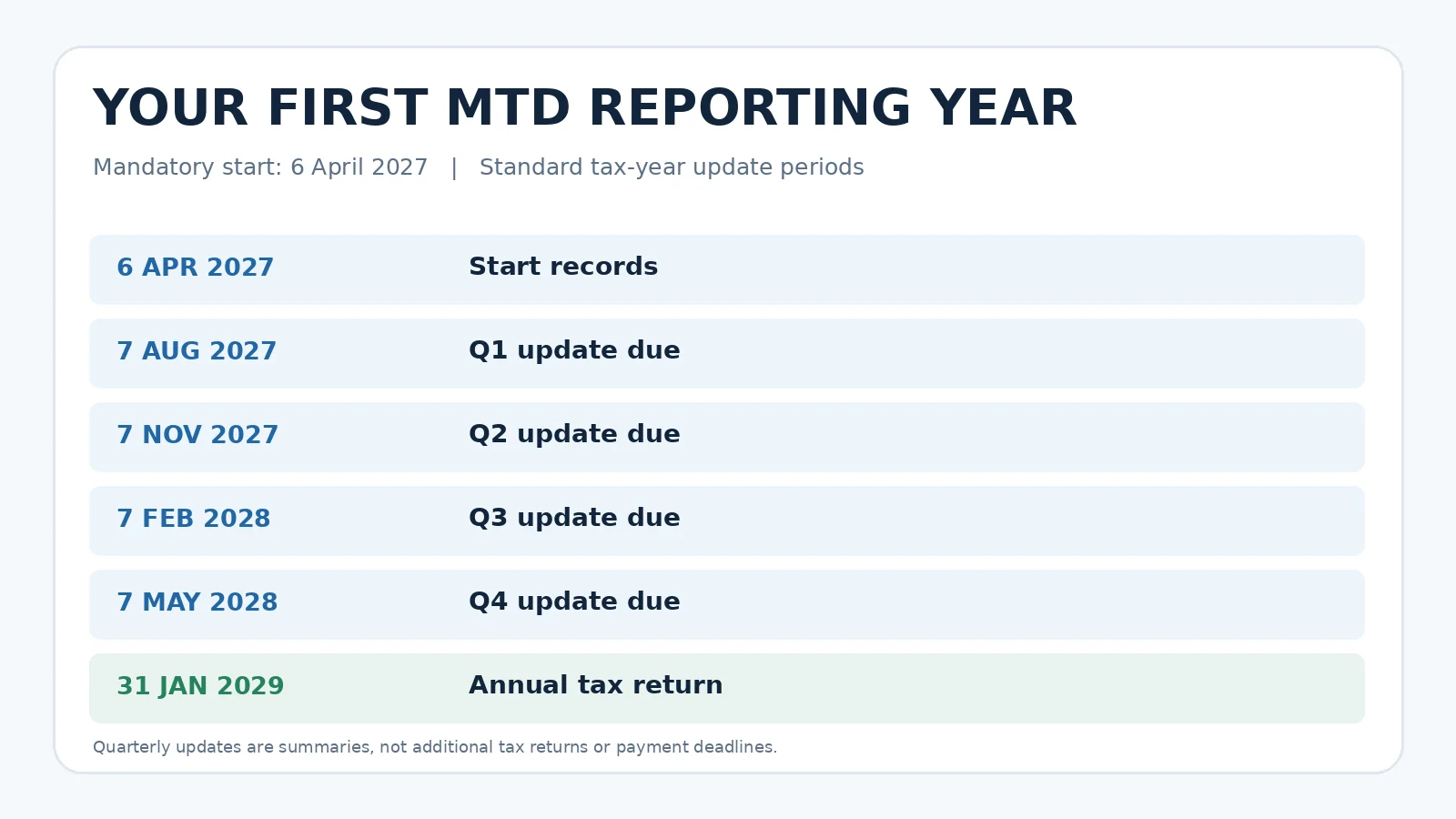
If your first mandatory year begins on 6 April 2027 and you use standard tax-year update periods, these are the key dates:
| What you must do | Period covered | Deadline |
|---|---|---|
| Start digital records | From 6 April 2027 | Start of relevant tax year |
| Quarterly update 1 | 6 April–5 July 2027 | 7 August 2027 |
| Quarterly update 2 | 6 April–5 October 2027, cumulative | 7 November 2027 |
| Quarterly update 3 | 6 April 2027–5 January 2028, cumulative | 7 February 2028 |
| Quarterly update 4 | 6 April 2027–5 April 2028, cumulative | 7 May 2028 |
| Final Self Assessment return for 2027–28 | Full tax year; adjustments and other income | 31 January 2029 |
This table shows the standard tax-year period view. If you use calendar update periods (for example, records beginning 1 April and periods closing at calendar quarter-ends), the periods covered change, but the usual 7 August, 7 November, 7 February and 7 May submission deadline pattern remains. Confirm the selection in your software. HMRC specifies that updates show year-to-date totals, so the second submission is not merely the July–September transactions: it reflects the cumulative position from the start of the relevant period.
A common 2027 trap: two tax years overlap on your calendar
A person first required to use MTD from 6 April 2027 still normally submits their 2025–26 Self Assessment return through the usual route by 31 January 2027. During calendar year 2027, they also prepare for digital record-keeping for the new 2027–28 year. Their first MTD annual return for 2027–28 is not due until 31 January 2029. Do not mistake the January 2028 deadline for the first April-2027 entrant: it is the tax return due date for 2026–27, and that year is usually handled through the previous arrangements for this cohort.
The quarterly-update timetable is confirmed in HMRC’s detailed quarterly guidance and its calendar explainer.
How to register for MTD for Income Tax before 6 April 2027
Start with a genuine GOV.UK page and the government’s software checker, not an unsolicited email or an advertisement claiming immediate penalties. At the time of this update, HMRC says people entering in April 2027 may sign up voluntarily in advance. Volunteering for an earlier tax year can trigger earlier record-keeping and missed-quarter catch-up responsibilities, so understand the consequences before opting in.
- Confirm the test: check your gross self-employment and property amounts from 2025–26, not last month’s profit. Use HMRC’s eligibility checker.
- Review Self Assessment status: HMRC says applicants should be registered for Self Assessment and have submitted a return within the preceding two years. Make sure the 2025–26 return is dealt with by its normal due date.
- Select software: use HMRC’s compatible software finder; check your mix of sole-trade and property sources and whether full annual filing is supported.
- Go to the official sign-up service: use Sign up for Making Tax Digital for Income Tax and follow the live authentication and verification steps. HMRC changed its identity-checking options in October 2026, so avoid following an outdated screenshot from a third-party tutorial.
- Check income sources and details: review what HMRC holds. If you have an agent, agree who will register and which records each person will manage.
- Authorise the software: link your compatible package to HMRC using the provider’s secure workflow, then verify that the connection is active.
- Test your records: enter several genuine transactions, categorise income and expenses, and ask the software to preview an update without sending incorrect demonstration data to HMRC.
You do not have to send your personal documents to a commercial website to use the GOV.UK sign-up service. HMRC’s official sign-up page is the authoritative source for changing on-screen steps. We deliberately do not reproduce a fabricated ‘Sign in’ screenshot; the current live form can be different for different users.
Which software should a sole trader or landlord choose?
Do not choose the cheapest-looking plan based only on the monthly price. An inexpensive package that sends quarterly updates but cannot deal with your annual return, rental income, foreign property, other personal income or accountant access may mean additional software or fees later. HMRC offers a personalised finder, but it does not itself provide accounting software.
| Software question | Why it matters | What to verify |
|---|---|---|
| Can it support all your relevant income sources? | Landlord and sole trader requirements can differ | UK/foreign property; multiple trades; other year-end income |
| Can it submit the annual personal return? | Quarterly-only packages may not finish the job | Ask the provider to confirm the full tax-return workflow |
| Can existing spreadsheets be used? | You may want to retain a familiar ledger | Verify compatible bridging/digital-link support, not a manual copy-and-paste workaround |
| Can your accountant collaborate? | Agent roles and authority must work | Main/supporting agents, access and filing approval |
| What will it cost for a full year? | Upgrades or add-ons can be material | Total cost including VAT, annual-return features and support |
| Can you export clean records? | Switching software should not trap your data | Export format and audit trail |
Original cost comparison: Suppose Package A is £10 a month for records and updates but requires a £90 annual-filing add-on: its first-year cost would be £210 before tax, assuming 12 paid months. Package B is £16 a month with annual filing included: £192. Package B is £18 cheaper even though its monthly sticker price is higher. These are hypothetical prices, not quotes for any actual software. Check current terms and compatibility before subscribing.
Can Excel or Google Sheets work?
A spreadsheet can be part of a compatible digital record-keeping arrangement if the necessary MTD-compatible bridging or connecting software preserves the required digital links and performs the electronic submissions. A spreadsheet alone is not equivalent to an HMRC-recognised submission tool. Check that the whole workflow, including the annual return, works for your situation. Consult the HMRC software finder and the provider’s documentation before relying on it.
A practical quarterly-record example for a landlord
Assume a landlord in the April 2027 cohort has £9,000 rental receipts and £2,100 of recorded allowable costs by 5 July 2027. Their first quarterly update would reflect the appropriate categorised cumulative records. By 5 October, receipts have risen to £18,000 and recorded costs to £4,000. The second update reports the year-to-date totals, not an additional, disconnected £9,000 and £1,900 as if it were a new year.
| Example period end | Cumulative rent receipts | Cumulative example costs | Simple difference, not final taxable profit |
|---|---|---|---|
| 5 July 2027 | £9,000 | £2,100 | £6,900 |
| 5 October 2027 | £18,000 | £4,000 | £14,000 |
| 5 January 2028 | £27,000 | £6,100 | £20,900 |
| 5 April 2028 | £36,000 | £8,200 | £27,800 |
These figures demonstrate record flow only. They are not an eligibility test for April 2027 (that used 2025–26 receipts), and the differences are not a tax estimate: reliefs, disallowed expenses, allowances, finance-cost rules and other income may matter. Your accounting software should calculate the submission categories; keep supporting invoices and bank statements even though HMRC receives totals rather than each receipt in the update.
What if your details changed after your last return?
A frequent source of confusion is using an old property or trade record that is no longer current. If all self-employment and property sources have genuinely ceased, HMRC may need to update your account. If only one source has ceased, the qualifying-income reference may still include it while you continue another qualifying source. Do not delete income entries simply to move under the threshold. The right correction is to update the official record and discuss the facts with HMRC where needed.
If a tax-return amendment takes you above or below a threshold, the date you make it relative to the start of the tax year can affect the MTD start date. The dedicated qualifying-income guidance describes how HMRC assesses revised returns.
What if HMRC has not sent a letter—or has signed you up?
HMRC says a letter normally follows review of your return, but taxpayers remain responsible for checking the rules even when a letter never arrives. The 2026 wave includes HMRC-led sign-up of people already obliged to use MTD, based on records it holds. Do not assume that process automatically covers your April 2027 circumstances correctly.
If the letter appears to rely on an old address, a ceased trade, incorrect ownership or an uncorrected income source, check your online services account and use the official instructions rather than opening a link in a suspicious message. The HMRC page for taxpayers signed up by HMRC explains account checks and changes for the existing cohort.
Late quarterly update penalties from 2027: what is the actual risk?
HMRC did not apply penalty points for late quarterly updates in the 2026–27 tax year. That transitional protection does not carry over unchanged to the 2027–28 year. For obligatory MTD users after 2026–27, HMRC’s new submission regime awards a penalty point when a required quarterly update or annual return misses the relevant deadline, subject to the regime’s rules.
The standard MTD Income Tax penalty threshold is four points. Reaching it triggers a £200 penalty, and further missed submissions while at the threshold can generate additional £200 penalties. Late tax payment has separate rules and potential interest. These rules are not the same as saying ‘one day late always costs £200’. See HMRC: Penalties for Making Tax Digital for Income Tax.
| Scenario | What the rule means |
|---|---|
| A required 2027–28 quarterly update is late | Normally a submission penalty point may be recorded |
| Four qualifying missed deadlines reach the threshold | £200 penalty, with further £200 penalties for later missed submissions while at threshold |
| First 2026–27 cohort’s quarterly updates were late | No quarterly-update penalty points for that 2026–27 year, but records and updates still had to be completed |
| You submit an update on time but pay tax late | Late-payment rules are separate; there is no quarterly tax payment just because you sent an update |
| You are exempt or volunteering | Check the specific penalty conditions; do not assume the standard mandatory-user rules apply identically |
Risk-control example: Put each quarterly date in your calendar a full fortnight earlier than HMRC’s deadline; reconcile bank transactions monthly and have your accountant review a draft summary ahead of submission. This is an editorial workflow recommendation, not an HMRC requirement. Save your software’s HMRC submission acknowledgments.
Exemptions: when might digital reporting not be required?
Some taxpayers are automatically exempt; others must apply. HMRC describes digital exclusion as circumstances in which it is not reasonable to use compatible digital services—for example, because of qualifying disability, age, remote location or certain religious beliefs. Having little experience with spreadsheets does not automatically entitle someone to an exemption, and there are additional special categories based on particular return pages and circumstances.
If the April 2027 rules would otherwise apply to you, check whether an exemption applies and how to apply. HMRC says people due to join in April 2027 can apply now where eligible. Do not simply skip registration because you think you might qualify; obtain an official decision where required. An exemption from MTD does not ordinarily cancel Self Assessment obligations.
A pre-April 2027 readiness checklist
- Reconcile 2025–26 gross sole-trade and property receipts and confirm your share of jointly owned rents.
- Check your 2025–26 Self Assessment return and note its filing deadline of 31 January 2027.
- Use HMRC’s official eligibility checker, even if no MTD invitation has arrived.
- Check any exemption or special residence/partnership issue early, with the relevant official guidance.
- Compare compatible software for both quarterly updates and the annual personal tax return.
- Decide how each income source and expense category will be recorded and corrected.
- Coordinate responsibilities with any accountant or bookkeeper; confirm the main filing agent.
- Sign up through GOV.UK at the appropriate time; understand voluntary early registration before selecting it.
- Save 7 August 2027, 7 November 2027, 7 February 2028, 7 May 2028 and 31 January 2029 in your calendar.
- Keep HMRC confirmations, an export of your records and a backup of source documents.
Bottom line: the £30,000 threshold changes the reporting process, not your tax rate
If your combined qualifying gross self-employment and property income in 2025–26 was above £30,000, April 2027 may be your mandatory MTD Income Tax start date. You do not need to pay Income Tax quarterly just because you send updates. You do need an accurate digital-record system and software that can finish the annual return. The most expensive mistake is to compare the threshold with profit after expenses, or to rely on a product that handles only half the filing process.
For the final eligibility decision use HMRC’s MTD checker; for registration use HMRC’s sign-up page; and for available solutions use the official software finder. This article is general information, not personalised tax advice.
Official sources and verification notes
- HMRC announcement, 5 October 2026: £30,000 cohort and expected number affected
- HMRC: Find out if and when you need to use MTD
- HMRC: Work out qualifying income — including joint ownership, amendments and ceased trades
- HMRC: Sign up for Making Tax Digital for Income Tax
- HMRC: Quarterly updates and year-to-date reporting
- HMRC: Official compatible software finder
- HMRC: Penalty points and late payments
- HMRC: MTD exemptions
You may also like
 Business & Economy
TG Jones Store Closures 2026–27: Confirmed Dates, Towns and Post Office Alternatives
TG Jones closures in the UK: check announced 2026–27 shop dates, where Post Office counters are affected, and…
 Business & Economy
Warm Home Discount 2026–27: Who Gets the £150 Energy Bill Rebate and What to Do if It Is Missing
The £150 Warm Home Discount for 2026–27 has different eligibility routes in England, Wales and Scotland. Check dates,…
 Business & Economy
Making Tax Digital for Income Tax 2026/27: Who Must Sign Up, Deadlines and Software
Making Tax Digital for Income Tax 2026/27 explained: check the £50,000 qualifying-income test, quarterly deadlines, software choices, exemptions,…