
MacBook Pro M6 vs PROLED XDR: What’s the Difference?
Compare MacBook Pro M6 and PROLED XDR models: touchscreen, chip tiers, memory, ports and US starting prices, with practical checks before buying.
Contents
- The two launches at a glance
- Why M6 does not settle the performance comparison
- Display: where the PROLED difference matters
- Touch is a feature of the PROLED hardware
- Memory and external displays may decide the purchase
- What does the price difference actually buy?
- Which type of buyer should shortlist each model?
- Shortlist the M6 when your requirements fit it
- Shortlist PROLED when its extra features solve a named problem
- Keep your current laptop if there is no clear bottleneck
- A five-point check before ordering
- Sources, images and scope
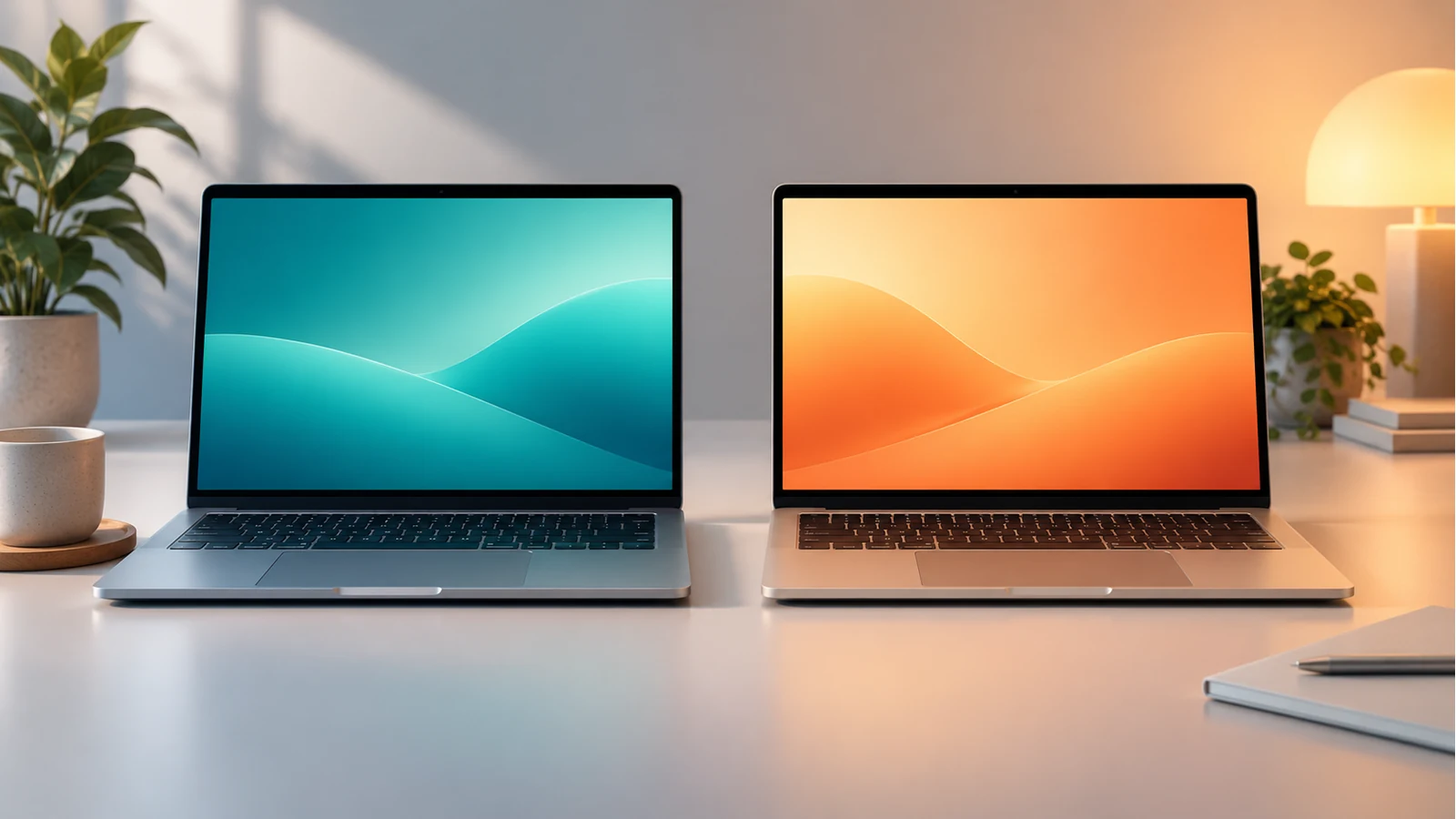
The new 14-inch MacBook Pro with M6 uses a Liquid Retina XDR display. The new PROLED XDR models pair an OLED touchscreen with M5 Pro or M5 Max chips and come in 14- and 16-inch versions. Buying an M6 MacBook Pro does not automatically get you the new touchscreen.
Apple announced the M6 model on 27 October 2026 and the PROLED machines a day later. Both launches have a stated availability date of 6 November. This comparison uses Apple’s published information checked on 29 October; it is a buying framework, not a hands-on review or an independent performance test.
The most useful decision is not simply “M6 or M5?” It is whether your workload needs a particular memory capacity, display, connection or application feature—and what the complete configuration costs in your country.
The two launches at a glance
| Question | 14-inch MacBook Pro with M6 | MacBook Pro with PROLED XDR |
|---|---|---|
| Chip family in this comparison | M6 | M5 Pro or M5 Max |
| Display | Liquid Retina XDR | Tandem OLED PROLED XDR with Touch |
| Available sizes | 14-inch | 14-inch and 16-inch |
| Starting price announced for the US | $1,999 | $2,899 for 14-inch M5 Pro; $3,399 for 16-inch M5 Pro |
| Memory ceiling stated for the range | Up to 32GB on M6 | Up to 128GB, depending on chip and configuration |
| Thunderbolt generation | Thunderbolt 4 | Thunderbolt 5 |
| Stated availability | 6 November 2026 | 6 November 2026 |
Sources: Apple’s M6 announcement, PROLED announcement and Liquid Retina XDR technical specifications. Starting prices describe different configurations, not an identical laptop with a screen upgrade.
Why M6 does not settle the performance comparison
The number identifies a chip generation, while Pro and Max identify different tiers. A newer generation in one tier is not sufficient evidence that it wins every task against a higher tier from another generation.
For example, a developer compiling a small project, an editor exporting a long video and a researcher loading a large local model may hit different limits. Even when two machines finish an ordinary task quickly, one may offer memory or connectivity that makes a different project possible.
Apple’s published claims comparing M6 with base M5 should not be silently relabelled as comparisons with M5 Pro or M5 Max. A percentage is meaningful only when the comparison machine, software, workload and conditions match the question you are asking.
Before treating any benchmark as decisive, check the exact chip configuration, memory, app version and test. A short demonstration also cannot establish sustained performance or fan noise during a long session. Those points need suitable independent testing; we have not measured them here.
Display: where the PROLED difference matters
Apple’s PROLED product page describes tandem OLED, touch input and support for colour-critical workflows. Its announcement specifies up to 2,000 nits peak HDR and SDR brightness and an adaptive refresh rate up to 120Hz. The M6 announcement describes a Liquid Retina XDR display with up to 1,600 nits peak HDR brightness.
Peak brightness is not a promise that every full-screen image stays at that level indefinitely. The PROLED technical specifications distinguish up to 1,000 nits sustained full-screen brightness from 2,000 nits peak HDR brightness and peak outdoor SDR brightness. That is more useful than treating “2,000 nits” as one constant operating level. Reflections, the content you view and your settings also affect the experience.
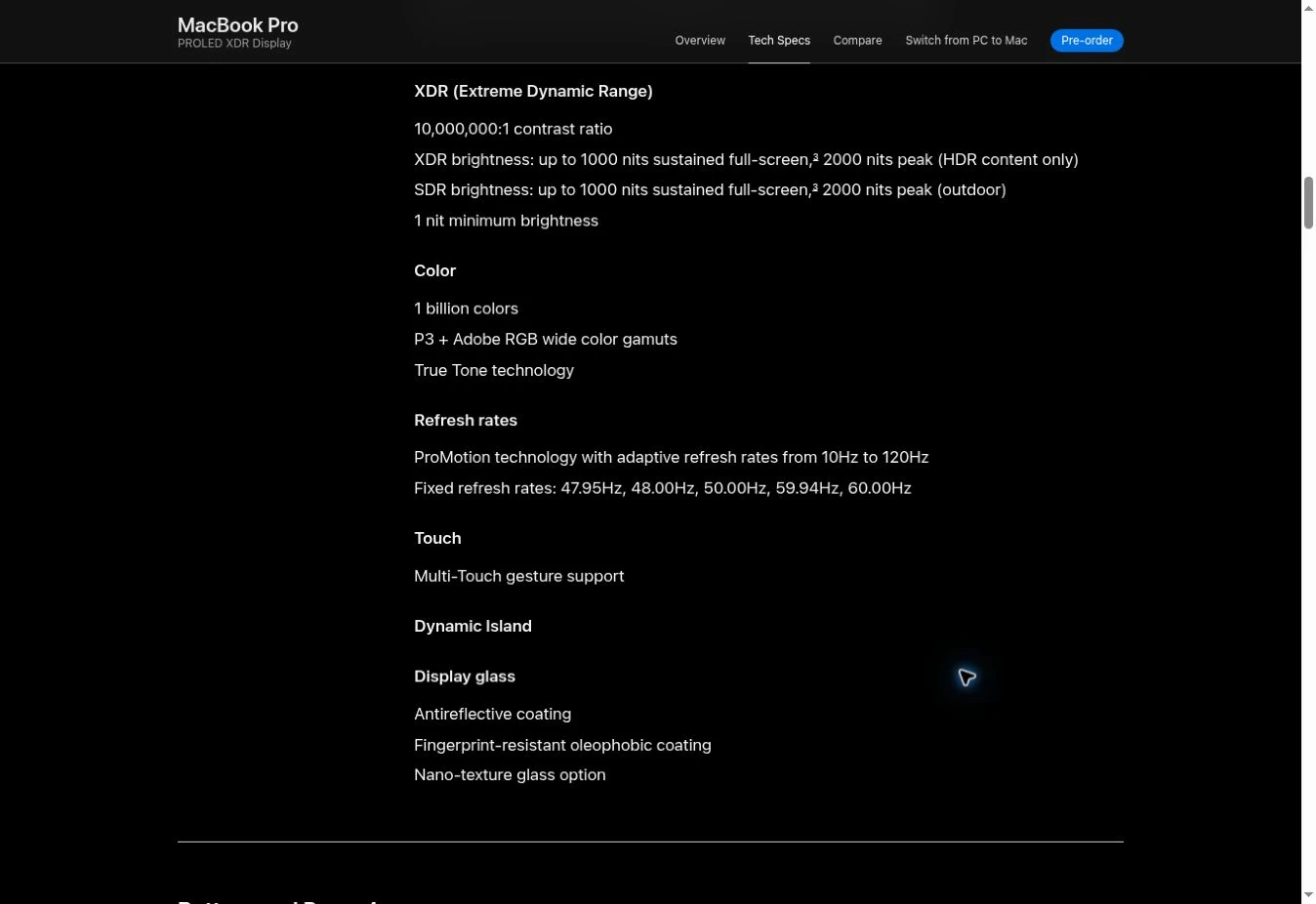
For a writer or office user, the main questions may be text comfort, glare and the screen size needed for several windows. A photographer may place more value on colour management and checking images away from a desk. A video professional should consider the display’s suitability within an entire monitored workflow, rather than using a headline specification alone as a guarantee of final output accuracy.
If you normally work with the lid closed and an external monitor, ask how often the built-in display will improve your day. You may still need the premium machine for its chip or ports, but the screen premium needs a separate justification.
Touch is a feature of the PROLED hardware
Apple describes touch gestures and app interactions on the PROLED machines. Do not assume a macOS update will turn the M6 model’s existing screen into a touch display.
Consider one task you actually perform: moving an element on a canvas, zooming an image or interacting with a virtual instrument. Then check whether the application supports the interaction you want, including any required update. Apple’s announcement notes that some listed third-party app enhancements are due later in the year; an announcement is not proof that every feature is already shipping.
Touch also does not establish support for every stylus, drawing accessory or iPad workflow. If pen input is essential, verify the exact accessory and software support before making the purchase. This comparison does not claim Apple Pencil support.
Memory and external displays may decide the purchase
The M6 technical specifications list the chip and its configuration options. Apple’s M6 announcement gives a memory range starting at 16GB and configurable to 32GB. The PROLED announcement gives a range ceiling of 128GB, but that maximum is not included in every starting-price machine.
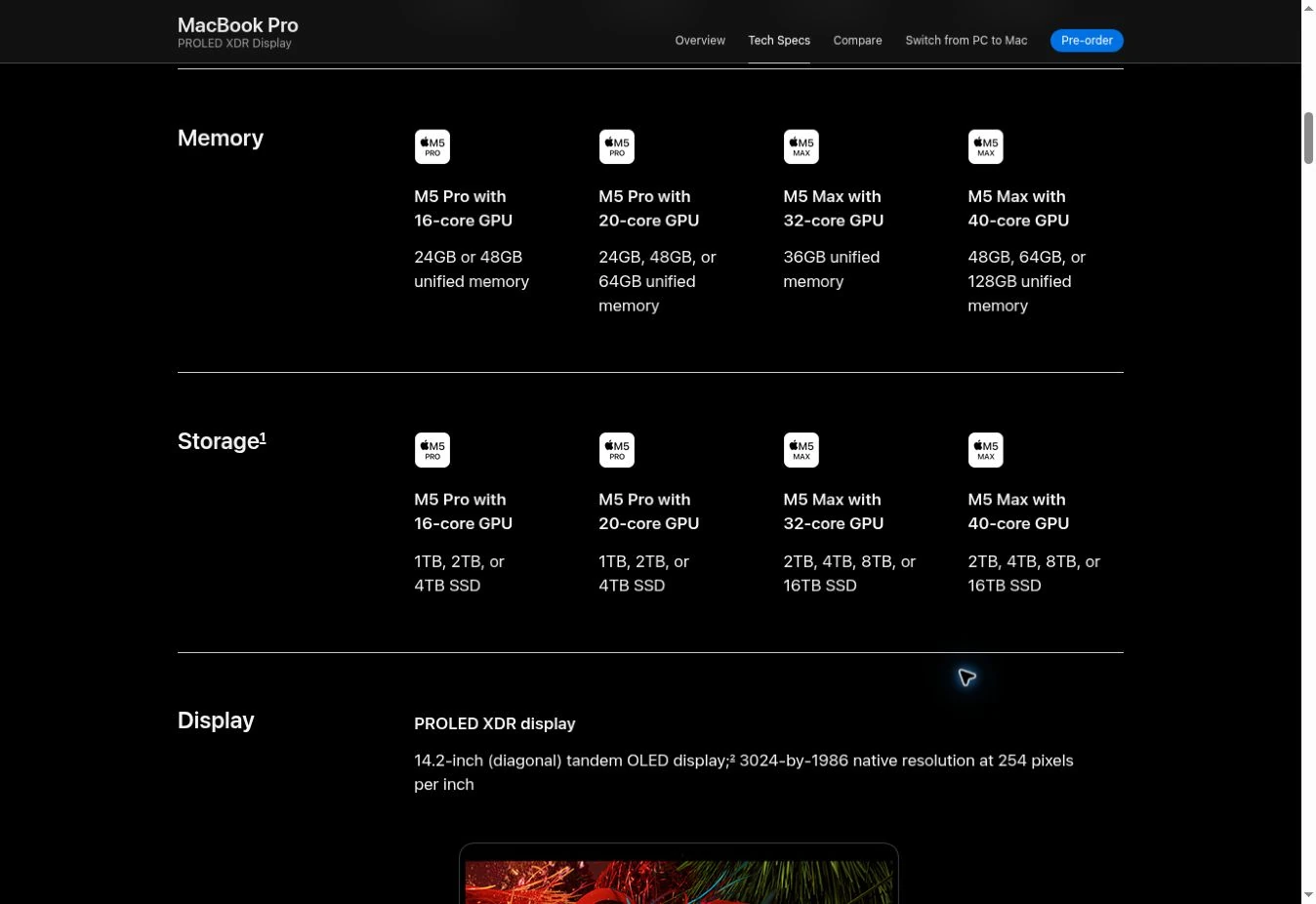
Start with your current project rather than the maximum available number. Record the largest files, virtual machines, development tools or model you need to use at the same time. If a configuration requirement exceeds the M6 ceiling, the decision has a concrete constraint. If it does not, a higher ceiling alone does not prove that paying for it will improve your current work.
External-display support is similarly specific. Apple states support for up to two external displays on the M6 model, up to three on PROLED M5 Pro and up to four on PROLED M5 Max. Verify resolution, refresh rate and connection conditions for your intended setup; the count alone does not describe every possible combination.
A useful pre-purchase note lists each monitor, cable, dock and required mode. This makes it easier to identify a genuine compatibility need instead of buying a port specification you will never use.
What does the price difference actually buy?
Using the announced US starting prices, the 14-inch PROLED M5 Pro begins $900 above the 14-inch M6: $2,899 minus $1,999. The difference is about 45% of the M6 starting price. These are our arithmetic comparisons of Apple’s published launch prices, not a claim about equivalent configurations or local checkout totals.
The premium combines several changes, including the chip tier and display. It would be misleading to call the full $900 the price of OLED alone. To isolate a display premium, you would need matching alternatives with the same chip, memory, storage and other relevant conditions.
Here is a hypothetical way to assess value. Suppose a more expensive configuration saved you ten minutes on each of 100 working days. That would be 1,000 minutes, or about 16.7 hours. A $900 premium would then equal roughly $54 per hour saved. The ten-minute saving is an example, not a measured result or forecast for these laptops. Replace it with credible testing of your task before using the calculation.
For readers in Australia, the UK or another market, use the local store’s prices, tax treatment and configuration options. A US dollar announcement does not establish the amount you will pay elsewhere. Compare the same ownership model too: an advertised monthly lease is not the same transaction as an outright purchase.
Which type of buyer should shortlist each model?
Shortlist the M6 when your requirements fit it
The lower starting price makes it a reasonable starting point for comparing configurations when your apps, memory and monitor needs fit within its capabilities. For writing, study, administration or mixed creative work, first identify the bottleneck you are trying to remove. Buying a more expensive model without that information may not solve the real problem.
This is a requirements-based recommendation, not a claim that we tested the M6 with every student or creator workload. Check your specialist software, required peripherals and the exact model options before ordering.
Shortlist PROLED when its extra features solve a named problem
Give the premium range closer attention if your work needs its available memory, additional display support, Thunderbolt 5 or the built-in OLED touchscreen. A person whose job depends on one of those capabilities has a more specific reason to investigate the cost than someone buying on the generation number alone.
Confirm the minimum configuration that meets that need. “Up to 128GB” is a range specification, while your basket contains one particular machine. Price the actual configuration, not a base model beside a maximum specification from elsewhere in the range.
Keep your current laptop if there is no clear bottleneck
An upgrade does not become necessary because a new model is announced. If your current machine handles your work, compare the cost with a specific benefit: compatibility, capacity, useful time saved or a needed display feature. If battery trouble or a software issue is the only complaint, obtain a diagnosis before treating replacement as the only option.
If constant fan noise is your main reason for considering a replacement, our guide to why a laptop fan runs constantly offers a starting point for separating workload and cooling concerns. Follow Apple’s model-specific guidance for Mac servicing; troubleshooting advice is not evidence that a particular new laptop will run silently.
A five-point check before ordering
- Record the full model name, display type, chip, memory and storage from the configuration page.
- Confirm your essential apps and peripherals support that configuration and macOS version.
- Check the exact display connections and any touch features you need.
- Compare local final prices and purchase terms, with accessories included where necessary.
- For performance-dependent purchases, look for tests matching your workload and separate measured results from manufacturer claims.
Sources, images and scope
Reviewed 29 October 2026. Specifications and announced availability may change; check Apple’s local store before paying. The inline images are actual screenshots of Apple’s public technical specifications, captured on the review date. The cover is a conceptual illustration of generic laptops, not a photograph of either model. No independent benchmarks, battery measurements or hands-on assessment were performed for this article.
You may also like
 Technology
Free Steam Games in November 2026: What You Can Keep and What’s Only a Free Weekend
Verified Steam offers for November 2026: Last Gambit, PAYDAY 3, Age of Wonders 4 and free DLC, with…
 Personal Finance
Why Do Credit Cards Expire? What Happens to Payments and Subscriptions
A practical guide to card expiry dates, replacement cards, recurring payments, balances, automatic account updates and what to…
 Technology
Android Theft Protection: Set Up Remote Lock Before You Need It
Set up Android Remote Lock, understand Identity Check and Find Hub, troubleshoot missing settings, and prepare a practical…