
Wrong HMRC Tax Code in 2026–27: How to Fix PAYE and Recover Overpaid Tax
Check a wrong HMRC tax code, separate payroll problems from incorrect income details, update PAYE records and understand refund timing, with GOV.UK screenshots.
Contents
- Payroll or HMRC? Choose the right first step
- Three checks to make before you contact HMRC
- What common codes mean — and when they are not an error
- How to correct a wrong HMRC code online
- Where to update the income estimate
- Starting a new job, missing P45 or emergency code
- Current-year PAYE refund versus tax from a completed year
- Worked example: an apparent £300 PAYE discrepancy
- Why estimated income and benefits matter more than the code alone
- Troubleshooting: which evidence resolves which coding problem?
- Refund scams and fake HMRC messages
- What to do if the code still is not corrected
- A ten-minute self-audit before filing a refund claim
- Official sources and further reading

If your UK tax code looks wrong, compare the exact code on your payslip with HMRC’s record first. If they differ, ask payroll to check the latest notice. If they match but your circumstances are wrong, correct the income, employment or benefit details HMRC holds. A wrong code can mean overpaid tax or a bill later; an unfamiliar code alone does not prove an error.
This guide follows the current HMRC tax-code correction instructions and refund guidance. It explains how to diagnose a mismatch rather than simply entering your code into a calculator. Figures are based on the 2026–27 tax year and examples are educational, not an official assessment of anyone’s tax liability.
Payroll or HMRC? Choose the right first step
| What you find | First action |
|---|---|
| Payslip and HMRC show different codes | Ask the employer or pension payroll team whether it has received and applied the latest notice. |
| Both codes match, but a job, income estimate or benefit is wrong | Update the incorrect information through HMRC’s official service. |
| The code and details look right, but the tax calculation differs | Use HMRC’s payslip-check guidance and discuss any discrepancy with payroll. |
This follows HMRC’s payslip-check sequence. Start with the code, gross pay and Income Tax deducted. National Insurance, pension contributions and student-loan deductions are separate lines; a lower take-home amount is not automatically a tax-code problem.
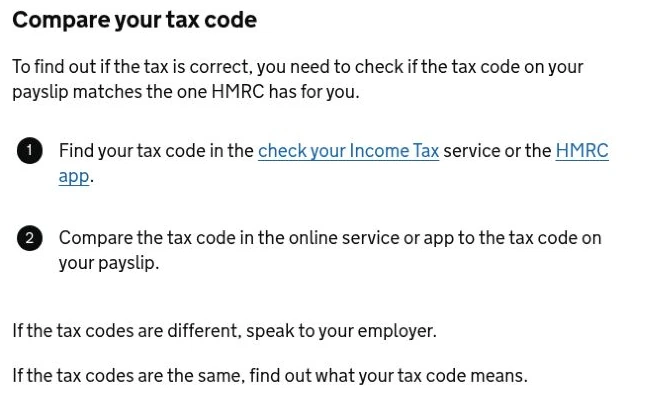
Three checks to make before you contact HMRC
- Find the exact code on your latest payslip or pension advice, and note the employer or pension provider using it.
- Check HMRC’s record of your jobs, taxable pay, benefits and estimated income using the online Income Tax service.
- Compare the record against evidence: P45, recent payslips, benefits details and employment start/end dates. Decide whether the problem is missing income, a duplicate job, an allowance adjustment or merely the timing of a payroll update.
A code is a way of administering PAYE, not a substitute for an end-of-year calculation. Even if a code looks familiar, an unreported taxable benefit, side income, underpayment or change in job can justify a different result. Conversely, seeing BR on a second job may be correct when your Personal Allowance is already being used against the first job.
What common codes mean — and when they are not an error
| Code or marker | Usual meaning | Next check |
|---|---|---|
| 1257L | Often the standard £12,570 Personal Allowance for an eligible person | Check whether total circumstances still warrant the standard allowance |
| BR | All earnings from that source taxed at basic rate | Check whether allowance is used with another employment or pension |
| 0T | No Personal Allowance allocated to that employment | Check missing starter details, benefits or allowance use elsewhere |
| W1 / M1 / X | Non-cumulative emergency basis | Check P45/starter checklist and the updated HMRC code notice |
| K code | Adjustments exceed the tax-free allowance available for that source | Review the deductions/benefits shown in HMRC account |
| S / C prefix | Scottish/Welsh coding for relevant income | Check residence and which rates should apply |
HMRC’s official tax-code guide explains how to read the numbers and letters. The standard Personal Allowance is £12,570 in 2026–27 according to published allowances. Do not apply England’s income-tax bands to a Scottish taxpayer without checking Scotland’s separate rates.
How to correct a wrong HMRC code online
- Sign in directly through Check your Income Tax current-year service. Avoid links from unexpected refund texts.
- Review every current and former employer and pension provider: are old employments still shown as current, or is a current job missing?
- Inspect estimated annual pay, taxable benefits, employment expenses and other adjustments. Check the dates and source of information before altering a number.
- Correct information the service permits you to update and retain the confirmation. Where the employer has sent incorrect payroll data, ask payroll to correct the underlying record as well.
- Monitor the account for a new code and check the actual payslip that follows; a corrected online record does not instantly prove payroll has applied the new code.
Where to update the income estimate
HMRC’s published online instructions give this route: open PAYE, then check current tax year. Open the employment details and the option to update the estimated taxable income. Review the full-year estimate, rather than entering one month’s take-home pay. The app has an estimated-income update option within PAYE.
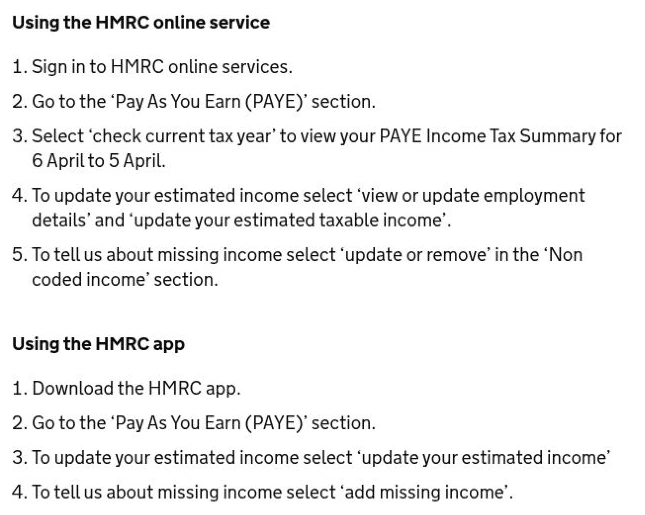
These steps apply to the income estimate. Changes to jobs, pension income or company benefits have their own options. The current-year service lets you review the record; not every update requires HMRC to issue a different code.
HMRC says it will normally notify the taxpayer and employer of a revised code within 15 working days where a change is needed. Monthly payroll should typically show it on the next or following payslip, while a weekly-paid employee should check the third payslip. If the code still has not changed, confirm with payroll that the code notice has been received, then contact HMRC. Official timetable and steps.
Keep the two clocks separate: the 15 working days concern HMRC’s notification when a code change is needed; monthly or weekly payroll then has its own application timing. It is not a promise of a cash refund within 15 working days. A new-job update can take up to 35 days from the start date, as explained below.
Starting a new job, missing P45 or emergency code
A new job and missing P45 are among the most common sources of temporary coding differences. If you left an employer, ask for the P45 and give it to the new employer. Otherwise complete the starter checklist accurately. HMRC advises allowing 35 days after starting a new job for income details to reach them before contacting HMRC about a code, where that is the issue. A suffix such as 1257L M1 calculates pay-period tax without the same year-to-date cumulative reconciliation and can leave a refund to be corrected later.
If you have two simultaneous jobs, do not tell both employers to use the full allowance without discussing the total picture. HMRC may allocate the allowance to one job, split it, or apply another code to the second. What matters is the total tax across all income sources, not whether each payslip independently displays 1257L.
Current-year PAYE refund versus tax from a completed year
| When was tax overpaid? | Typical route | What to watch |
|---|---|---|
| During the current 2026–27 PAYE year | Correct tax code and HMRC’s income details; refund often through employer/pension payroll | Check correction after employer receives notice |
| After a completed tax year | HMRC reconciles information and may issue a P800 calculation | Check tax year, calculation, bank/refund instruction |
| You filed Self Assessment | Correct via Self Assessment rules where relevant | Avoid double-claiming the same tax through different routes |
| Pay or tax data are missing | Supply P45 or request employer/payroll correction | Refund may be delayed until HMRC receives accurate figures |
HMRC explicitly states that once it has enough of the tax-year income details, it will calculate the difference between the tax paid and due and ask the employer or pension provider to refund overpaid tax through pay, normally when the new code is used. If it does not have the needed data, no reliable refund can be calculated yet. See the official refund explanation.
Worked example: an apparent £300 PAYE discrepancy
Imagine an employee sees total PAYE Income Tax of £1,500 deducted over several payslips, but after correcting the income record HMRC calculates £1,200 was due over the same period. £1,500 − £1,200 = £300 is the potential overpayment on those assumptions. It is not proof that the employee is entitled to a £300 cheque immediately: payroll may adjust later months; the taxable period and other employment data must match; and a final reconciliation may change the answer.
Another simplified comparison illustrates the code mechanism. A basic-rate taxpayer who unexpectedly has £1,000 less tax-free allowance would pay roughly £200 more Income Tax over a full year if all of that difference falls within the 20% band. That is £1,000 × 20%. This example excludes Scottish bands, benefit adjustments, national insurance, non-cumulative pay cycles and allowance tapering, and is not a reliable refund estimate for a real payslip.
Why estimated income and benefits matter more than the code alone
HMRC may adjust a code to collect tax on employment benefits, other income, an earlier underpayment or changes to estimated pay. A taxpayer whose adjusted net income is £110,000 will not normally receive the whole £12,570 Personal Allowance, because the standard allowance reduces by £1 for each £2 of adjusted net income above £100,000. Therefore a code below 1257L can be correct. Verify the adjustment in the HMRC account before requesting removal of what might be a legitimate restriction.
Similarly, a company car or employer-provided medical insurance may affect tax coding; the relevant issue could be an outdated benefit valuation, not a broken tax system. Obtain the employer’s taxable benefit details and check the year to which they relate. A good correction request identifies the specific number believed to be wrong, the document proving it and the tax year involved.
Troubleshooting: which evidence resolves which coding problem?
| Problem | Evidence to check | Action |
|---|---|---|
| Old job still active | P45 and last payslip | Update employment end details / ask employer to correct submissions |
| New job missing | Starter checklist and recent payslip | Allow update period; ask payroll what was submitted |
| Income forecast too high | Contract and recent payslips | Update estimated income where supported |
| Company benefit shown incorrectly | P11D or payroll benefit summary | Ask employer to correct benefit reporting and notify HMRC |
| Emergency code persists | P45 or starter checklist and tax-code notice | Check data transfer, then follow up with HMRC/payroll |
| P800 amount disagreed | P800 calculation, P60, P45 and pension statements | Use the official tax calculation correction process |
Refund scams and fake HMRC messages
A message saying HMRC has approved a refund and asking for a card number is not evidence that you are owed money. Open the government website yourself, check your Personal Tax Account and any genuine P800 communication, and never provide one-time security codes to a caller. The correct portal will guide you through any eligible repayment procedure. Keep records but avoid emailing complete identity documents to addresses you cannot authenticate.
What to do if the code still is not corrected
- Compare the current HMRC tax-code notice with the code on the payslip; they may be from different dates.
- If HMRC has issued a code but payroll is using an older one, ask the employer’s payroll department to check its notices.
- If the HMRC record is wrong, submit the specific corrected income or employment details with documentary support.
- If the tax year has ended, identify whether the problem belongs in a P800 repayment, Self Assessment correction or another official route.
- Escalate through HMRC’s contact pages when the online system cannot resolve it, keeping a chronology of notices and contacts.
A ten-minute self-audit before filing a refund claim
Write down the current tax year, every active employer, each code shown on payslips, taxable benefits, estimated annual income and the latest HMRC notice date. Check that no former employment is being counted twice and no genuine second job is omitted. Save the notice number and evidence. If all details are correct but the code seems unusual, look for an allowance restriction or non-cumulative marker; do not claim an invented cash figure.
If your income-tax position requires a Self Assessment return rather than PAYE coding alone, read our separately focused Horus Valley guide to the 2025–26 Self Assessment paper and online deadlines. Do not rely on a PAYE code correction to replace a tax return you are legally required to file.
Official sources and further reading
- HMRC: If you think your tax code is wrong
- HMRC: Overpaid or underpaid tax
- HMRC: P800 tax calculations and refunds
- HMRC: Income Tax rates and allowances 2026–27
- Scottish Income Tax rates
- HMRC: Check the tax on your payslip
- HMRC: Update estimated employment income
Correct the underlying income record, check where your allowance is allocated, and confirm the result on a later payslip. Current-year payroll adjustments and completed-year tax reconciliations follow different routes. The aim is an accurate tax deduction across your income sources, not 1257L on every payslip.
Public guidance and the two GOV.UK screenshots were checked on 3 November 2026. No personal account, tax-code change or refund claim was tested. The featured image is illustrative.
You may also like
 Business & Economy
Making Tax Digital 2027: £30,000 Threshold, Registration, Quarterly Deadlines and Penalties
MTD Income Tax expands on 6 April 2027 for UK sole traders and landlords above £30,000 qualifying income.…